Adding rows in Google Sheets seems simple until your formulas start breaking. As a growth manager at RowSpeak, I've seen how this small oversight can derail entire reports. Whether you're tracking sales, managing budgets, or analyzing marketing data, keeping formulas intact during edits is non-negotiable.
Here's the good news: Google Sheets offers multiple ways to add rows without formula headaches. Let's explore these methods so you can work smarter, not harder.
Why Formula Preservation Matters
Formulas are the engines powering your spreadsheets. They calculate totals, analyze trends, and transform raw numbers into actionable insights. When you add a new transaction row and the SUM formula doesn't carry over? That's when mistakes happen - and they're costly.
At RowSpeak, we've built AI-powered tools that automatically maintain formula consistency, but understanding the native Google Sheets methods gives you valuable backup skills.
Method 1: The Basic Insert (With a Twist)
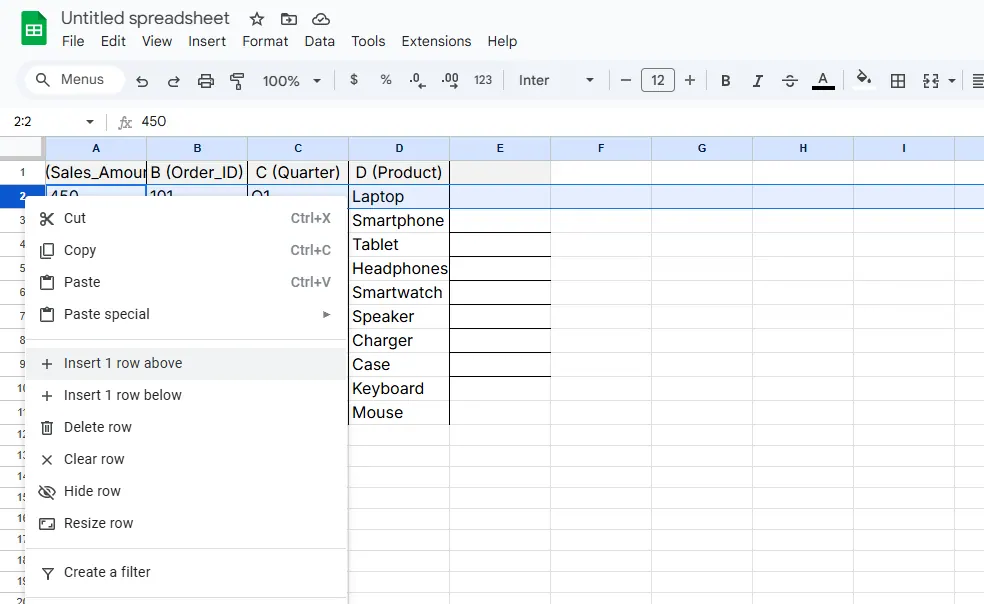
- Right-click any row number
- Choose "Insert 1 above" or "Insert 1 below"
- Watch as Sheets copies formulas from adjacent rows
Pro Tip: This works best when your formulas follow clear patterns. For irregular setups, try dragging the fill handle (that little blue square) from cells above to copy formulas manually.
Method 2: Array Formulas - Your Safety Net
Array formulas automatically expand when new data appears. Here's a game-changing example:
=ARRAYFORMULA(IF(ROW(A2:A), A2:A+B2:B, ""))
This adds columns A and B for every row, automatically including new entries. No more dragging formulas down!
Method 3: The Master Template Row
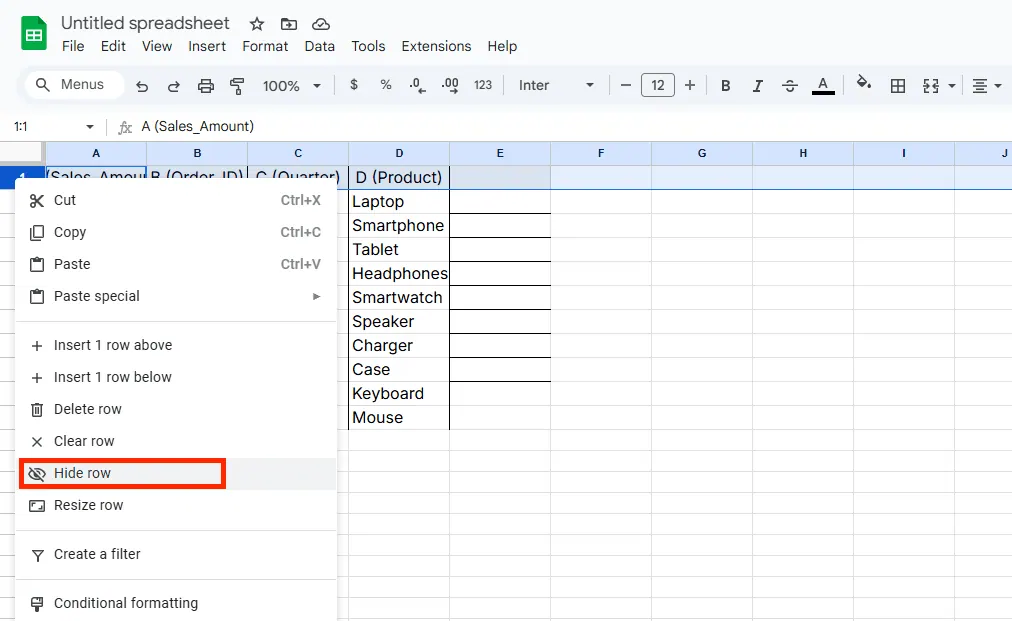
Create a hidden "template row" with all your formulas:
- Add a row at your sheet's top or bottom
- Input every formula you regularly use
- Hide the row (right-click > Hide row)
- When adding new data, unhide and copy these pre-made formulas
When Spreadsheets Get Complex
For advanced users, Google Apps Script can automate row additions with perfect formula replication. While powerful, this requires coding knowledge - which is exactly why tools like RowSpeak exist. Our AI handles these technical tasks so you can focus on insights, not implementation.
Final Checklist for Formula Safety
✅ Use array formulas for expanding datasets
✅ Set up template rows for frequent additions
✅ Consider conditional formatting to flag formula errors
✅ For enterprise needs, explore AI solutions like RowSpeak that maintain formula integrity automatically
While Google Sheets offers solid built-in options, modern data teams are switching to AI-enhanced platforms. RowSpeak not only preserves formulas when adding rows but can suggest optimizations, detect anomalies, and even write complex formulas for you - all while working seamlessly with your existing Sheets data.
The next time you need to insert rows, remember: your formulas shouldn't be fragile. With these techniques (and maybe a little AI assistance), you'll keep your data flowing smoothly no matter how your spreadsheet grows.
About the Author: As part of RowSpeak's growth team, I help professionals transform spreadsheet headaches into automated workflows. Our mission? Making data work for you, not the other way around.