How to Add a Column in Google Sheets Instantly with AI (No Formulas Needed)

Let’s be real—manually adding columns in Google Sheets is about as exciting as watching paint dry. But what if I told you AI can do this mind-numbing task for you? No more dragging formulas or counting cells. Just clean, automated data magic.

As someone who’s spent years optimizing spreadsheets for growth teams, I’ve seen firsthand how AI tools like RowSpeak are changing the game. Here’s how to work smarter, not harder.

Why Bother with AI for Simple Tasks?

Google Sheets is already awesome for collaboration and basic calculations. But its built-in AI features (like "Explore") are often overlooked goldmines. They can:

  • Spot patterns you’d miss
  • Auto-generate columns from existing data
  • Reduce formula errors (we’ve all been burned by =SUM mishaps)

Your AI Shortcut: RowSpeak + Google Sheets

While Google’s native AI helps, RowSpeak takes it further. Imagine typing: "Add a 10% growth column to Q2 sales data"
And having it done—instantly. No coding, no menus. Just results.

Here’s how to set it up:

  1. Connect RowSpeak (it integrates directly with Google Sheets)
  2. Describe what you need in plain English:
    "Create a ‘Total Revenue’ column multiplying units by price"
  3. Watch the AI work—it even suggests optimizations like rounding decimals

Pro tip: RowSpeak learns your business context. The more you use it, the sharper its suggestions get.

Beyond Basic Columns: AI Superpowers

While adding columns is handy, the real win is what comes next:

  • Smart forecasting: "Predict next month’s signups based on past 6 months"

  • Auto-cleanup: "Flag duplicate customer entries in column A"
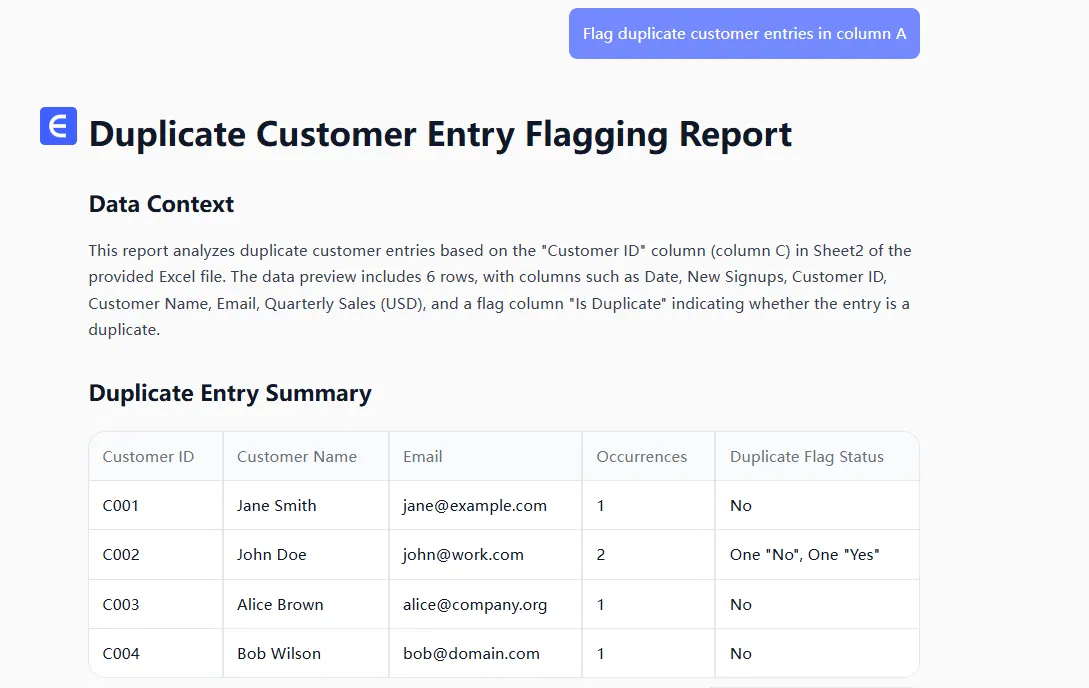
biaoji

  • Instant visuals: "Turn this sales data into a quarterly trend chart"
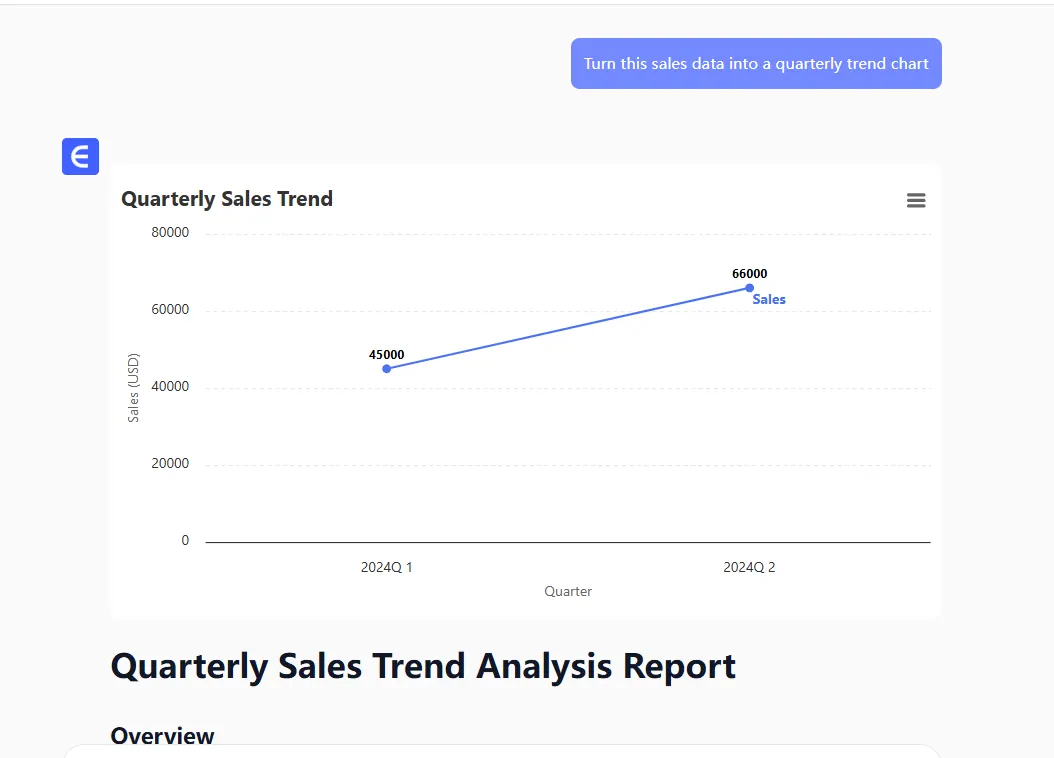
visual

I recently used this to cut a client’s monthly reporting time from 3 hours to 20 minutes. Their CFO still thinks I’m a wizard.

Common Pitfalls (And How to Dodge Them)

AI isn’t perfect—yet. Watch out for:

  • Garbage in, garbage out: Clean your base data first
  • Over-automation: Some columns need human judgment (like categorizing qualitative feedback)
  • Permission slips: Double-check sharing settings when collaborating

The Bottom Line

Adding columns is just the start. Tools like RowSpeak turn spreadsheets from static grids into dynamic assistants. The best part? You don’t need to be a data scientist to benefit.

Ready to try?
👉 Get RowSpeak’s free Google Sheets plugin here

"But wait—can’t I just use Google’s built-in AI?"
Sure, but it’s like comparing a bicycle to a Tesla. Both get you there, but one lets you focus on the road ahead.

Ditch Complex Formulas – Get Insights Instantly

No VBA or function memorization needed. Tell RowSpeak what you need in plain English, and let AI handle data processing, analysis, and chart creation

Try RowSpeak Free Now

Recommended Posts

How to Add Borders in Google Sheets Instantly with AI (RowSpeak Guide)
Excel Operation

How to Add Borders in Google Sheets Instantly with AI (RowSpeak Guide)

Tired of manually adding borders in Google Sheets? Learn how AI tools like RowSpeak can transform this tedious task into a one-click solution for professional-looking spreadsheets.

Gianna
How to Add Columns in Google Sheets Instantly with AI (2025 Guide)
Excel Operation

How to Add Columns in Google Sheets Instantly with AI (2025 Guide)

Tired of manually adding columns in Google Sheets? AI-powered tools like RowSpeak can do it in seconds. Here's your complete guide to smarter spreadsheet workflows.

Gianna
How to Add Columns in Google Sheets Instantly with AI (No More Manual Work!)
Excel Operation

How to Add Columns in Google Sheets Instantly with AI (No More Manual Work!)

Tired of manually adding columns in Google Sheets? Learn how AI tools like RowSpeak can handle this task instantly while you focus on what matters most.

Gianna
How to Add Tables in Google Sheets Faster with AI (RowSpeak Guide)
Excel Operation

How to Add Tables in Google Sheets Faster with AI (RowSpeak Guide)

Tired of manual data entry? Discover how AI-powered tools like RowSpeak can transform your Google Sheets workflow by generating and formatting tables in seconds.

Gianna
How to Add Two Columns in Excel Instantly with AI (No Formulas Needed)
Excel Operation

How to Add Two Columns in Excel Instantly with AI (No Formulas Needed)

Adding columns in Excel doesn’t have to mean typing formulas forever. Here’s how AI tools like RowSpeak turn this boring task into a one-click solution, with bonus tips for error-free data.

Gianna
How to Add Commas to Numbers in Google Sheets Instantly Using AI
Excel Operation

How to Add Commas to Numbers in Google Sheets Instantly Using AI

Tired of squinting at endless rows of numbers? Discover how AI-powered solutions like RowSpeak can transform your Google Sheets data with smart comma formatting—no manual work required.

Gianna
How to Add Horizontal Lines in Google Sheets with AI (The Easy Way)
Excel Operation

How to Add Horizontal Lines in Google Sheets with AI (The Easy Way)

Tired of manually formatting spreadsheets? Discover how AI tools like RowSpeak can automatically add horizontal lines to organize your Google Sheets data in seconds.

Gianna
How to Add a Data Series to Charts in Google Sheets (With AI Help)
Excel Operation

How to Add a Data Series to Charts in Google Sheets (With AI Help)

Adding new data to charts doesn't have to be complicated. Here's a straightforward guide to expanding your visualizations, plus how AI tools like RowSpeak can automate the entire process.

Gianna