How to Add Two Columns in Excel Instantly with AI (No Formulas Needed)

Let’s be real—nobody wakes up excited to type =SUM(A1:A10) for the hundredth time. What if you could add two Excel columns instantly without formulas? AI is changing the game, and tools like RowSpeak make it stupidly simple.

Here’s the truth: AI isn’t just for chatbots and self-driving cars. It’s your secret weapon for killing spreadsheet busywork.

Why Bother with AI for Simple Column Addition?

  • No more formula errors: AI skips typos like =SUN(A1:A10) (we’ve all been there).
  • Handle huge datasets: Add 100 columns as easily as 2.
  • Smart suggestions: AI spots outliers (like that random "-999" in your sales data).

How to Add Columns the Old-School Way (Just in Case)

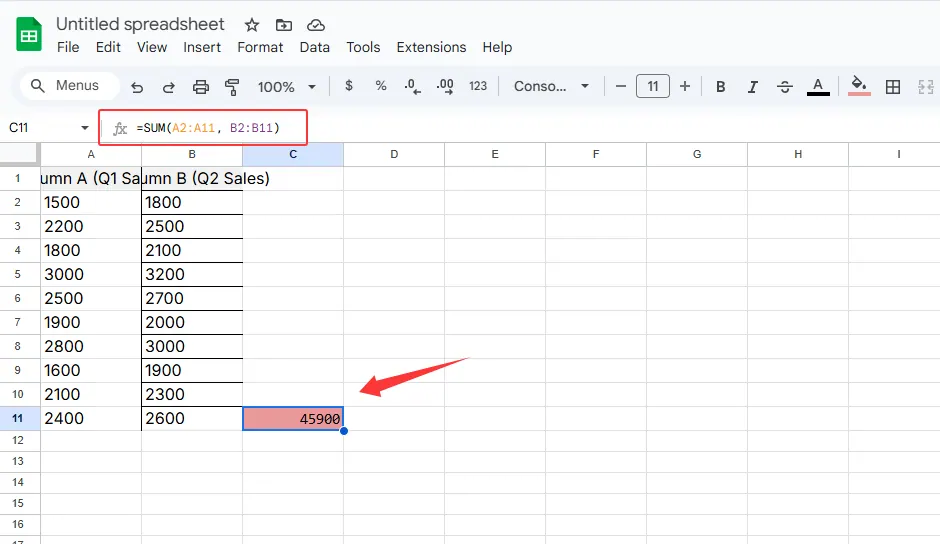
  1. Click the cell where you want the total.
  2. Type =SUM(A2:A12, B2:B11).
  3. Pray you didn’t miss any cells.

sum

This works, but it’s 2025. Let’s upgrade.

The AI Shortcut: RowSpeak’s One-Click Magic

RowSpeak (the AI spreadsheet sidekick you need) does this differently:

  1. Upload your Excel file or connect your data.
  2. Say “Add columns A and B” in plain English.
  3. Boom—done. The tool even flags weird data for you.

Pro tip: RowSpeak’s AI also:
✔ Cleans messy data automatically
✔ Builds charts from your results
✔ Exports reports in one click

sy

When AI Beats Manual Work

  • Monthly reports: Add 12 months of data in one action.
  • Team budgets: Combine department columns without chasing down errors.
  • E-commerce: Sum daily sales across multiple platforms instantly.

Try This Today

  1. Sign up for RowSpeak’s free plan.
  2. Drag-drop your latest spreadsheet.
  3. Type “add [your columns]” and watch the magic.

No more formula headaches. Just results.


About the Author:
As a growth lead at RowSpeak, I help teams ditch spreadsheet frustration. Our AI tools handle the boring stuff so you can focus on decisions—not data entry.

P.S. Need more than column sums? RowSpeak automates pivot tables, forecasts trends, and even writes formulas for you. Try it free →

Ditch Complex Formulas – Get Insights Instantly

No VBA or function memorization needed. Tell RowSpeak what you need in plain English, and let AI handle data processing, analysis, and chart creation

Try RowSpeak Free Now

Recommended Posts

How to Add a Column in Google Sheets Instantly with AI (No Formulas Needed)
Excel Operation

How to Add a Column in Google Sheets Instantly with AI (No Formulas Needed)

Spreadsheets don't have to be tedious. Discover how AI tools like RowSpeak can transform your Google Sheets workflow by adding entire columns with a single command.

Gianna
How to Add Text to Cells in Excel Instantly with AI (No More Manual Work!)
Excel Operation

How to Add Text to Cells in Excel Instantly with AI (No More Manual Work!)

Tired of manually editing hundreds of Excel cells? Learn how AI transforms this tedious task into a one-click operation with tools like RowSpeak.

Gianna
How to Add Two Columns in Excel Fast (Even Without Formulas)
Excel Operation

How to Add Two Columns in Excel Fast (Even Without Formulas)

Tired of manual Excel formulas? Discover smarter ways to add columns, from basic methods to AI-powered automation with RowSpeak.

Gianna
How to Add Borders in Google Sheets Instantly with AI (RowSpeak Guide)
Excel Operation

How to Add Borders in Google Sheets Instantly with AI (RowSpeak Guide)

Tired of manually adding borders in Google Sheets? Learn how AI tools like RowSpeak can transform this tedious task into a one-click solution for professional-looking spreadsheets.

Gianna
How to Add Columns in Google Sheets Instantly with AI (No More Manual Work!)
Excel Operation

How to Add Columns in Google Sheets Instantly with AI (No More Manual Work!)

Tired of manually adding columns in Google Sheets? Learn how AI tools like RowSpeak can handle this task instantly while you focus on what matters most.

Gianna
How to Add Columns in Google Sheets Instantly with AI (2025 Guide)
Excel Operation

How to Add Columns in Google Sheets Instantly with AI (2025 Guide)

Tired of manually adding columns in Google Sheets? AI-powered tools like RowSpeak can do it in seconds. Here's your complete guide to smarter spreadsheet workflows.

Gianna
How to Add Multiple Rows in Excel Instantly Using AI (2025 Guide)
Excel Operation

How to Add Multiple Rows in Excel Instantly Using AI (2025 Guide)

Tired of manually adding rows in Excel? Learn how AI transforms this tedious task into a one-click solution - and why RowSpeak leads the pack for smart spreadsheet automation.

Gianna
How to Add Totals in Excel Instantly with AI (Step-by-Step Guide)
Excel Operation

How to Add Totals in Excel Instantly with AI (Step-by-Step Guide)

Tired of manually adding numbers in Excel? AI-powered tools like RowSpeak can automate totals in seconds. Here's how to work smarter, not harder.

Gianna