How to Add Commas to Numbers in Google Sheets Instantly Using AI

Ever stared at a spreadsheet full of numbers and felt your brain short-circuit? We’ve all been there. Raw numbers like 1000000 are visual nightmares—but slap some commas in (1,000,000), and suddenly everything makes sense.

Here’s the good news: You don’t need to manually format cells anymore. With AI tools like RowSpeak, you can automate comma formatting (and so much more) in Google Sheets. Let’s break it down.

Why Comma Formatting Matters

  • Readability: Our brains process "1,000" faster than "1000".
  • Accuracy: Reduces errors in financial reports or inventory tracking.
  • Professionalism: Clean data impresses clients and stakeholders.

The Manual Way (For Nostalgia’s Sake)

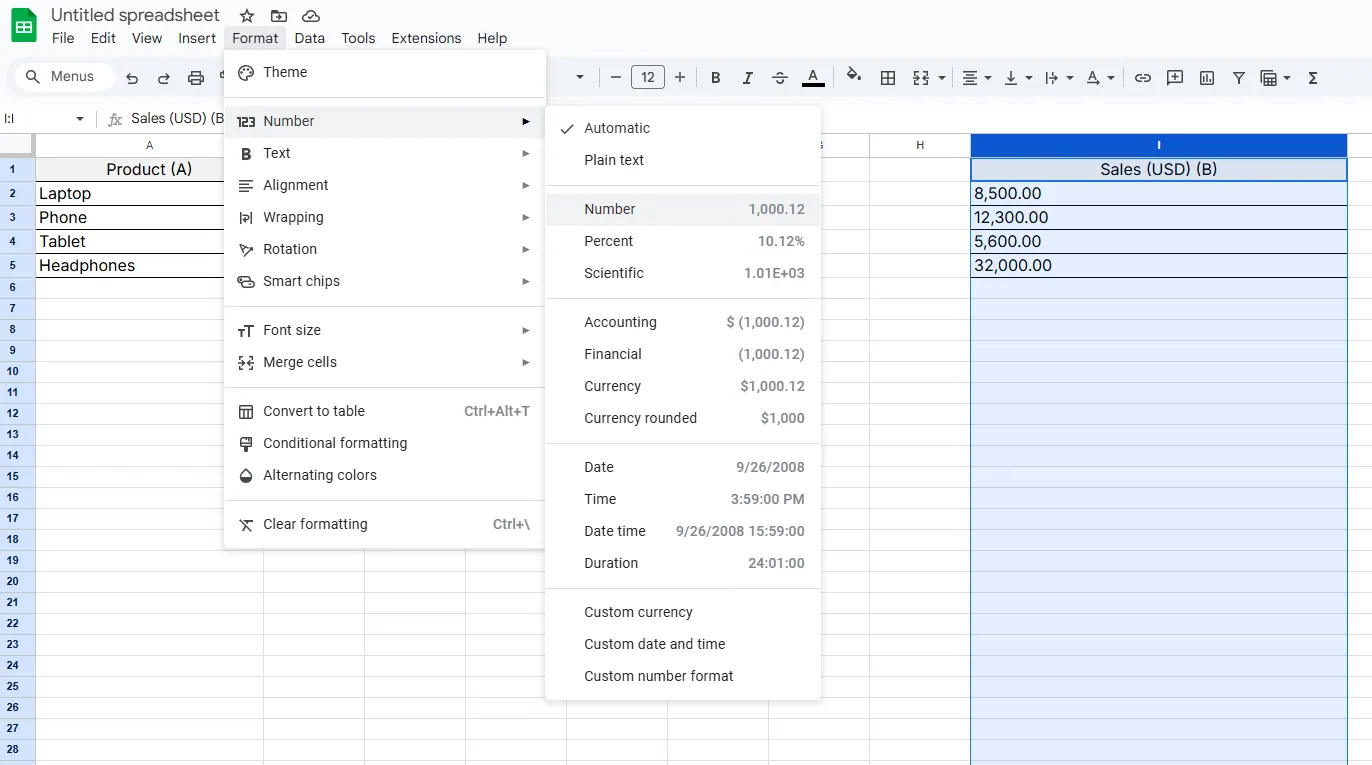
Google Sheets has built-in formatting:

  1. Select your cells
  2. Click Format > Number > Number with commas
number

But let’s be real—this gets old fast if you’re dealing with 10,000+ rows. That’s where AI comes in.

Enter RowSpeak: Your AI Formatting Assistant

RowSpeak isn’t just another add-on—it’s your spreadsheet’s brainy sidekick. Here’s how it solves comma formatting (and way more):

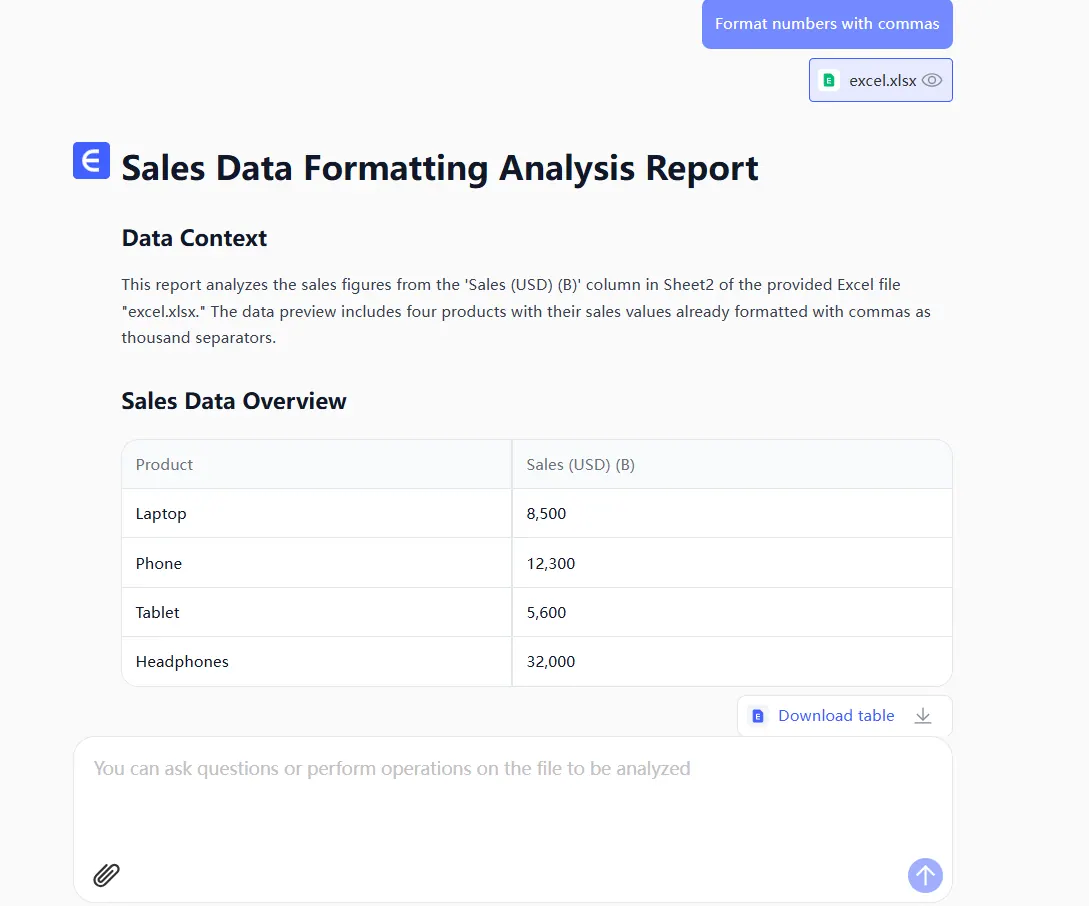
  1. Connect Your Sheet: Link RowSpeak to Google Sheets in 2 clicks.
  2. Describe What You Need: Type “Add commas to all numbers” or even “Format column B as currency”.
  3. Watch the Magic: RowSpeak applies perfect formatting instantly.
get

Bonus: It learns your preferences over time. Next time you upload data, it’ll auto-format based on past actions.

Beyond Commas: What Else Can AI Do?

RowSpeak handles tedious tasks so you can focus on insights:
Smart Data Cleaning: Fix typos, standardize dates, merge columns.
Auto-Visualization: Turns raw numbers into charts without menu diving.
Formula Generation: No more Googling “Excel IF statement syntax”.

Pro Tip: Set It and Forget It

With RowSpeak’s automation rules, you can:

  • Auto-format new data as it’s added
  • Apply company-branded styling (e.g., all currency in blue)
  • Get alerts for outlier numbers

Why Waste Time on Manual Work?

The future of spreadsheets is AI-driven. Tools like RowSpeak turn hours of grunt work into a 10-second task—letting you focus on what actually matters: understanding your data.

Ready to upgrade? Try RowSpeak free and watch your spreadsheets format themselves.


About the Author: As a growth lead at RowSpeak, I help teams ditch spreadsheet busywork. My mission? Make data analysis as easy as texting a friend.

Ditch Complex Formulas – Get Insights Instantly

No VBA or function memorization needed. Tell RowSpeak what you need in plain English, and let AI handle data processing, analysis, and chart creation

Try RowSpeak Free Now

Recommended Posts

How to Add Commas to Numbers in Google Sheets (3 Simple Methods)
Excel Operation

How to Add Commas to Numbers in Google Sheets (3 Simple Methods)

Struggling with hard-to-read numbers in your spreadsheets? Discover how a simple comma can transform your data clarity—plus how RowSpeak automates the entire process.

Gianna
How to Add a Y-Axis Label in Google Sheets Using AI
Excel Operation

How to Add a Y-Axis Label in Google Sheets Using AI

Struggling with chart labels in Google Sheets? Discover how to add Y-axis labels like a pro - from basic manual methods to AI-powered automation that saves you hours.

Gianna
How to Add a Column in Google Sheets Instantly with AI (No Formulas Needed)
Excel Operation

How to Add a Column in Google Sheets Instantly with AI (No Formulas Needed)

Spreadsheets don't have to be tedious. Discover how AI tools like RowSpeak can transform your Google Sheets workflow by adding entire columns with a single command.

Gianna
How to Add Tables in Google Sheets Faster with AI (RowSpeak Guide)
Excel Operation

How to Add Tables in Google Sheets Faster with AI (RowSpeak Guide)

Tired of manual data entry? Discover how AI-powered tools like RowSpeak can transform your Google Sheets workflow by generating and formatting tables in seconds.

Gianna
How to Add a Data Range in Google Sheets Using AI (RowSpeak Alternative)
Excel Operation

How to Add a Data Range in Google Sheets Using AI (RowSpeak Alternative)

Tired of manually defining data ranges in Google Sheets? Learn how AI-powered tools like RowSpeak can automate this process, making data organization effortless while reducing errors.

Gianna
How to Add Columns in Google Sheets Instantly with AI (2025 Guide)
Excel Operation

How to Add Columns in Google Sheets Instantly with AI (2025 Guide)

Tired of manually adding columns in Google Sheets? AI-powered tools like RowSpeak can do it in seconds. Here's your complete guide to smarter spreadsheet workflows.

Gianna
How to Add Time in Google Sheets Using AI (The Easy Way)
Excel Operation

How to Add Time in Google Sheets Using AI (The Easy Way)

Tired of manual time calculations? Learn how AI transforms Google Sheets into a smart time-tracking powerhouse—with zero formulas required.

Gianna
How to Add Commas to Numbers in Excel (3 Simple Methods)
Excel Operation

How to Add Commas to Numbers in Excel (3 Simple Methods)

Struggling with hard-to-read numbers in Excel? Discover how commas can transform your data presentation with these simple formatting techniques.

Gianna