Let's be real—manually adding numbers in Excel feels like using a flip phone in 2024. Sure, it works, but there are way smarter ways to handle your totals. Whether you're tracking sales, expenses, or inventory, knowing how to sum efficiently can save you hours of spreadsheet headaches.
The Basic Sum Formula (Your Excel Starter Pack)
Every Excel user should know this simple trick:
- Click where you want your total
- Type
=SUM( - Highlight your number range (or type the cell references)
- Close with
)and hit Enter
Pro tip: RowSpeak's AI assistant can recognize your data patterns and suggest sum formulas automatically—no typing required.
AutoSum: The Lazy Genius Method
For those "I need this done yesterday" moments:
- Click below your number column
- Find the Σ symbol in the Home tab (or press Alt+=)
- Excel guesses your range—just press Enter
Fun fact: RowSpeak's smart analysis goes further by detecting anomalies in your totals and suggesting corrections.
Summing Across Multiple Sheets Like a Wizard
Working with monthly reports? Here's the magic formula:
=SUM(January:December!B2)
This adds all B2 cells from January through December sheets. But if you're juggling dozens of sheets, RowSpeak can automatically consolidate your data with natural language commands like "sum all regional sales."
Conditional Sums (Because Not All Data Is Equal)
When you need to sum only specific items:
=SUMIF(range, criteria, sum_range)
Example: =SUMIF(B2:B100, ">1000") totals all values over 1,000.
RowSpeak takes this further with AI-powered conditional sums that understand phrases like "show me total sales for premium customers last quarter."
SUMPRODUCT: The Overachiever's Formula
Need to multiply-then-sum columns? Like calculating total revenue from price × quantity:
=SUMPRODUCT(quantity_range, price_range)
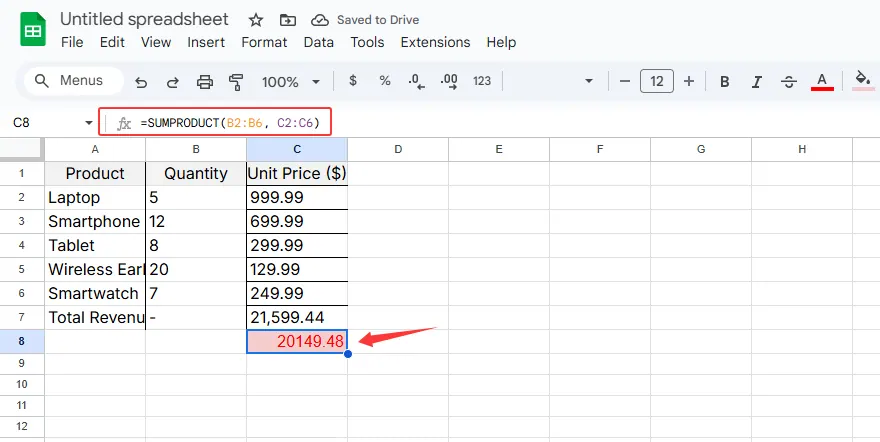
Warning: Complex formulas like this are where most errors happen. RowSpeak's formula debugger catches mistakes before they ruin your reports.
Named Ranges: Your Future Self Will Thank You
Tired of remembering cell coordinates? Name your ranges:
- Select your data
- Go to Formulas > Define Name
- Use names like "Q1_Sales" in formulas
RowSpeak automatically suggests smart naming conventions based on your data headers.
Common Sum Mistakes (And How to Fix Them)
- Text masquerading as numbers: Use
=VALUE()to convert - Hidden errors: Wrap formulas in
=IFERROR(your_formula, 0) - Filtered data issues: Use
=SUBTOTAL(9, range)for visible cells only
RowSpeak's data health checker identifies these issues automatically—no manual troubleshooting needed.
Visualizing Your Totals
Numbers tell the story, but charts sell it:
- Select your data + totals
- Insert > Recommended Charts
- Customize to make it pop
With RowSpeak, you can say "create a pie chart of regional sales totals" and get a presentation-ready visual in seconds.
When Manual Summing Just Doesn't Cut It
While these Excel techniques work, there's a better way:
- AI-powered auto-sums that understand natural language
- Smart error detection that flags inconsistencies
- Automatic data visualization that turns numbers into insights
RowSpeak handles all these scenarios—and more—with AI that learns your workflow. Instead of writing formulas, just describe what you need in plain English.
The Future of Spreadsheet Math
Gone are the days of manually hunting down cell ranges. Modern tools like RowSpeak are changing the game by:
- Automating repetitive calculations
- Providing intelligent suggestions
- Generating reports with a single command
Why spend hours on formulas when AI can do it accurately in seconds? The best part? You still get all the flexibility of Excel—just without the manual work.
Ready to work smarter? RowSpeak turns your spreadsheet struggles into one-click solutions, freeing you to focus on what really matters—the insights, not the data entry.