Monthly Attendance Sheet Template
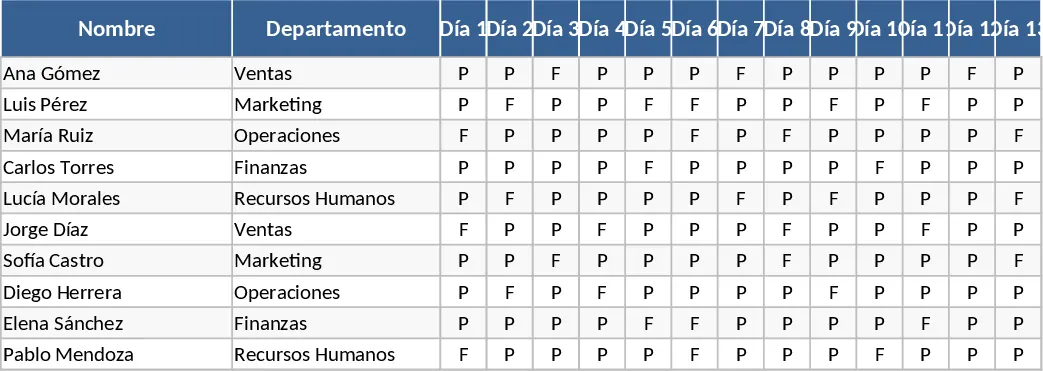
Maintaining an accurate record of employee presence is a cornerstone of effective human resource management. This Monthly Attendance Table is designed to provide a comprehensive yet simple solution for tracking daily check-ins, sick leaves, vacations, and other types of absences. The template is structured with a primary data entry sheet where you can list your entire workforce, categorized by department or role. Each day of the month is represented by a dedicated column, allowing for a granular view of your team's availability at any given moment. The interface is clean and intuitive, utilizing color-coded cells to help you distinguish between different attendance statuses at a glance, making it easy to spot gaps in coverage or excessive leave patterns.
This template is particularly useful for small to medium-sized businesses, department heads, and HR administrators who need a reliable system to monitor workforce reliability without the complexity of expensive software. It solves the common problem of fragmented attendance data by consolidating everything into a single, easy-to-read dashboard. By using this tool, you can ensure that payroll is calculated accurately based on actual days worked, and you can maintain a fair and transparent leave policy that employees can trust. It is also an excellent resource for tracking remote work or flexible schedules, as you can customize the status labels to fit your specific organizational needs, such as Work from Home or Half Day.
Beyond just tracking presence, the template helps you visualize trends over time. For instance, you can quickly see if certain days of the week have higher absenteeism or if specific departments are struggling with staffing levels. This insight allows managers to make informed decisions about scheduling, hiring, and resource allocation. The template includes automated formulas that tally up totals for each category—such as total days present, total sick days, and total vacation days—saving you from the tedious task of manual counting at the end of every month. This ensures that your records are always audit-ready and that any discrepancies in pay or leave balances can be resolved quickly with documented evidence.
How to use this template:
- Start by navigating to the employee setup section and entering the names, IDs, and departments of your staff members to populate the tracking sheet for the current month.
- On a daily basis, use the dropdown menus in the date columns to select the appropriate status for each employee, such as Present, Excused Absence, Unexcused Absence, or Holiday.
- At the end of the month, review the automated summary table at the end of the row or on a separate summary tab to see the aggregated totals for each individual and the team as a whole.
- Use the generated data to inform your payroll system, update your internal HR records, or to conduct monthly performance check-ins regarding punctuality and attendance.
By implementing this structured approach, you can expect a significant reduction in administrative errors and the time spent on manual data entry. It provides a professional way to manage your most valuable asset—your people—while ensuring that your operational workflow remains uninterrupted and well-documented. This template helps you move from reactive management to proactive planning, giving you the clarity needed to lead your team effectively and maintain high levels of accountability across the organization.
Similar Templates Recommendation
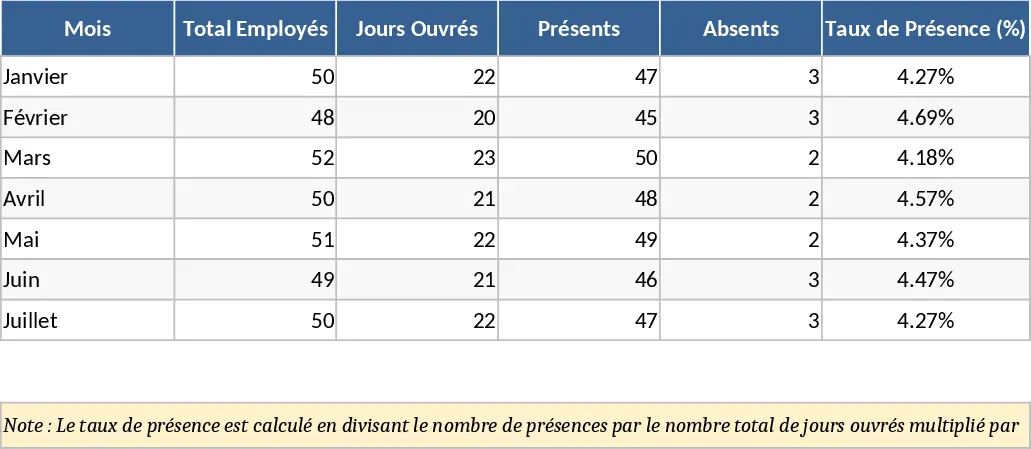
Attendance Tracker with Dashboard Template
Track daily employee attendance, monitor leave types, and generate monthly summaries to streamline payroll and workforce management.
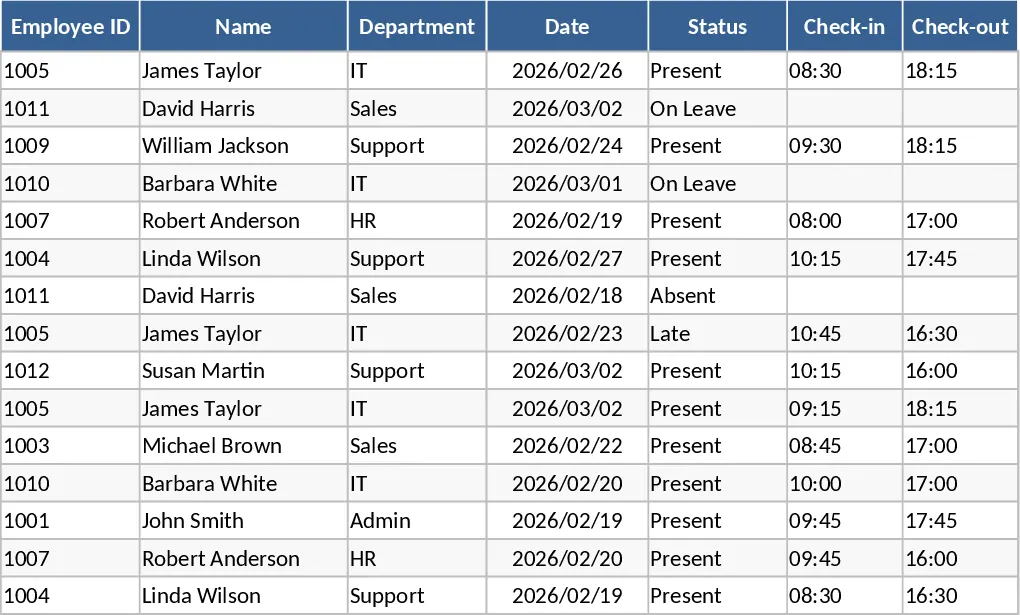
Attendance Tracker with Attendance Log Template
Track daily attendance, monitor absences, and manage participation for employees or students with this organized and automated tracking sheet.
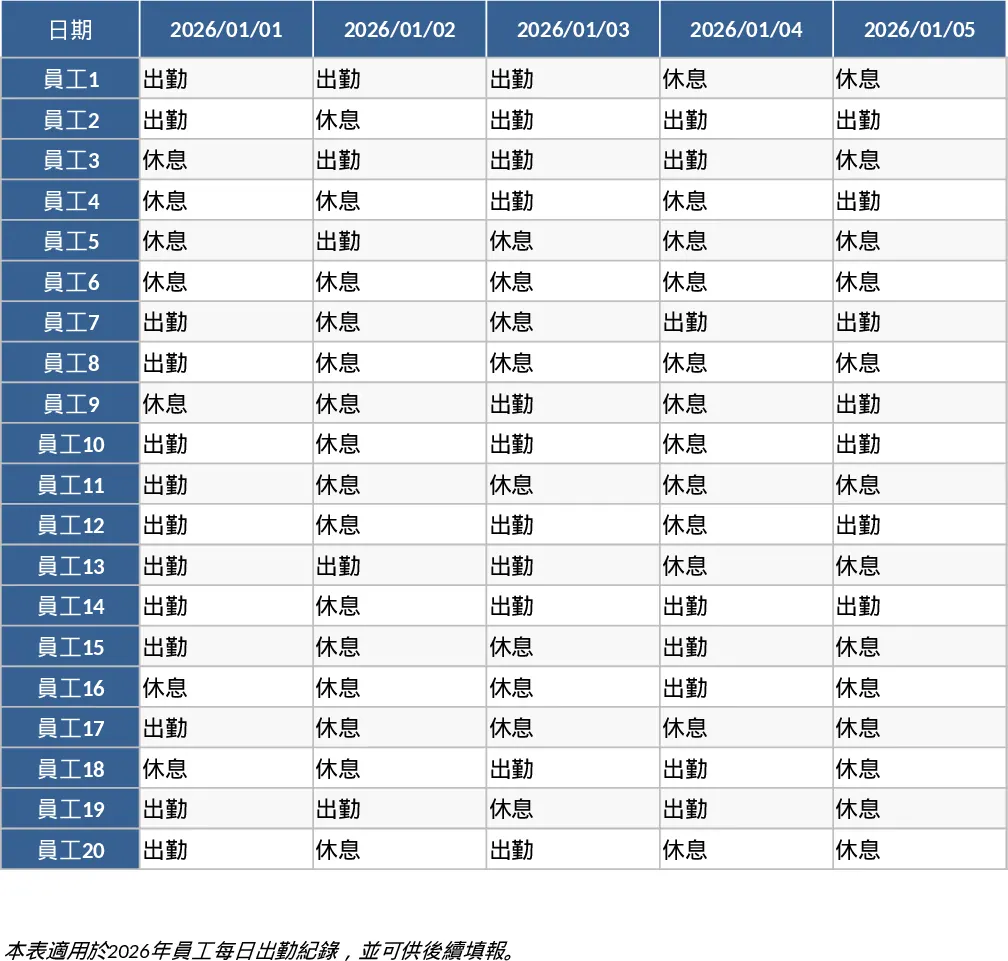
2026 Daily Employee Attendance Tracker Template
Monitor daily attendance for up to 20 employees throughout 2026 with a clear visual layout to track work status, leaves, and absences.