How to Analyze Daily Sales Data and Track Targets Using Excel

Staring at spreadsheets all day? If you're a sales manager, you know the drill: checking daily reports, comparing numbers to targets, and hunting for trends—all while trying to keep your team on track. But what if you could skip the formula headaches and get straight to insights?

In this guide, I’ll walk you through three quick ways to analyze sales data using RowSpeak, a tool that turns plain-English questions into clear reports. No coding required—just answers.


Your Data: A Typical Daily Sales Report

Here’s a snapshot of what your Excel sheet might look like:
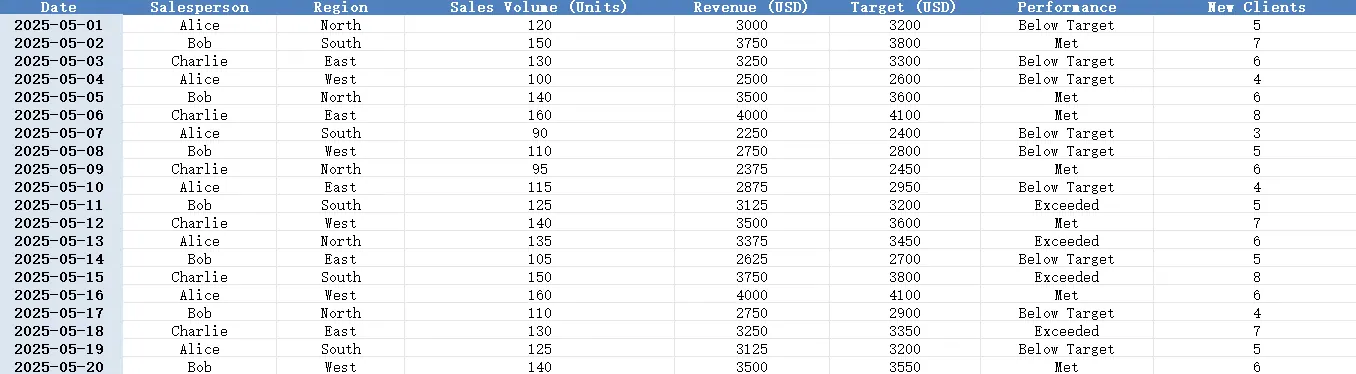
depart


3 Real-World Tasks (Solved in Seconds)

1️⃣ Spot Who’s On Track—And Who Isn’t

Ask RowSpeak:

Show me daily performance (Actual vs. Target) for each salesperson.

What You Get:
A clean table highlighting gaps:

Now you know exactly where to focus.


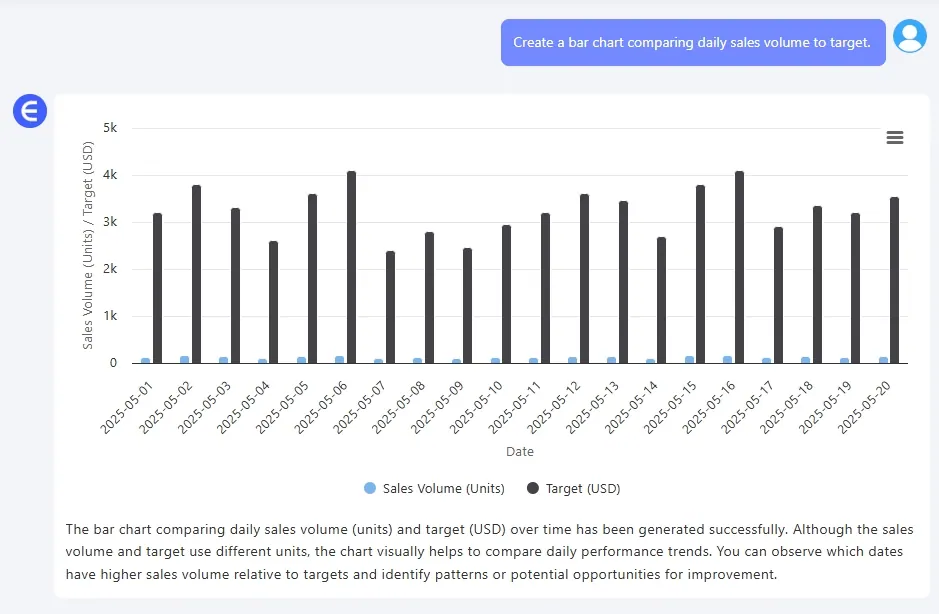
Ask RowSpeak:

Create a Bar Chart comparing daily sales volume to target.

What You Get:
depart

Pro Tip: Share this with your team to quickly show where they’re crushing it or falling short.


3️⃣ Flag Problem Days Automatically

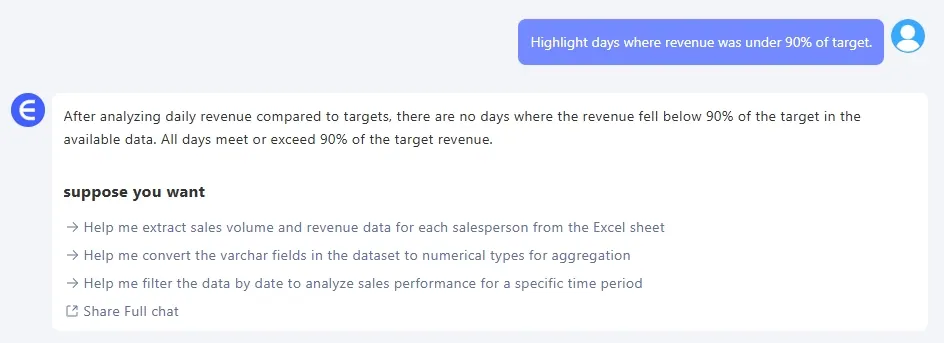
Ask RowSpeak:

Highlight days where revenue was under 90% of target.

What You Get:
depart


Why This Matters

  • Save time: Ditch manual calculations and pivot tables.
  • Act faster: Catch problems early, like a repeat slump on Mondays.
  • Communicate clearly: Show your team data they’ll actually understand.

Final Thoughts

Sales tracking shouldn’t feel like detective work. With the right tools, you can spend less time crunching numbers and more time closing gaps.

Click here to see the full prompt flow and try the tool >>

Ready to simplify your workflow?Try RowSpeak now >>
Ditch Complex Formulas – Get Insights Instantly

No VBA or function memorization needed. Tell RowSpeak what you need in plain English, and let AI handle data processing, analysis, and chart creation

Try RowSpeak Free Now

Recommended Posts

How to Analyze KPI Achievement Rates Across Departments Using Excel AI
Excel Tips

How to Analyze KPI Achievement Rates Across Departments Using Excel AI

Track KPI achievement rates across departments using RowSpeak. Visualize performance and detect gaps with three easy prompts—no pivot tables required.

Sally
How to Compare Sales vs Target and Visualize Product Performance in Excel
Excel Tips

How to Compare Sales vs Target and Visualize Product Performance in Excel

Compare actual vs target sales and visualize product performance in Excel using RowSpeak. Generate charts, calculate revenue ratios, and identify sales gaps easily.

Sally
How to Analyze Campaign ROI and Performance with Excel AI Tools
Excel Tips

How to Analyze Campaign ROI and Performance with Excel AI Tools

Discover how to use Excel AI tools to review campaign ROI, trends, and performance. Find your top 5 campaigns, chart ROI over time, and calculate cost efficiency—no formulas needed.

Sally
How to Set Up an Inventory Warning System in Excel and Track Replenishment Needs
Excel Tips

How to Set Up an Inventory Warning System in Excel and Track Replenishment Needs

Track your inventory levels, flag products needing replenishment, and forecast sales remaining with simple prompts using RowSpeak—no formulas required.

Sally
Sales Analysis Made Easy: Use AI to Excel Data Analysis and Boost Efficiency by 80%
Excel Tips

Sales Analysis Made Easy: Use AI to Excel Data Analysis and Boost Efficiency by 80%

Automate your sales data analysis with RowSpeak to boost efficiency, reduce errors, and make data-driven decisions.

Sally
Simplify Bonus and Commission Calculations with Excel AI
Excel Tips

Simplify Bonus and Commission Calculations with Excel AI

Using Excel to calculate commissions and bonuses is tedious and risky. See how RowSpeak simplifies compensation analysis with one smart question.

Sally
How to Perform a Breakeven Analysis with Excel AI
Excel Tips

How to Perform a Breakeven Analysis with Excel AI

Discover how AI is revolutionizing financial planning with RowSpeak. Learn to perform break-even analysis in Excel using traditional methods and RowSpeak's AI-powered tools. Simplify your financial planning with instant calculations and intuitive visualizations. Read more to see how RowSpeak can transform your business!

Sally
AI Empowers Excel: Streamline E-Commerce Data Analysis
Excel Tips

AI Empowers Excel: Streamline E-Commerce Data Analysis

In the e-commerce industry, ​data is the lifeblood of every operation

Sally