Compare New vs Old Product Sales with Dual-Line Excel AI Charts

You launched a new product. Now what? You wanna know:

  • Is it growing the pie?
  • Or eating the old product’s slice?

With RowSpeak’s dual-line charts, you can visualize product cannibalization or expansion success—instantly. No pivot drama. No axis wrestling.


Traditional Analysis: Old School Meets Overkill

Let's say you have the following files:
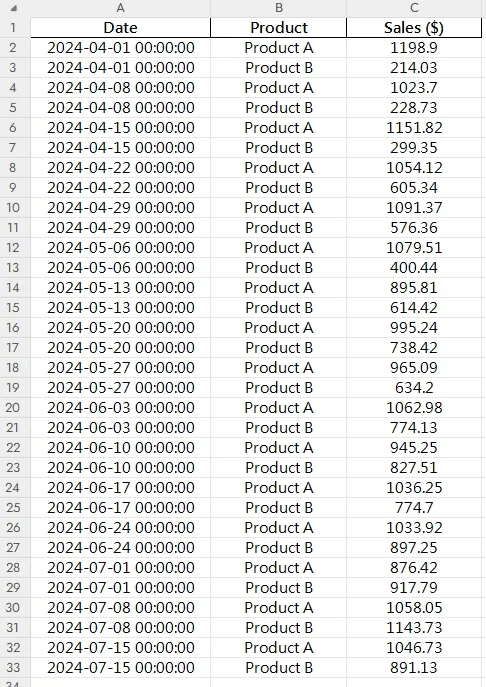
depart

Here’s how this usually goes in Excel:

  1. Group sales by product and date
  2. Align both on the same time scale
  3. Build a dual-line chart (if you’re lucky)
  4. Try to label the lines clearly… then fix the x-axis, again 🙄
  5. Still kinda ugly, and hard to read

You’ve spent 40 minutes—and still no answers.


RowSpeak to the Rescue

Just ask:

Prompt: Compare weekly sales of Product A and Product B since April 2024 using a dual-line chart.

or

Prompt: Show total weekly sales combining both products alongside individual lines.

And boom:

  • Two distinct, styled lines
  • Matching dates on the x-axis
  • Insightful, clear visuals
  • Ready to share with your team, investors, or boss

When to Use a Dual-Line Chart

  • Measure impact of new product launches
  • Detect sales cannibalization or growth
  • Track performance of product pairs over time (bundles, upgrades, etc.)

Excel vs RowSpeak AI

Step Traditional Excel RowSpeak AI
Data aggregation Manual/grouped Automatic
Time series alignment Painful Smart & synced
Chart layout Manual + tweaking Beautiful by default
Style & labels Basic Clean, pro-level
Actionable insights Needs interpretation Visually obvious
Time to generate 30–45 mins < 1 min

Pro Tips

  • Use different colors and thickness to show primary vs secondary products
  • Add annotations at crossover points
  • Consider stacked area chart if you want to show total volume growth

Final Thoughts

Product launches are full of hopes and hunches. But with a dual-line chart, you move from "I think it’s doing okay" to "I know it’s growing our revenue."

👉 Try RowSpeak now >>

Ditch Complex Formulas – Get Insights Instantly

No VBA or function memorization needed. Tell RowSpeak what you need in plain English, and let AI handle data processing, analysis, and chart creation

Try RowSpeak Free Now

Recommended Posts

How to Create a Line Chart Instantly Using Excel AI Tools
Data Visualization

How to Create a Line Chart Instantly Using Excel AI Tools

Forget manual formatting—learn how Excel AI can create clear, clean line charts in one simple step.

Sally
Compare Seasonal Sales Trends with Multi-Line Excel AI Charts
Data Visualization

Compare Seasonal Sales Trends with Multi-Line Excel AI Charts

Track sales across multiple years and reveal your seasonality trends with just one Excel AI prompt. RowSpeak makes comparing monthly sales easy and accurate.

Sally
Compare Brand Sales Trends with Multi-Line Charts in Excel AI
Data Visualization

Compare Brand Sales Trends with Multi-Line Charts in Excel AI

Want to track your brand against competitors over time? Multi-line charts in Excel AI let you compare monthly sales trends instantly—no formulas, no formatting headaches.

Sally
Track Monthly Sales Trends in Seconds with Excel AI Line Charts
Data Visualization

Track Monthly Sales Trends in Seconds with Excel AI Line Charts

Ditch manual work and discover how Excel AI tools like RowSpeak can create dynamic, trend-focused line charts from your raw data. Analyze monthly changes with zero stress.

Sally
Track Your Average Order Value with Excel AI Line Charts
Data Visualization

Track Your Average Order Value with Excel AI Line Charts

Wondering if customers are spending more per order? Use Excel AI to track average order value (AOV) with clean, automated line charts that reveal the story behind your revenue.

Sally
Compare Ad Channel Sales with a Bar Chart in Excel AI
Data Visualization

Compare Ad Channel Sales with a Bar Chart in Excel AI

Tired of guessing which ad channel works best? Let Excel AI generate Bar Charts comparing Facebook, Google, TikTok, and more—instantly and insightfully.

Sally
Stop Wasting Time on Manual Charts: Create Excel Line Graphs Instantly with AI
Data Visualization

Stop Wasting Time on Manual Charts: Create Excel Line Graphs Instantly with AI

Tired of endlessly clicking through Excel menus to create a simple line graph? Discover how to visualize trends instantly. This guide contrasts the slow, manual method with a new AI-powered approach using RowSpeak, turning your raw data into insightful charts with just a few words.

Ruby
How to Instantly Create Bar Charts with Excel AI (No Manual Work Needed)
Data Visualization

How to Instantly Create Bar Charts with Excel AI (No Manual Work Needed)

Stop wasting time building charts manually. Discover how Excel AI can generate clean, insightful Bar Charts from your data with just one simple prompt.

Sally