Let's be real - we've all spent way too much time manually creating number sequences in spreadsheets. Google Sheets offers decent tools for building data series, but what if you could skip the manual work entirely?
As a growth manager at RowSpeak, I help teams ditch spreadsheet busywork every day. Here's the traditional way to create series in Google Sheets - followed by how RowSpeak revolutionizes the process.
What Are Data Series (And Why They Matter)
Data series transform random numbers into meaningful patterns. They're the difference between:
1
2
3
And:
Q1 Revenue: $15,000
Q2 Revenue: $18,500
Q3 Revenue: $22,300
Traditional methods require manual setup. RowSpeak? It understands what you need and builds intelligent series automatically.
The Old-School Way: Creating Series in Google Sheets
1. Basic Number Sequences
- Type "1" in cell A1
- Type "2" in cell A2
- Drag the fill handle down
- Watch Google guess your pattern
Pro tip: This works for simple sequences but falls apart with complex patterns.
2. Date Series
- Enter "1/1/2023" in B1
- Enter "2/1/2023" in B2
- Drag to auto-fill months
Handy? Sure. Time-consuming? Absolutely.
3. Custom Patterns
Google Sheets can handle some custom patterns if you:
- Establish clear examples
- Hope it detects your logic
- Manually fix mistakes
The RowSpeak Difference: AI-Powered Series Generation
Here's where spreadsheets get magical. With RowSpeak:
- Describe what you need: "Create quarterly revenue projections growing 15% QoQ"

- Watch as AI generates perfect series instantly
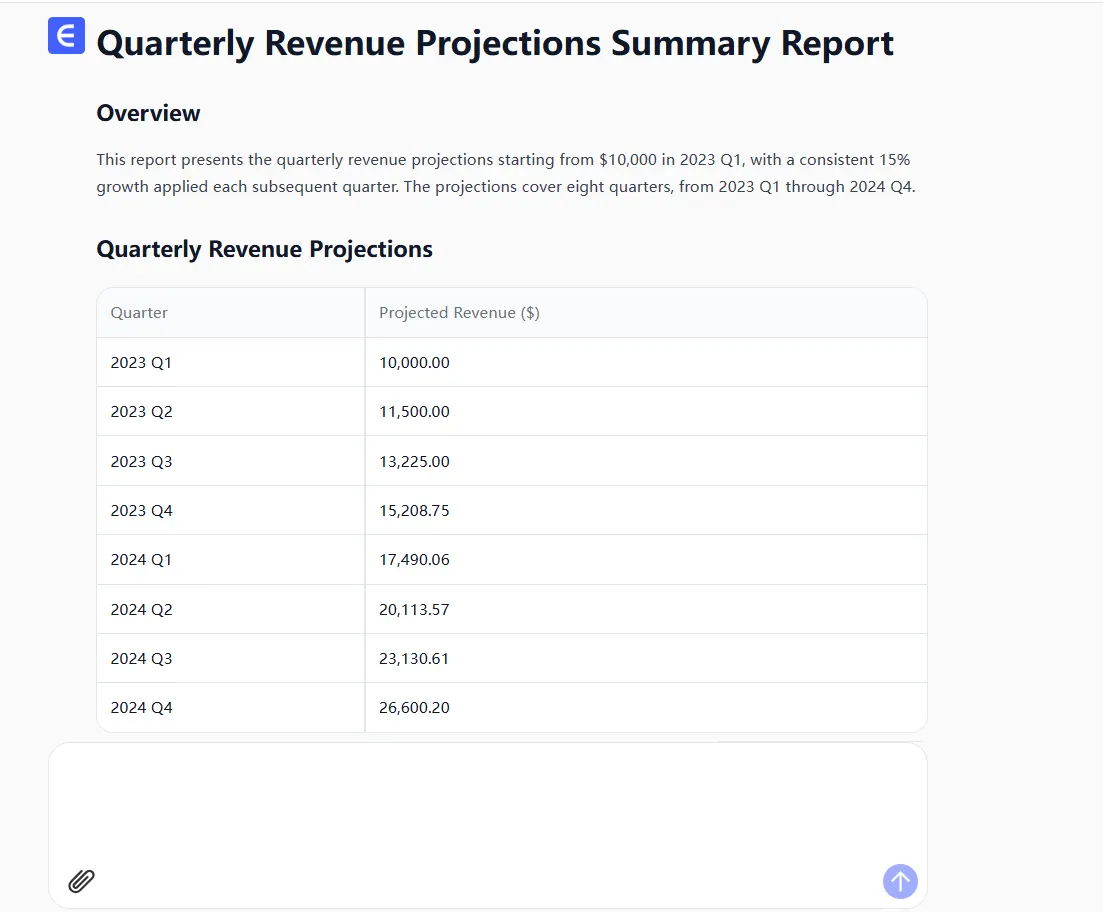
- No dragging. No guessing. Just results.
Our users save 3+ hours weekly on tasks like:
- Financial forecasting sequences
- Time-based data tracking
- Complex mathematical progressions
Why Smart Teams Are Switching
Google Sheets requires you to:
❌ Manually establish patterns
❌ Drag fill handles endlessly
❌ Cross your fingers hoping it guesses right
RowSpeak delivers:
✅ Automatic pattern recognition
✅ Natural language commands ("Create a Fibonacci sequence here")
✅ One-click series generation
Try This Instead
Next time you need to:
- Build a sales forecast
- Create a project timeline
- Generate test data
Skip the manual work. Let RowSpeak's AI handle the heavy lifting while you focus on what matters - interpreting the data, not creating it.
Ready to work smarter? RowSpeak turns hours of spreadsheet work into seconds. The future of data is here - are you ready to join it?
Experience AI-powered spreadsheets now - because your time is too valuable for fill handles.