Business intelligence often sounds like a platform decision. In real teams, it often starts much earlier: someone receives an Excel file, a CSV export, a PDF table, or a screenshot and needs to explain what is happening.
That is the gap AI business intelligence should address.
Not every team is ready for a full BI rollout. Not every report deserves a semantic model. And not every business user wants to learn DAX, SQL, or dashboard configuration before answering a simple question.
For Excel-heavy teams, the more practical goal is this:
Turn messy business files into reviewable analysis, reports, and dashboards without losing the ability to check the numbers.
That is where RowSpeak fits.
Key takeaways:
- AI business intelligence should help teams explain spreadsheet data, not just generate prettier charts.
- The strongest workflow combines file inspection, metric logic, analysis, narrative reporting, dashboard planning, and human review.
- RowSpeak works as a lightweight BI layer for teams whose reporting still begins with Excel, CSV, PDF, and image-based tables.
Why BI Still Starts in Spreadsheets
Even companies with data warehouses and dashboards still use spreadsheets for serious work.
Finance teams collect department budgets in Excel. Sales teams export CRM data for deal reviews. Marketing teams combine ad platform CSVs with revenue data. Operations teams work from supplier spreadsheets and inventory snapshots. Agencies receive whatever file a client sends.
These files are not always clean enough for BI. They may be temporary, messy, incomplete, or changing. But they still drive decisions.
This is why AI business intelligence should not only mean "chat with a database." For many teams, it means "chat with the files that actually contain the work."
RowSpeak's data analysis workflow is built around that file-first reality.
What AI BI Should Do
A useful AI BI workflow should do six things.
1. Understand the file
Before producing charts, AI should inspect the tables, columns, missing values, duplicate records, mixed formats, and likely key fields.
2. Clarify the metric
The tool should ask or infer how metrics are defined, then show the logic. Revenue, churn, pipeline, margin, and inventory risk are not universal concepts. They depend on the business context.
3. Explain movement
BI is not only a dashboard. A business user needs to know what changed, which segment drove the change, and whether the change is worth action.
4. Produce report-ready language
Leadership usually does not want raw charts. They want a concise explanation: what happened, why it matters, and what should happen next.
5. Recommend visuals
The right chart depends on the question. A trend line, variance waterfall, ranking table, cohort view, and scatter plot each tell a different story.
6. Stay reviewable
AI BI should make it easier to check assumptions, not harder. If a number is important, the user should be able to ask where it came from.
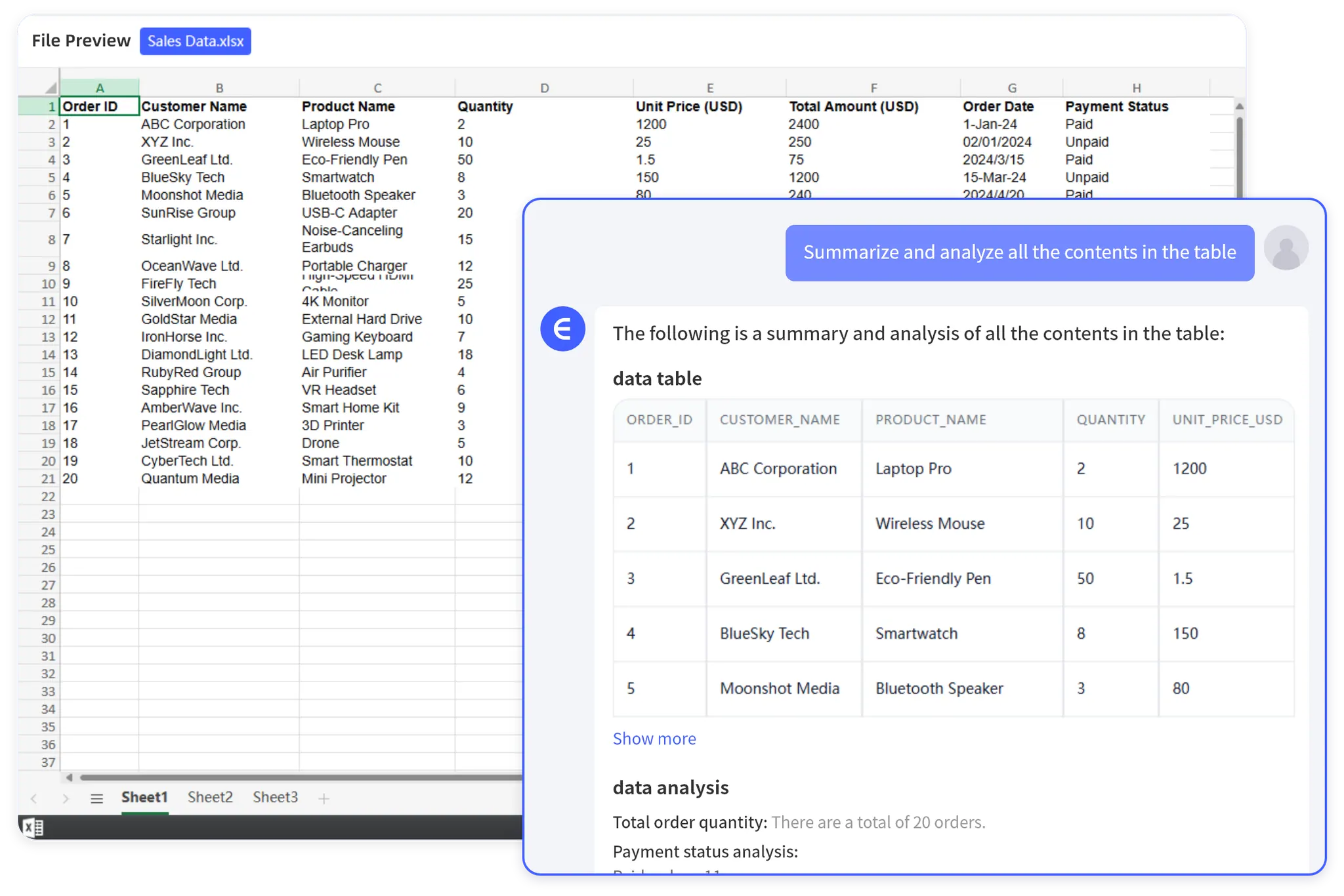
A file-first BI workflow usually starts with a spreadsheet and a business question, then turns the output into charts, summaries, and report language that can be reviewed.
Example: Finance Reporting Without a BI Project
Imagine an FP&A manager has:
- Department budget workbook
- Actuals export from accounting
- Headcount plan
- Notes from department owners
The team needs a monthly variance report. A full BI model might eventually make sense, but this month the question is urgent:
- Which departments are over budget?
- Which expense categories explain the variance?
- Which movements are timing issues versus real changes?
- What should be shown to leadership?
A RowSpeak prompt can start like this:
Analyze these finance files for a monthly variance report. First inspect the
data quality and map budget, actuals, department, category, and period fields.
Then calculate variance by department and category, explain the largest drivers,
flag items that need manual review, and draft a leadership-ready summary.
That is AI business intelligence in practical form. It turns file-based analysis into a report someone can discuss.
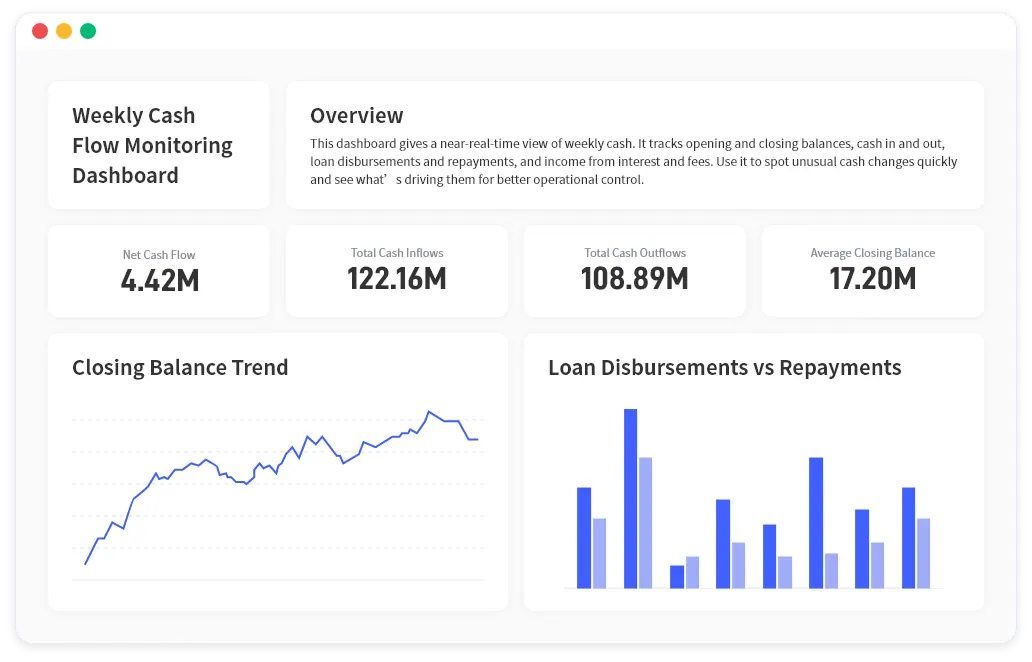
The report output can be dashboard-like when the business question calls for it. The important point is that the visuals and summary stay connected to the source files and metric logic.
For finance teams, this connects naturally with finance AI for Excel and management reporting workflows.
RowSpeak Versus Traditional BI
Traditional BI is strongest when the organization has stable sources, defined metrics, shared dashboards, permissions, and long-term reporting needs.
RowSpeak is stronger when the workflow is closer to raw files:
- Ad hoc analysis
- Recurring spreadsheet reports
- Multi-file business reviews
- Reports that change each month
- Narrative summaries
- Dashboard drafts
- File formats beyond clean tables
This makes RowSpeak a bridge. It can help teams understand the work before investing in a formal BI model.
It can also support teams that never need a full BI stack for certain reports. A monthly client report, a board packet update, or a quick operational review may only need a fast, reviewable workflow.
The AI BI Workflow for Excel Teams
Use this sequence:
Step 1: Upload the files
Start with the real source files: Excel, CSV, PDF, screenshots, or image-based tables.
Step 2: Ask for a data audit
Inspect these files and identify table structure, key fields, missing values,
duplicate records, inconsistent labels, and fields that need clarification before
analysis.
Step 3: Define the decision
The audience is the leadership team. The decision is where to focus next month.
Create metrics and analysis that support that decision.
Step 4: Generate analysis and explanation
Ask RowSpeak to calculate KPIs, identify changes, explain drivers, and show caveats.
Step 5: Turn it into a report or dashboard
Use the output to create a written report, a KPI table, or a dashboard plan. For visual workflows, see RowSpeak's Excel-to-dashboard feature.
Step 6: Review the result
Ask which rows support each claim, which assumptions matter, and which numbers should be checked manually.
What Makes This Different From Generic AI
Generic AI can explain business concepts. It can help draft a report. It can suggest formulas.
But spreadsheet business intelligence depends on files, table structure, metric logic, and repeated correction. A useful workflow has to stay close to the data.
RowSpeak is designed for that file-based work. The value is not only conversation. It is the path from messy source data to a report or dashboard that a business team can review.
When to Move From RowSpeak to BI
Move a workflow into BI when:
- The source tables are stable.
- The metrics are agreed upon.
- Many people need access.
- Permissions and refresh logic matter.
- The dashboard will be used for a long time.
Keep using RowSpeak when:
- The files change often.
- The question changes often.
- The report needs narrative explanation.
- The team needs fast analysis before modeling.
- The report owner is a business user, not a BI developer.
This is not a purity contest. Strong teams use different tools for different stages of the reporting lifecycle.
A Reusable AI BI Prompt
Act as an AI business intelligence assistant for these spreadsheet files.
Inspect the data, define the key metrics, calculate the results, explain the
largest changes, identify anomalies or data quality risks, recommend dashboard
charts, and draft a leadership-ready report. Show assumptions and calculation
logic before the final summary.
This prompt works because it treats BI as a workflow, not just a dashboard.
For Excel-heavy teams, that is the main shift. AI BI should not force every business question into a data platform first. It should help teams turn the files they already have into decisions they can defend.