The best AI tool for data analysis is not the same tool for every team.
A finance manager may need a variance report from an Excel workbook. A sales operations team may need charts from CRM exports. A data team may need governed metrics inside BI. A consultant may need to turn a messy CSV and a PDF table into a client-ready summary before tomorrow's meeting.
Those are different jobs. They should not be judged by one generic "AI data analysis" checklist.
This guide compares AI data analysis tools by workflow: where the data starts, what output the team needs, and how much review the result requires.
Key takeaways:
- Choose RowSpeak when the work starts from Excel, CSV, PDF, screenshots, or exported business files and needs to become a reviewable chart, dashboard, summary, or report.
- Choose ChatGPT or Claude for flexible ad hoc reasoning, code-assisted exploration, and drafting, but review sources, calculations, and repeatability.
- Choose Copilot in Excel when the workbook belongs inside Microsoft 365 and the task is workbook-native editing or analysis.
- Choose Power BI, Fabric, Tableau, Looker, or another BI stack when data is governed, recurring, permissioned, and shared across teams.
- Choose audit-specific or spreadsheet add-in tools when the workflow is narrow, such as evidence collection, formula generation, or sheet-level automation.
How to choose an AI data analysis tool
Start with the workflow, not the model name.
The first question is where the data starts:
- Excel workbook
- CSV export
- PDF table
- screenshot or image-based table
- database or warehouse
- BI semantic model
- notebook or code project
- Google Sheets or Excel add-in workflow
The second question is what the output must become:
- quick answer
- chart
- dashboard
- executive summary
- management report
- audit evidence
- forecast or model
- reusable governed metric
The third question is how much review the output needs. A marketing brainstorm can tolerate more flexibility. A finance report, sales forecast, inventory decision, or client deliverable needs clearer assumptions, source checks, and human review.
Best AI tools for data analysis in 2026
| Tool | Best for | Starting data | Typical output | Main tradeoff |
|---|---|---|---|---|
| RowSpeak | Spreadsheet-heavy business reporting | Excel, CSV, PDF, screenshots, exports | Charts, dashboards, summaries, reports | Not a replacement for every Excel or BI feature |
| ChatGPT | Flexible ad hoc analysis and code help | Uploaded files, examples, prompts | Explanation, code, summaries, prototypes | Review trail and repeatability can be weaker |
| Claude | Document-heavy reasoning and analysis support | Documents, prompts, uploaded context | Summaries, analysis plans, narrative output | Verify current data/file limits and workflow fit |
| Microsoft Copilot in Excel | Microsoft 365 workbook-native help | Excel workbooks in supported workflows | In-workbook edits, formulas, explanations | Best when the workflow fits Microsoft 365 |
| Julius AI | Self-serve data analysis workflows | Uploaded datasets | Charts, analysis, explanations | Verify current file support, export, and review controls |
| GPT for Work / spreadsheet add-ins | Cell and sheet-level AI tasks | Excel or Google Sheets | Formulas, text generation, transformations | Narrower than a full reporting workflow |
| DataSnipper | Audit and evidence-heavy finance workflows | Excel plus audit documents | Evidence, audit procedures, supporting workpapers | More specialized than general business analytics |
| Power BI / Fabric Copilot | Governed dashboards and enterprise analytics | BI models, databases, governed data | Dashboards, reports, enterprise metrics | Heavier than ad hoc spreadsheet reporting |
| Tableau / Looker AI | Mature analytics teams | Governed analytics environments | Insights, dashboards, conversational analytics | Requires analytics stack maturity |
| Lightweight no-code analytics tools | Narrow analytics or ops workflows | App-specific data or uploaded datasets | Quick analysis, simple dashboards | Feature set varies; verify current product status |
The order here is not a universal ranking. It is a decision map.
1. RowSpeak: best for spreadsheet-heavy business reports
RowSpeak is the best fit when the workflow starts from business files and ends in something a team can review and share.
That includes:
- Excel workbooks
- CSV exports
- PDF tables
- screenshots
- image-based tables
- CRM, ERP, accounting, inventory, or ad platform exports
RowSpeak fits the messy middle between manual Excel work and heavy BI. A user can upload files, ask a question, get charts or summaries, refine the result, and use the output in a business report.
Use RowSpeak when you need:
- AI data analysis from uploaded spreadsheet files
- an AI reporting workflow for weekly or monthly summaries
- an Excel-to-dashboard workflow without building a full BI project
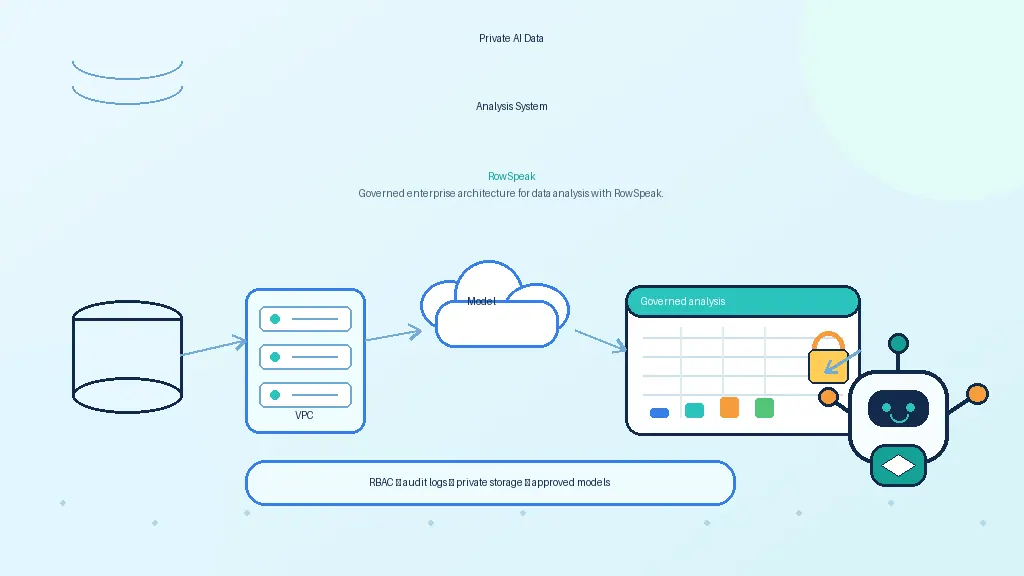
- a private deployment path for sensitive spreadsheet workflows
Example prompt:
Analyze this monthly sales export.
Check the data quality first, then calculate revenue, margin, refund rate, and order count by region and channel.
Create one chart for the biggest change, draft a short management summary, and list anything I should verify before sharing.
2. ChatGPT: best for flexible ad hoc analysis
ChatGPT is useful for exploration, explanation, code-assisted analysis, and early drafts.
It can help users:
- reason through an analysis plan
- write Python or SQL
- explain formulas
- summarize uploaded examples
- prototype charts or report language
The main tradeoff is workflow control. When the answer affects a business decision, the team still needs to verify files, rows, calculations, assumptions, and repeatability.
For spreadsheet-heavy work, compare it with the ChatGPT data analysis alternative page and the risk-focused article on data analysis limitations in ChatGPT.
3. Claude: best for document-heavy reasoning support
Claude is useful to evaluate when the work is document-heavy: policies, memos, long reports, research notes, and analytical writing.
For data analysis, its fit depends on the current file workflow, limits, connectors, and export path. Treat it as a strong reasoning assistant, then verify whether it can support your team's exact spreadsheet, BI, or reporting process.
4. Microsoft Copilot in Excel: best for Microsoft 365 workbook-native work
Microsoft Copilot in Excel is the natural option when the workbook belongs inside Microsoft 365.
Use it when:
- the file is already in a supported Excel/Microsoft 365 workflow
- the user wants help inside the workbook
- the task involves formula columns, explanations, formatting, or workbook-native analysis
- IT wants the AI layer close to Microsoft 365 governance
If the job starts from local exports, PDF tables, screenshots, or multiple business files, a file-to-report workflow such as RowSpeak may be easier. See the Excel Copilot alternative page or the Excel Copilot tutorial.
5. Julius AI: best to evaluate for self-serve analysis
Julius AI is relevant for teams that want self-serve analysis from uploaded data. It often appears in the same evaluation set as ChatGPT, RowSpeak, and spreadsheet AI tools.
Evaluate it with real files:
- Can it read your file types?
- Can it produce the charts you need?
- Can the team review assumptions and calculations?
- Can outputs become reports or dashboards?
- Does pricing and data handling fit the team?
For a focused buyer comparison, read the Julius AI alternative page.
6. GPT for Work and spreadsheet add-ins: best for sheet-level tasks
Spreadsheet add-ins are useful when the user wants AI directly in Excel or Google Sheets.
They are often good for:
- formula generation
- text cleanup
- translation inside cells
- classification
- repetitive transformations
- lightweight sheet automation
They are less complete when the final output needs to become a management report, dashboard, or multi-file analysis workflow.
7. DataSnipper: best for audit and evidence-heavy workflows
DataSnipper is strongest when the analysis problem is also an evidence problem.
Audit and finance teams often need:
- document matching
- evidence extraction
- control testing
- workpaper support
- traceable procedures inside Excel
That is different from a general business reporting workflow. Use it when evidence and audit procedure are central.
8. Power BI and Fabric Copilot: best for governed dashboards
Power BI and Microsoft Fabric are stronger when analytics should be governed, refreshed, permissioned, and shared broadly.
Use this path when:
- data comes from databases or a warehouse
- metrics need a governed semantic layer
- dashboards are recurring and shared across teams
- IT or analytics teams can support the build
If the work is still a messy spreadsheet export or a first-pass management report, BI may be too heavy. Read Power BI alternative for spreadsheet reporting for that decision point.
9. Tableau, Looker, and enterprise analytics AI
Enterprise analytics platforms are useful when the organization already has mature data infrastructure and dashboard governance.
They are not usually the fastest answer for a one-off Excel export, but they are often the right place for stable metrics, permissions, and executive dashboards.
10. Lightweight no-code analytics tools
Lightweight analytics tools can be useful for narrow workflows: quick dashboards, operational reporting, marketing analysis, or small team exploration.
Before choosing one, verify:
- current product status
- supported file types
- export options
- privacy controls
- whether the workflow can repeat month after month
Decision framework: which tool should you test first?
Use this rule:
- If the work starts from Excel, CSV, PDF, screenshots, or business exports, test RowSpeak.
- If the work stays inside Microsoft 365 Excel, test Copilot in Excel.
- If the work is ad hoc reasoning or code exploration, test ChatGPT or Claude.
- If the work is audit evidence, evaluate DataSnipper.
- If the work is cell-level automation, evaluate GPT for Work or similar add-ins.
- If the work is governed dashboards, evaluate Power BI, Fabric, Tableau, Looker, or your existing BI stack.
A practical test before buying
Do not test an AI data analysis tool with a perfect demo dataset. Use one real file.
Choose a file with at least one realistic mess:
- inconsistent date formats
- blank rows
- duplicate customer names
- a PDF table or screenshot
- a subtotal row that should not be counted
- a business rule the AI must clarify
Then ask:
Analyze this file for a management report.
Check data quality first.
Calculate the main KPIs.
Identify the biggest change.
Create one chart.
Draft a short summary.
List anything a human should verify before sharing.
The best tool is the one that gets you closest to a result you can review, correct, and use.
FAQ
What is the best AI tool for data analysis in 2026?
There is no single best tool for every team. RowSpeak is strongest for spreadsheet-heavy file-to-report workflows. ChatGPT and Claude are useful for flexible analysis and reasoning. Copilot in Excel is strongest inside Microsoft 365. BI tools are strongest for governed dashboards.
What is the best AI tool for Excel data analysis?
If the workbook lives inside Microsoft 365, test Copilot in Excel. If the work starts from Excel, CSV, PDF, screenshots, or exported business files and needs a chart, dashboard, summary, or report, test RowSpeak.
Is ChatGPT enough for business data analysis?
It can be useful, but business data analysis needs review. Check source files, rows, calculations, assumptions, and whether the workflow can be repeated.
Are AI data analysis tools better than BI dashboards?
Not always. AI analysis tools are useful for ad hoc questions, messy exports, and report preparation. BI dashboards are better for governed metrics that many people need repeatedly.
Can AI tools analyze CSV, PDF, and screenshot data?
Some can, but support varies by product and plan. For spreadsheet-heavy workflows, choose a tool designed for Excel, CSV, PDF, screenshots, and business exports rather than assuming any general AI tool can handle every file reliably.
Final recommendation
Choose the tool that matches your workflow.
For spreadsheet-heavy teams, the practical path is simple: upload a real file, ask for a chart, dashboard, summary, or report, review the assumptions, and decide whether the output is usable.
That is where RowSpeak fits best.