The debate around local LLMs and public AI APIs is often too simplistic.
One side says every company should run models locally. The other side says enterprise AI APIs are safe enough and much easier to operate.
For sensitive Excel data, the better answer is more practical: match the architecture to the sensitivity of the spreadsheet, the maturity of your security process, and the workflow your users actually need.
A public API, an enterprise AI service, a local model, a private VPC deployment, and a hybrid redaction workflow can all be correct in different situations.
Why Excel data needs special care
Spreadsheets are easy to underestimate.
They often contain the data that never made it into a governed BI system:
- customer-level revenue
- salaries and commissions
- forecasts
- budgets
- board-reporting numbers
- vendor terms
- support exports
- tax records
- operational exceptions
- personally identifiable information
When an employee uploads that file to a chatbot, the company may lose control over where the data goes, how long it is retained, who can access it, and whether the action complies with policy.
The risk is not only technical. It is procedural. Most spreadsheet uploads happen outside the normal data-governance path.
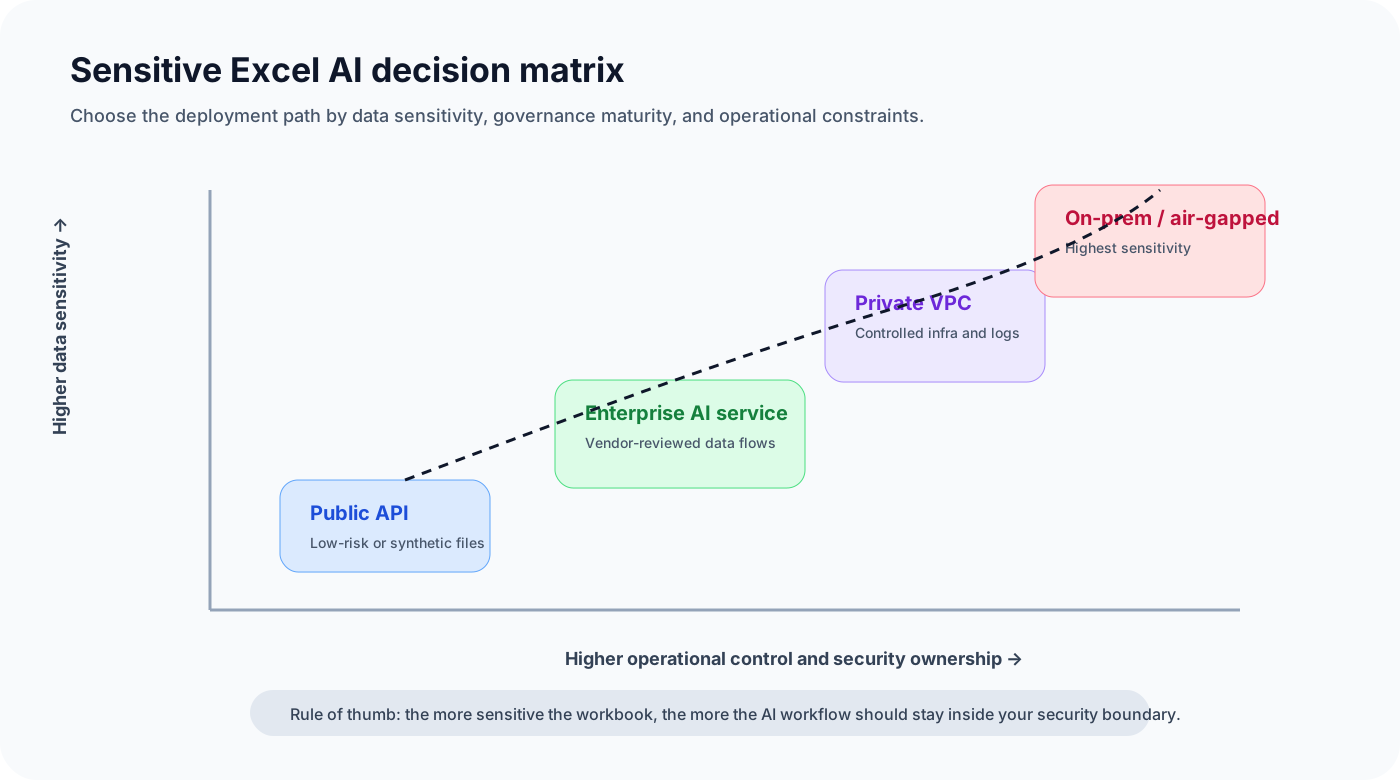
The five main options
1. Public chatbot
This is the easiest path. A user opens a chatbot, uploads a file, and asks for analysis.
It can be fine for public or synthetic data. It is risky for confidential files unless the organization has explicitly approved that tool and use case.
The main benefit is speed. The main risk is uncontrolled data exposure.
2. Public API
A public API gives developers more control than a consumer chatbot. They can build an internal app, limit what is sent, and manage prompts more carefully.
But the data still leaves the company's environment. The vendor's data-use, retention, logging, and compliance terms matter.
For many companies, this can work after vendor review and with the right contract. It should not be treated as automatically safe.
3. Enterprise AI service
Enterprise AI platforms often provide stronger privacy commitments, admin controls, encryption, no-training commitments, retention options, and compliance documentation.
Examples include enterprise offerings from OpenAI, Microsoft Azure OpenAI, AWS Bedrock, Google Vertex AI, Anthropic, and others.
This is often the best middle path for companies that want strong model quality without operating their own GPU infrastructure.
The tradeoff is that processing still happens outside the company's own servers, even if it happens under stronger enterprise controls.
4. Local LLM
A local LLM runs on a laptop, workstation, server, or internal GPU box.
The main advantage is control. Data can stay inside the machine or network. This can be useful for prototypes, privacy-sensitive experiments, or offline use cases.
The tradeoffs are real:
- model quality may be lower than frontier APIs
- setup can be fragile
- GPUs may be expensive
- monitoring is limited unless you build it
- access control and audit logs are your responsibility
- local does not automatically mean compliant
5. Private VPC or on-prem deployment
This is the enterprise version of local AI.
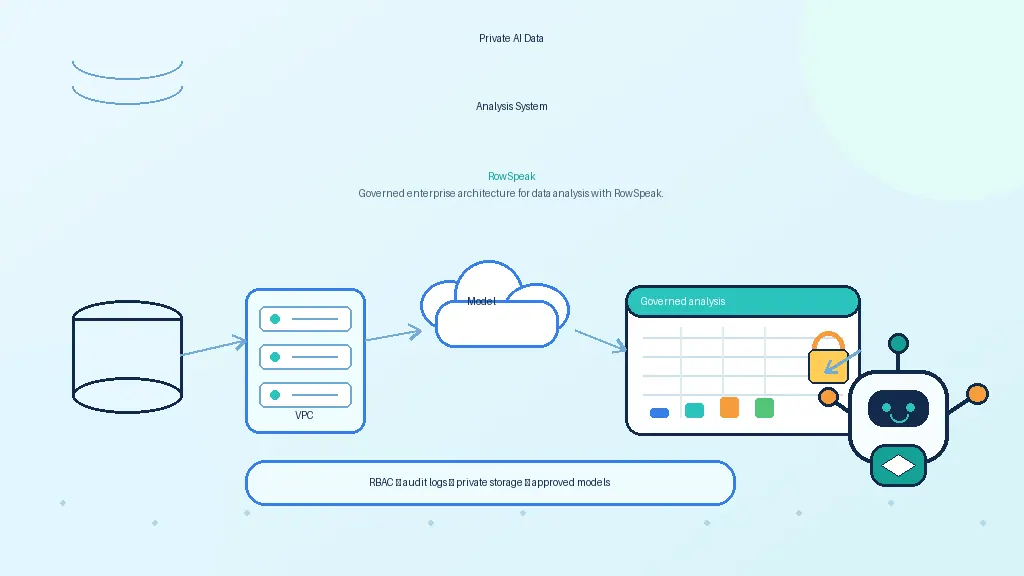
The model runs in a controlled environment, usually with identity, networking, logging, storage, and security policies around it. The team can expose an internal API and connect it to approved applications.
This is the strongest path for highly sensitive spreadsheet workflows, but it requires operational maturity.
A practical decision framework
Use data sensitivity as the first filter.
| Spreadsheet type | Reasonable AI path |
|---|---|
| Public data or examples | Public chatbot or API |
| Internal but low-risk data | Approved enterprise AI service |
| Confidential business data | Enterprise API with contract controls, private VPC, or approved internal app |
| Regulated or highly sensitive data | Private VPC, on-prem, air-gapped, or redacted workflow |
| Unknown sensitivity | Do not upload until classified |
Then ask an operational question: who will maintain the system?
If the company has no capacity to operate GPUs, patch model servers, monitor logs, and evaluate outputs, a fully local deployment may create a new risk. In that case, an enterprise AI service with strong controls may be safer than an unmanaged local model.
Local does not automatically mean safe
A local model can still leak or mishandle data if the surrounding system is weak.
Common mistakes include:
- storing uploaded files in an unencrypted folder
- logging prompts with sensitive values
- giving every user access to every file
- allowing generated code to access the network
- failing to patch the host machine
- copying outputs into unmanaged tools
- using models or packages from untrusted sources
Privacy is an architecture property, not just a model-location property.
Public API does not automatically mean unsafe
The opposite is also true.
Enterprise AI APIs can provide strong controls. Some providers state that business or API customer data is not used to train models by default. Cloud providers may offer private networking, IAM, encryption, audit logs, and data-retention controls.
The right question is specific:
- Which product plan?
- Which contract?
- Which retention setting?
- Which region?
- Which logs?
- Which users?
- Which spreadsheet data?
A public API with enterprise controls may be acceptable for many workflows. A random chatbot upload may not be.
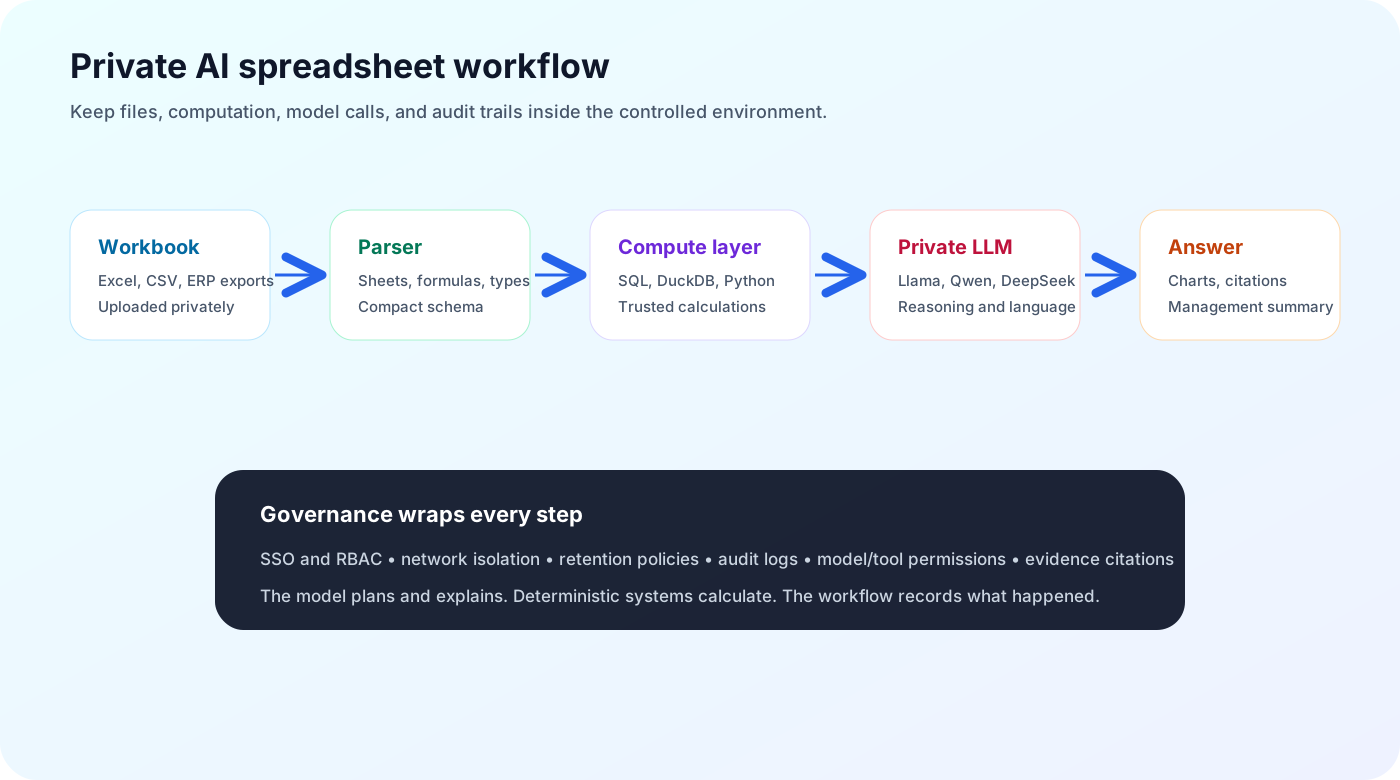
What an ideal sensitive-Excel workflow looks like
For sensitive spreadsheet analysis, a good workflow should:
- classify the data before analysis
- keep files in approved storage
- enforce user permissions
- use deterministic tools for calculations
- send only necessary context to the model
- prevent outbound leakage from tools
- cite source rows, sheets, formulas, or queries
- log prompts, tools, data access, and outputs
- allow admins to control retention
- support private or enterprise-approved model endpoints
This gives teams a practical balance: AI usefulness without uncontrolled copy-paste behavior.
Where RowSpeak fits
RowSpeak is a workflow layer for spreadsheet analysis. That means it can sit above different model choices.
For a lower-risk team, the model endpoint may be an approved enterprise API. For a sensitive deployment, it may be a private LLM running in the customer's infrastructure. In both cases, the user experience should stay focused on the spreadsheet task: upload data, ask questions, generate charts, review evidence, and turn Excel files into dashboards with an Excel-to-dashboard workflow.
The model is replaceable. The governed workflow is the durable part. That is why this decision often belongs next to broader AI business intelligence planning, not just model selection.
Final checklist
Before choosing local LLM or public API for Excel analysis, answer these questions:
- What is the most sensitive field in the workbook?
- Is the tool approved for that data class?
- Does the vendor train on prompts, files, or outputs?
- Where is the data processed and retained?
- Can you use redacted samples instead?
- Do users need row-level or file-level permissions?
- Are calculations performed deterministically?
- Are answers auditable?
- Who maintains the model and infrastructure?
- What happens when the model is wrong?
The best architecture is rarely the most ideological one. It is the one that gives users real analytical help while matching the risk level of the spreadsheet. If the main question is vendor fit, it can also help to compare familiar options like Copilot in Excel against private workflow tools.
Sources and further reading
- OpenAI enterprise privacy: https://openai.com/enterprise-privacy/
- AWS Bedrock FAQs: https://aws.amazon.com/bedrock/faqs/
- Google Vertex AI data governance / zero data retention: https://docs.cloud.google.com/vertex-ai/generative-ai/docs/vertex-ai-zero-data-retention
- vLLM OpenAI-compatible server: https://docs.vllm.ai/en/latest/serving/openai_compatible_server/
- Ollama library: https://ollama.com/library