Data cleansing tools help teams find and fix messy, inconsistent, duplicate, incomplete, or invalid data before it is analyzed, reported, or moved into another system.
For reports that repeat every week or month, RowSpeak's automated spreadsheet reports keeps file cleanup, metric checks, and summaries reusable.
That sounds simple until you open the actual file.
The export may be an Excel workbook from a finance system, a CSV from a CRM, a customer list with duplicate contacts, a PDF table converted into rows, or a sales report where dates, currencies, regions, and product names all follow different rules. The "best" tool depends less on the software category and more on the work you need to finish after the data is cleaned.
If the final output is a reviewed business report, a chart, or a dashboard, a tool that only fixes rows may not be enough. If the final output is a governed enterprise dataset, a lightweight spreadsheet assistant may not be enough either.
This guide compares 12 data cleansing tools and tool categories in 2026, with a practical bias toward messy spreadsheets, CSV exports, and business reporting workflows.
Short answer
- Choose RowSpeak when your data starts in Excel, CSV, PDF, screenshots, or exported business files and needs to become a cleaned table, chart, dashboard, summary, or report.
- Choose OpenRefine when you want a free, open-source tool for exploring and standardizing messy tabular data.
- Choose Power Query when the workflow stays inside Excel or Microsoft BI and you need repeatable transformations.
- Choose Informatica, Melissa, Data Ladder, or similar platforms when data quality, matching, validation, and governance are enterprise requirements.
- Choose pandas/Python when a data team needs code-level control, testing, and pipeline integration.
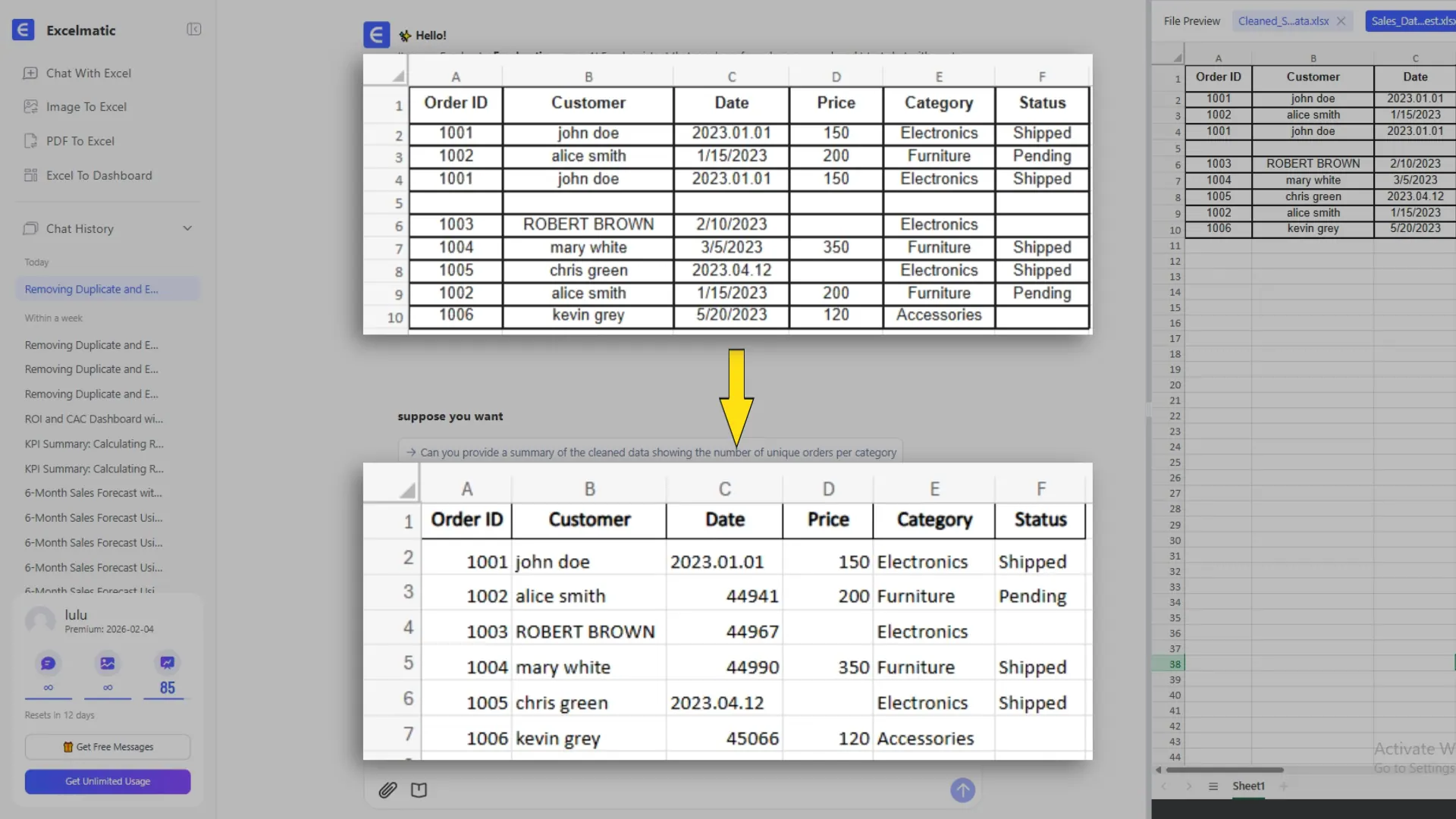
What data cleansing tools actually do
Data cleansing tools do more than "make data look neat." In a business workflow, they usually help with some combination of:
- removing duplicate rows or duplicate entities
- standardizing dates, currencies, phone numbers, addresses, names, and categories
- trimming spaces and cleaning text
- converting numbers stored as text into usable numeric fields
- filling, flagging, or excluding missing values
- validating emails, addresses, phone numbers, IDs, or required fields
- detecting outliers and suspicious records
- merging records that refer to the same customer, product, vendor, or transaction
- creating a cleanup log so the team can review what changed
The review step matters. A clean-looking file can still be wrong if duplicate rules, date filters, exclusions, or category mappings were guessed without business context.
That is why this guide evaluates tools by workflow fit, not only by feature count.
Data cleansing tools comparison
| Tool | Best for | Good fit when | Watch out for |
|---|---|---|---|
| RowSpeak | Messy business files to reports | You need to clean Excel, CSV, PDF, or image-based tables, then create charts, summaries, dashboards, or reports | Not a replacement for every Excel feature, BI model, or enterprise data governance platform |
| OpenRefine | Free open-source exploration and cleanup | You need faceting, clustering, standardization, and repeatable cleanup of tabular data | Less natural for polished business reporting after cleanup |
| Microsoft Power Query | Excel-native transformations | You already work in Excel or Power BI and need repeatable data prep steps | Can feel rigid or hard to debug for non-technical users |
| Google Sheets functions | Lightweight cleanup and checks | You need quick fixes with formulas, filters, data validation, and basic cleanup | Becomes fragile for large files, recurring workflows, or complex joins |
| Tableau Prep | Preparing data for Tableau dashboards | Your cleaned output feeds Tableau views and governed analytics | Less useful if the team is not already using Tableau |
| Alteryx Designer | Analyst-led data prep and blending | Analysts need visual workflows, joins, enrichment, and repeatable data prep | More platform than many spreadsheet-first teams need |
| Domo Magic ETL | Data preparation inside Domo | Your reporting stack already lives in Domo | Best when Domo is the broader analytics environment |
| Integrate.io | ETL and data pipeline workflows | You need to move, transform, and sync data across systems | More pipeline-oriented than spreadsheet-oriented |
| Informatica Data Quality | Enterprise data quality and governance | You need profiling, standardization, matching, validation, and data quality rules at scale | Too heavy for a one-off spreadsheet cleanup job |
| Melissa Data Quality Suite | Contact, address, email, and phone validation | Customer, lead, or mailing data quality is the core problem | Specialized around identity and contact data quality |
| Data Ladder DataMatch Enterprise | Matching, deduplication, and entity resolution | You need to merge duplicate customers, vendors, products, or records across sources | Less focused on report generation after cleanup |
| pandas/Python | Code-driven cleaning and pipelines | A data team needs full control, tests, versioning, and custom rules | Requires technical skill and maintenance |
1. RowSpeak: best for messy spreadsheets that need a report next
RowSpeak is a strong fit when data cleansing is not the final job.
Many business users do not just need a cleaned file. They need to answer a question, build a chart, prepare a dashboard, explain a metric change, or share a report with a manager or client. That is where RowSpeak fits differently from traditional cleanup utilities.
With RowSpeak, you can upload Excel, CSV, PDF, screenshots, image-based tables, or exported business data, then ask for cleanup in plain English. After the data is cleaned, you can continue into analysis and reporting instead of switching tools.
Useful RowSpeak prompts include:
Clean this sales export before analysis. Remove duplicate rows based on Order ID, standardize the Order Date column to YYYY-MM-DD, convert Revenue and Refund Amount to numeric USD values, normalize Region names, and flag any rows with missing Customer ID.
Show me a cleanup log. List how many duplicates were removed, which date formats were changed, which rows still need review, and what assumptions you used.
After cleaning the data, summarize revenue, refund rate, and gross margin by region and channel. Create a chart for the biggest change and draft a management-ready summary.
This is the main distinction: RowSpeak is useful when the workflow starts with messy files and ends with reviewable business output.
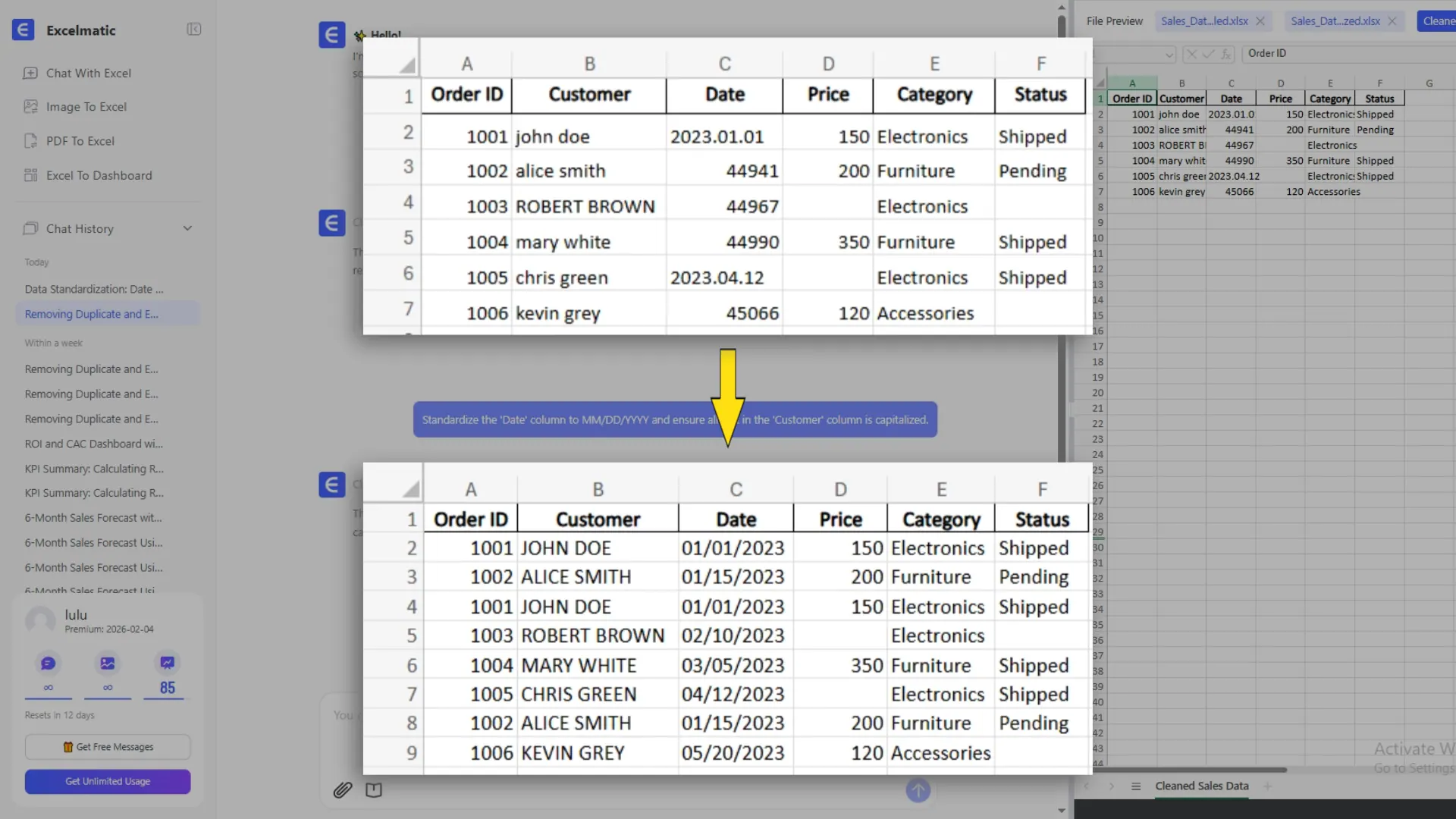
A useful data cleansing workflow should also explain what changed, not only return a new file. This example shows the kind of cleanup summary a business user can review before trusting the output.
For more detailed product steps, see the RowSpeak data cleaning guide and data transformations guide.
2. OpenRefine: best free tool for exploring messy tabular data
OpenRefine is one of the best-known free data cleansing tools for people who need to inspect, standardize, cluster, and transform messy tabular data.
It is especially useful when names, categories, IDs, or values are inconsistent. For example, a product column may contain "NYC", "New York", "New York City", and "new york city." OpenRefine-style clustering and faceting help users find those variants and clean them systematically.
OpenRefine is a good fit when:
- you want a free, open-source option
- the data is tabular
- you need to inspect values before changing them
- you are comfortable learning a dedicated data cleanup interface
- the output is a cleaned dataset for another tool
The tradeoff is that OpenRefine is not designed as a business reporting workspace. If the next step is a chart, dashboard, or executive summary, you may still move the cleaned file into another tool.
3. Microsoft Power Query: best for Excel-native repeatable transformations
Power Query is often the default answer for Excel users who need repeatable data preparation. It can import data, remove rows, split columns, merge tables, change data types, unpivot columns, append files, and refresh a recorded transformation sequence.
It is a good fit when:
- the team already works in Excel or Power BI
- the transformation steps are repeatable
- a power user can own the query logic
- source files have reasonably stable structure
Power Query is powerful, but it can be difficult for casual business users. The interface is step-based, so the user often needs to know which operation exists, where to find it, and how to debug the query when next month's export changes.
If your issue is specifically cleaning Excel data before analysis, read Stop Cleaning Excel Data Manually: A Smarter Way with AI.
4. Google Sheets: best for lightweight checks and one-off cleanup
Google Sheets is not a dedicated data cleansing platform, but it is often where quick cleanup happens.
Common cleanup tasks include:
- removing duplicates
- trimming whitespace
- using formulas to standardize names or categories
- applying data validation lists
- filtering blank rows
- using conditional formatting to find suspicious values
- splitting text into columns
This works well for small files and quick collaboration. It is not ideal for large datasets, recurring reporting, multi-file joins, or workflows where cleanup assumptions need to be documented for review.
If the sheet is only a temporary workspace, keep the cleanup simple and export a clean copy before analysis.
5. Tableau Prep: best when the cleaned output feeds Tableau
Tableau Prep is useful when data cleaning and shaping are part of a Tableau analytics workflow. It helps teams combine, clean, and prepare data before it appears in Tableau dashboards.
It is a good fit when:
- your company already uses Tableau
- the cleaned data will feed Tableau dashboards
- analysts need visual preparation flows
- the workflow is more BI-oriented than spreadsheet-oriented
The tradeoff is stack fit. If your users live in Excel and simply need a cleaned spreadsheet plus a short report, Tableau Prep may be more structure than the job requires.
6. Alteryx Designer: best for analyst-led data prep and blending
Alteryx Designer is often used by analysts who need repeatable visual workflows for data preparation, blending, enrichment, and analysis.
It is a good fit when:
- analysts need to combine multiple sources
- workflows should be reusable
- data preparation includes joins, filters, calculations, and enrichment
- the team wants a visual workflow instead of pure code
For spreadsheet-heavy teams, the question is whether the additional platform depth is worth it. Alteryx can be powerful, but a sales ops or finance manager with one messy export may need a faster path from file to answer.
7. Domo Magic ETL: best inside a Domo analytics environment
Domo Magic ETL makes sense when the broader reporting and dashboard environment is already Domo. It helps teams transform data as part of the Domo data and analytics stack.
It is a good fit when:
- dashboards live in Domo
- data sources are already connected to Domo
- the team wants data prep close to the reporting layer
- business users need visual transformation steps
If your team is not already using Domo, a standalone spreadsheet-to-report workflow may be a simpler first step.
8. Integrate.io: best for ETL and pipeline-centered workflows
Integrate.io belongs more to the ETL and data pipeline category than the everyday spreadsheet cleanup category. It is useful when teams need to move, transform, and integrate data across systems.
It is a good fit when:
- source data lives across multiple applications
- data needs to sync into a warehouse or operational system
- the work is recurring and pipeline-based
- engineering or data teams own the flow
If the user only has a CSV export and needs a clean report by this afternoon, a pipeline platform may be more than the problem requires.
9. Informatica Data Quality: best for enterprise data quality programs
Informatica Data Quality is built for larger data quality programs where profiling, standardization, validation, governance, matching, and data quality rules matter across systems.
It is a good fit when:
- data quality is an enterprise program
- the organization needs governance and stewardship
- many systems share customer, product, vendor, or financial data
- data quality rules must be managed at scale
This is not the kind of tool most teams choose for one spreadsheet. It becomes relevant when the problem is no longer "clean this file" but "control data quality across the organization."
10. Melissa Data Quality Suite: best for contact data validation
Melissa Data Quality Suite is especially relevant when the data cleansing problem involves customer, lead, contact, mailing, address, phone, or email fields.
It is a good fit when:
- addresses need verification
- email and phone fields need validation
- duplicate contacts need merging
- mailing lists need standardization
- CRM or customer records are the main cleanup problem
This is a specialized data quality use case. A contact validation platform may be the right tool for CRM hygiene, but it will not replace a general business reporting workflow.
11. Data Ladder DataMatch Enterprise: best for matching and deduplication
Data Ladder focuses on data matching, deduplication, standardization, and entity resolution. This is useful when the hard part is deciding whether two records refer to the same real-world customer, vendor, product, or account.
It is a good fit when:
- duplicates are not exact matches
- records come from multiple systems
- names, addresses, product titles, or vendor labels vary
- the team needs match confidence and review
If your main issue is matching entities across systems, this category deserves attention. If the next job is a monthly business report, pair it with a reporting workflow after cleanup.
12. pandas/Python: best when data teams need code-level control
pandas is a Python library widely used for data cleaning, analysis, and transformation.
It is a good fit when:
- a technical user owns the workflow
- rules need tests and version control
- the dataset is too large or complex for spreadsheet tools
- cleanup logic should run inside a larger data pipeline
- custom transformations matter more than a visual interface
The tradeoff is accessibility. A finance manager, sales ops lead, or agency analyst may know exactly what needs to be fixed but may not want to write code to do it.
How to choose the right data cleansing tool
Start with the source file and the output, not the product category.
1. What kind of data are you cleaning?
If the data is an Excel workbook, CSV export, PDF table, or screenshot, a spreadsheet-first AI workflow such as RowSpeak may be practical.
If the data lives in databases, SaaS systems, warehouses, and pipelines, evaluate ETL and data quality platforms.
If the data is customer contact information, address, email, or phone validation tools may be more relevant.
2. Is this a one-time cleanup or a recurring workflow?
One-time cleanup favors tools that are fast and easy to inspect.
Recurring cleanup needs rules, repeatability, and review. Power Query, Alteryx, pipeline tools, or RowSpeak prompt-based workflows can all fit depending on who owns the work.
3. Who will use the tool?
The best tool for a data engineer is often not the best tool for a sales ops manager.
Ask whether the user can write code, maintain queries, debug joins, or review match logic. If not, choose a tool that exposes the cleanup in plain language and lets the user inspect results before sharing them.
4. What happens after the data is cleaned?
This is the most overlooked question.
If the clean file feeds a warehouse, choose a pipeline or data quality platform.
If the clean file feeds a dashboard, choose a prep tool that connects to the dashboard stack.
If the clean file needs to become a business answer, chart, KPI summary, or management report, choose a workflow that continues beyond cleanup.
For that use case, RowSpeak is built around the path from messy file to reviewable output. The same cleaned data can feed a dashboard workflow or a repeatable AI reporting workflow.
5. How much auditability do you need?
For high-stakes reporting, do not accept a cleaned file with no explanation.
Ask for:
- row counts before and after cleanup
- duplicate rules
- date filters
- category mappings
- excluded records
- missing fields
- assumptions
- rows that still need human review
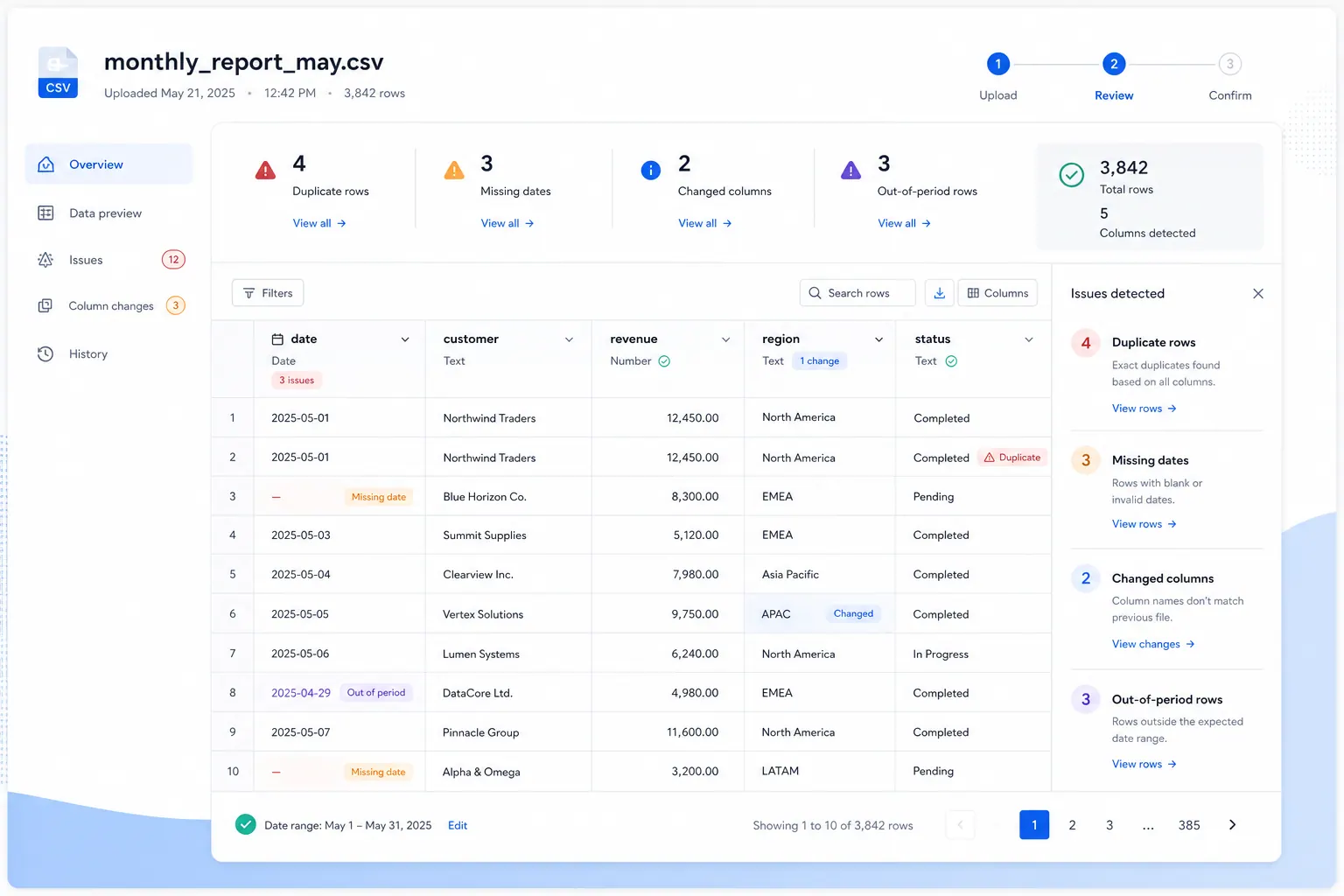
This is especially important for finance, operations, customer records, and leadership-facing reports.
Example workflow: clean a messy sales CSV before reporting
Suppose you export monthly sales data from a CRM or ecommerce system.
The raw file looks like this:
| Order ID | Order Date | Region | Channel | Revenue | Refund | Customer ID | Product |
|---|---|---|---|---|---|---|---|
| 10021 | 06/01/26 | west | Shopify | $1,240.00 | 0 | C-392 | Starter Plan |
| 10021 | 2026-06-01 | West | shopify | 1240 | 0 | C-392 | starter plan |
| 10022 | Jun 2 2026 | North-East | Amazon | 890 USD | 50 | Pro Plan | |
| 10023 | 2026/06/03 | NE | amazon marketplace | text missing | 0 | C-411 | Pro plan |
| 10024 | 2027-01-15 | South | Direct | 450 | -20 | C-512 | Basic |
Several issues could change the final report:
- duplicate Order ID
- inconsistent date formats
- region aliases
- channel casing and naming
- revenue stored as text
- missing customer ID
- future date
- negative refund value
- product naming differences
In RowSpeak, you could start with a cleanup prompt:
Clean this monthly sales export before analysis. Use Order ID as the unique transaction key. Remove exact duplicate rows, but if the same Order ID appears with conflicting values, flag it for review instead of deleting it automatically.
Standardize Order Date to YYYY-MM-DD. Normalize Region values so "west" becomes "West" and "NE" or "North-East" become "Northeast." Normalize Channel values so "shopify" becomes "Shopify" and "amazon marketplace" becomes "Amazon."
Convert Revenue and Refund to numeric USD values. Flag rows where Revenue cannot be converted, Customer ID is blank, Order Date is in the future, or Refund is negative.
Return a cleanup log, a cleaned preview, and a list of rows that need human review before building any charts.
Then move into reporting:
Using the cleaned rows only, summarize total revenue, refund rate, average order value, and order count by Region and Channel. Create one chart for the largest revenue driver and write a short management summary with assumptions and data quality warnings.
That second step is where many data cleansing tools stop short. A clean table is useful, but the business user usually needs the next layer: what changed, what matters, what needs attention, and what should be checked before sharing.
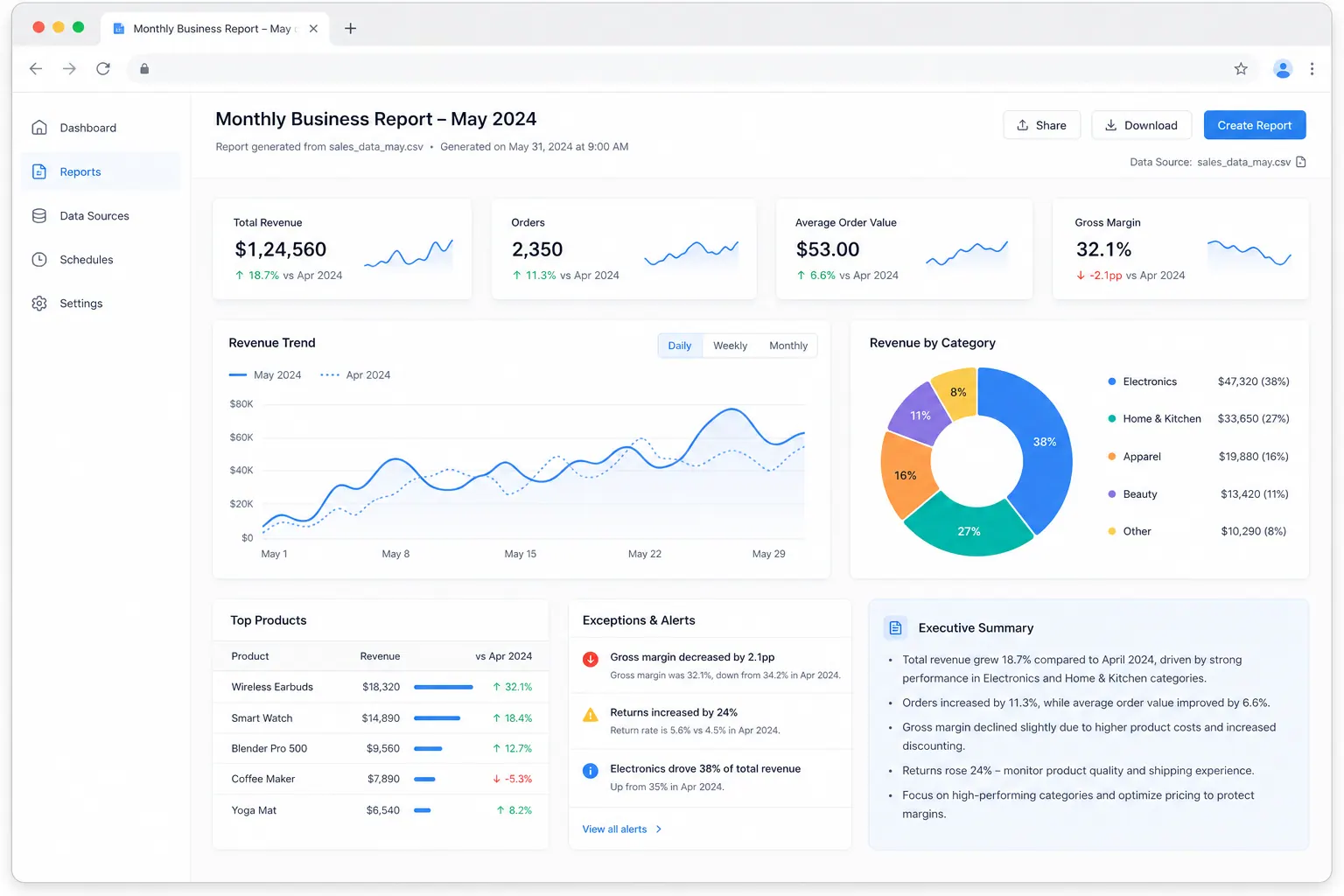
If you want to practice this workflow, download the sample file from the RowSpeak data cleaning guide.
Data cleansing checklist before you trust the output
Use this checklist before turning clean data into a report.
| Check | Question to ask |
|---|---|
| Row count | Did the number of rows change? Why? |
| Duplicate logic | Which fields define a duplicate? |
| Date range | Does the file cover the full reporting period? |
| Numeric fields | Are currency, percentage, quantity, and cost fields real numbers? |
| Categories | Were aliases mapped consistently? |
| Missing values | Which blanks were filled, excluded, or flagged? |
| Outliers | Are negative, zero, or unusually large values valid? |
| Joins | Did any records fail to match after merging files? |
| Exclusions | Were internal, test, cancelled, or incomplete records removed? |
| Review log | Can a stakeholder see what changed? |
For dashboard-specific cleanup, read How to Clean Data Before Building a Dashboard in Excel.
Data cleansing vs. data cleaning
In most business searches, "data cleansing" and "data cleaning" are used almost interchangeably.
There is a slight difference in tone:
- Data cleaning often describes practical fixes in spreadsheets, analysis files, and data prep workflows.
- Data cleansing often appears in data quality, CRM hygiene, enterprise governance, and data management contexts.
For SEO and user clarity, it is worth using both phrases naturally. A finance analyst may search "data cleaning in Excel." A data quality manager may search "data cleansing tools." They may have similar problems, but they expect different levels of tooling, control, and governance.
Common mistakes when choosing data cleansing tools
Mistake 1: Choosing a platform before defining the output
If the output is a leadership report, choose a workflow that can explain numbers. If the output is a warehouse table, choose a tool that fits your pipeline.
Mistake 2: Cleaning without a review log
Cleaning changes data. Any change that affects a business metric should be visible enough to review.
Mistake 3: Treating every duplicate the same way
Exact duplicate rows are different from duplicate customers, duplicate leads, duplicate SKUs, or duplicate invoices. Define the entity before deleting records.
Mistake 4: Using AI without clear instructions
AI can speed up cleanup, but vague prompts create risk. Tell the tool which columns matter, which rules to follow, and which rows should be flagged instead of changed automatically.
Mistake 5: Overbuying for spreadsheet problems
Enterprise data quality tools are important when the organization needs governance. They can be overkill when a team simply needs to clean a recurring export and create a report.
Where RowSpeak fits in the data cleansing stack
RowSpeak is not trying to replace every data cleansing tool.
Use RowSpeak when:
- the source is a spreadsheet, CSV, PDF, screenshot, image table, or exported business file
- the user understands the business question but does not want to write code
- cleanup needs to be followed by analysis, charts, dashboards, summaries, or reports
- the team wants a reviewable workflow, not only a transformed file
- BI feels too heavy and generic chat feels too loose
Use a heavier data quality or ETL platform when:
- live pipelines and warehouse sync are required
- enterprise governance is the primary requirement
- many systems need persistent master data rules
- technical teams need full pipeline control
- data stewardship, lineage, or policy enforcement is central
That boundary matters. The right tool is the one that fits the decision you need to make after the data is cleaned.
If your team works from messy spreadsheets and exported files, try this practical path:
- Upload the file to RowSpeak.
- Ask for cleanup plus a review log.
- Inspect flagged rows and assumptions.
- Ask for charts, KPI summaries, or a report.
- Export or share the result with stakeholders.
Try it with a messy file in RowSpeak or start with the data cleaning help guide.
FAQ
What are data cleansing tools?
Data cleansing tools are software products or workflows that find, fix, standardize, validate, and document bad data before it is used for analysis, reporting, integration, or decision-making. Common tasks include removing duplicates, standardizing formats, validating fields, filling missing values, and flagging suspicious records.
What tool allows you to discover, cleanse, and transform data?
OpenRefine is a common free tool for discovering patterns in messy tabular data, cleansing values, and transforming datasets. Power Query, Tableau Prep, Alteryx Designer, and RowSpeak can also support discovery, cleansing, and transformation depending on the workflow. Choose RowSpeak when the source is a messy business file and the next step is a report, chart, dashboard, or written analysis.
Is Excel a data cleansing tool?
Excel can be used for data cleaning through filters, formulas, Remove Duplicates, Text to Columns, Power Query, data validation, and conditional formatting. It is practical for many spreadsheet tasks, but complex or recurring cleansing workflows often need Power Query, an AI spreadsheet workflow, a data prep platform, or a dedicated data quality tool.
What is the best free data cleansing tool?
OpenRefine is one of the strongest free options for cleaning and standardizing messy tabular data. Excel and Google Sheets can also handle lightweight cleanup if the file is small and the rules are simple. For code-based users, pandas in Python is free and highly flexible.
Can AI cleanse Excel data?
Yes, AI tools can help clean Excel data when the user gives clear instructions and reviews the output. For example, RowSpeak can help remove duplicates, standardize date formats, convert text numbers, normalize categories, flag suspicious rows, and then continue into charts, summaries, dashboards, or reports. AI cleanup should still be reviewed when the output affects business decisions.
What is the difference between data cleaning and data cleansing?
The terms are often used interchangeably. "Data cleaning" is common in spreadsheet and analysis workflows. "Data cleansing" is common in data quality, CRM, governance, and enterprise data management contexts. In practice, both refer to improving data quality before the data is used.
When should I not use an AI spreadsheet tool for data cleansing?
Do not use a lightweight AI spreadsheet workflow as the only system of control when you need enterprise master data management, live warehouse pipelines, governed lineage, regulatory controls, or persistent data quality rules across many systems. In those cases, evaluate enterprise data quality and ETL platforms, and use spreadsheet AI for analysis or reporting workflows around exported files.