If you've ever struggled with data analysis and chart creation in Excel, RowSpeak is your lifesaver! As an AI-driven Excel analysis tool, RowSpeak eliminates the need for complex formulas, allowing you to generate professional-grade data analysis and visualization just by using natural language. Whether you're conducting market research, financial management, or personal data organization, RowSpeak helps you gain insights quickly and presents them in the most intuitive way.
For the visualization step, RowSpeak's graph generation workflow can turn spreadsheet data into charts without rebuilding visuals by hand.
AI + Excel: Powerful Data Analysis Capabilities
RowSpeak integrates AI technology to make data analysis smarter. Simply upload an Excel file and ask a question like: Help me calculate the total sales for each month and it will quickly generate the answer along with the most suitable visualization.
It supports multiple data processing methods:
Data Cleaning: Sorting, filtering, and find-and-replace, all in one click.
Intelligent Formulas: Supports mathematical, statistical, and logical operations without manually entering complex functions.
Trend Analysis: Automatically identifies key trends and generates insightful reports.
One-Click Chart Creation: Intuitive and Professional.
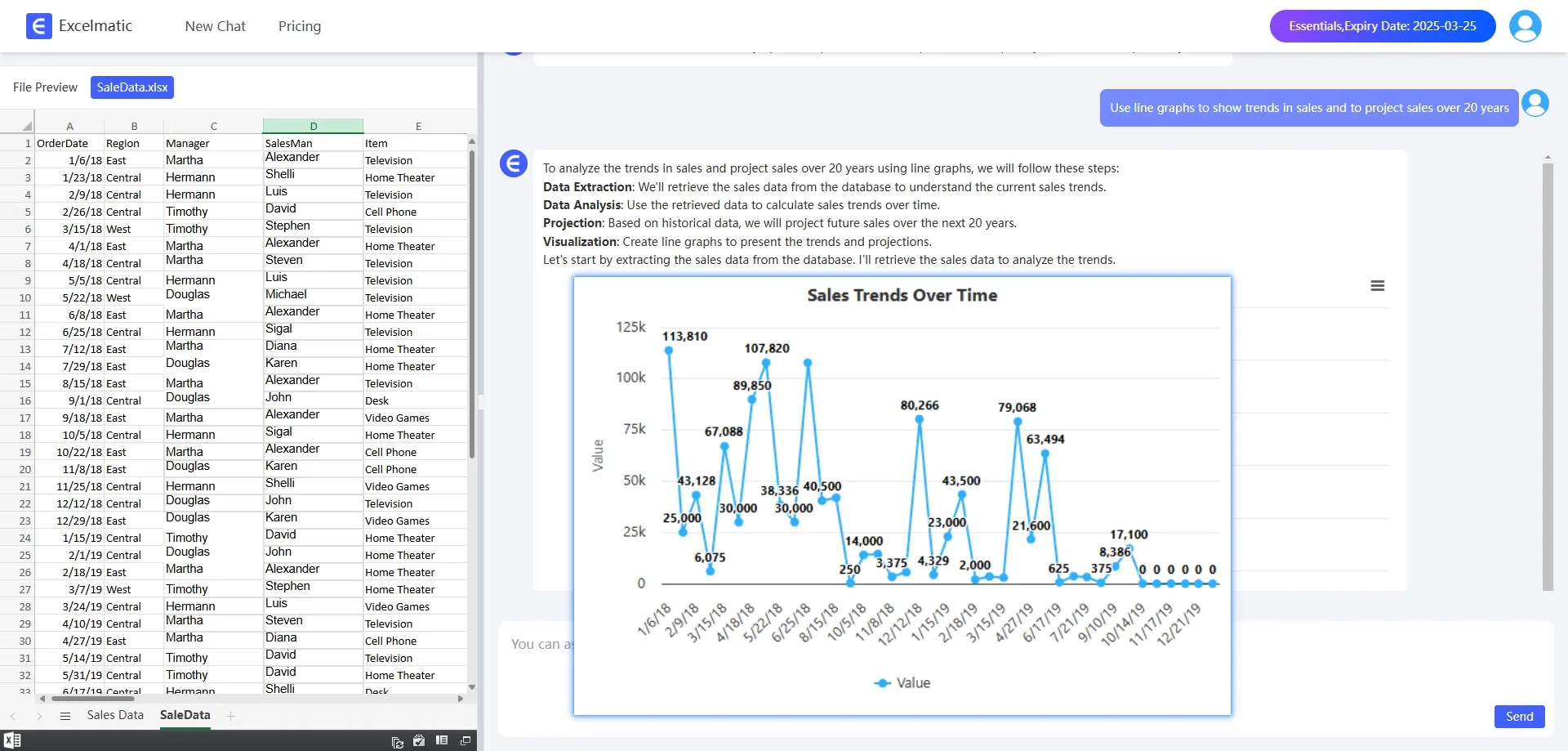
Data visualization is a major highlight of RowSpeak. Whether you need Bar Charts, pie charts, line graphs, or even more complex scatter plots and radar charts, you only need to type a simple command, and the AI will intelligently match the best chart type and adjust formatting for optimal clarity.
Example:
Scenario: Market Sales Data Analysis
You have a sales dataset and want to understand the sales trends for each quarter. Traditionally, you would manually filter data, insert charts, and tweak formats.
With RowSpeak, simply type:Please help me to draw a line graph of sales.
Why Choose RowSpeak?
Boost Efficiency: Automates data processing, eliminating manual tasks.
Visually Stunning Charts: AI intelligently selects the best visualization format with customization options.
Powerful AI Insights: Identifies trends and key metrics with ease.
Beginner-Friendly: No advanced Excel skills required—just interact with natural language.
Conclusion: Let RowSpeak Be Your Data Analysis Assistant!
RowSpeak revolutionizes data analysis by making visualization easy, efficient, and precise. Whether you're a business manager, data analyst, or casual user, it helps you gain quick insights and create professional charts effortlessly. Try RowSpeak now and experience the future of AI-driven data analysis!