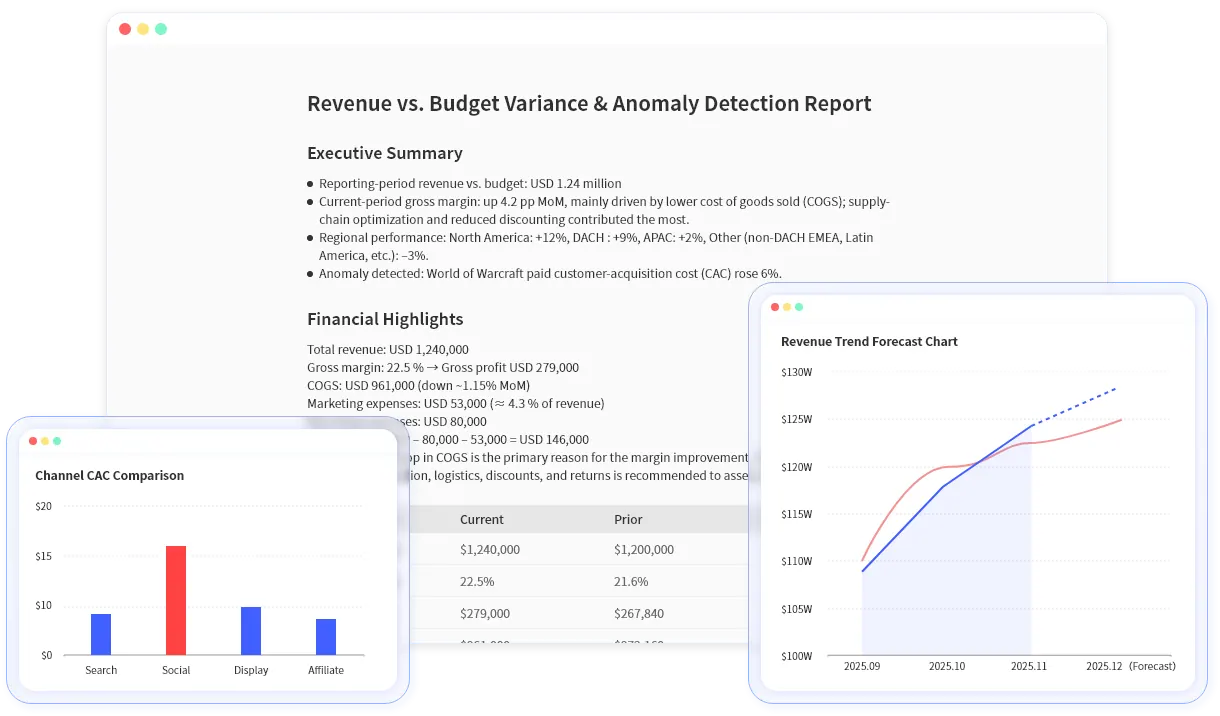
AI in accounting and finance becomes risky when it is positioned as a black box. Month-end review, accounting close, and management reporting need speed, but they also need source data, review checks, and clear limits.
A better starting point is not "let AI run accounting." It is "use AI to help review the files finance already works with."
Key takeaways:
- AI can support accounting and finance teams by reviewing files, ranking anomalies, explaining variances, and drafting reports.
- It should not replace final accounting judgment, controls, or source-document review.
- RowSpeak fits month-end workflows where teams need answers from Excel, CSV, PDF, and exported ledger files.
The accounting and finance files AI can help with
Common inputs include:
| File | Useful AI task |
|---|---|
| General ledger export | Flag unusual balances, vendors, amounts, or descriptions |
| Trial balance | Compare period movements and account-level deltas |
| P&L workbook | Explain margin, revenue, and expense variances |
| Budget vs Actual file | Rank unfavorable variances by department and owner |
| PDF statement | Extract tables before analysis |
This is the natural home for finance AI for Excel: it starts with the source file and produces outputs that accounting or finance can review.
Workflow 1: month-end variance review
Use this when the close package is prepared but still needs explanation.
Review this month-end P&L and identify the largest month-over-month and budget variances. Group the results by account and department, explain possible drivers, and list items that require manual review.
Expected output:
- Top favorable and unfavorable variances.
- Account and department groupings.
- A concise variance narrative.
- A manual review list for unexpected or material items.
This can feed a management reporting workflow after the finance owner reviews the explanation.
Workflow 2: ledger anomaly check
AI can help find review candidates, not final errors.
Sample ledger fields:
| Date | Account | Vendor | Amount | Cost Center | Memo |
|---|---|---|---|---|---|
| 2026-02-18 | Software | CloudCo | 18500 | Engineering | annual renewal |
| 2026-02-19 | Travel | Airline | 4200 | Sales | customer visit |
Prompt:
Find unusual ledger lines by account, vendor, amount, cost center, and memo. Explain why each item is worth reviewing and do not mark anything as an error unless the file clearly proves it.
The wording matters. In accounting workflows, "worth reviewing" is safer and more accurate than "wrong."
Workflow 3: report-ready close summary
After reviewing the numbers, ask for a written summary:
Draft a month-end finance summary for leadership. Include the top 5 drivers, risks to review, and one chart recommendation. Keep the tone factual and avoid conclusions that are not supported by the file.
This is where RowSpeak connects spreadsheet analysis to AI reporting. The output should be editable, shareable, and grounded in the uploaded file.
Review controls
Before sending any AI-supported accounting output, check:
- The account sign convention.
- Whether dates and periods are correctly parsed.
- Whether grouped names are standardized.
- Whether the output distinguishes "unusual" from "incorrect."
- Whether materiality thresholds match your internal process.
RowSpeak helps teams move faster, but it does not replace the accountant, controller, or audit process. Use it as a review assistant for real files, then keep the final judgment with the finance owner.
Start with a close package in RowSpeak Finance AI and test the workflow on one variance review before expanding it.