AI finance tools sound useful until the first real file arrives: a P&L workbook with hidden sheets, a Budget vs Actual export with renamed departments, a PDF from accounting, and a leadership request that simply says, "What changed?"
That is the moment where the tool category matters. A formula assistant, a generic AI chat, a BI dashboard, and a file-based finance workspace solve different parts of the problem.
Key takeaways:
- AI finance tools should be judged by the workflow they support, not by whether they mention "finance" on a feature page.
- Excel remains strong for modeling, but recurring variance analysis and narrative reporting often need a faster file-to-output workflow.
- RowSpeak fits when finance teams need to upload real files and produce reviewable analysis, charts, forecasts, and reports.
What "AI finance tools" usually means
Most buyers are really choosing between four workflows:
| Tool type | Good for | Watch out for |
|---|---|---|
| Manual Excel | Controlled models, formulas, and one-off workbook logic | Repeated close review, fragile pivots, and manual report writing |
| Generic AI chat | Brainstorming, formulas, and plain-language explanations | Weak file context, weak review flow, and limited repeatability |
| BI tools | Governed dashboards from stable data pipelines | Setup is heavy when the team only has monthly exports |
| RowSpeak | Uploading finance files and getting reviewable analysis, charts, forecasts, and narratives | Still requires finance review before decisions are shared |
If your team already has a governed data warehouse and stable reporting model, BI may be the right home for the recurring dashboard. If your team receives messy Excel, CSV, PDF, or screenshot-based tables every month, a file-based finance AI for Excel workflow is usually the faster first step.
A practical evaluation checklist
Before comparing vendors, ask what the tool can do with a real finance file:
- Can it read Excel, CSV, PDF, and messy exported reports?
- Can it explain Budget vs Actual movements by department or account?
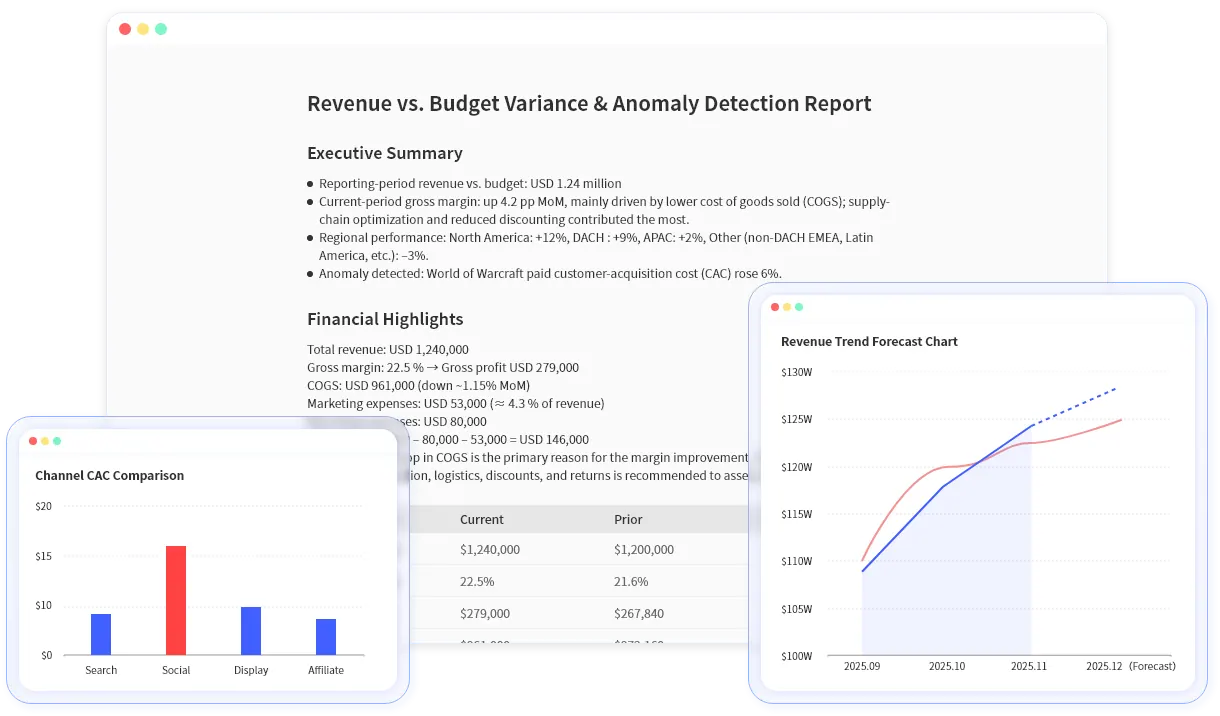
- Can it generate a written variance narrative, not just a chart?
- Can it create tables and charts that a finance owner can review?
- Can it support follow-up questions when the first answer needs correction?
- Does it avoid presenting outputs as final accounting judgment?
This is also why a general Excel AI workflow is different from an AI finance workflow. Finance work needs period logic, variance context, source-file review, and outputs that can survive a leadership meeting.
Example workflow: from workbook to review pack
Sample input file:
| Month | Department | Account | Budget | Actual | Owner |
|---|---|---|---|---|---|
| Jan | Sales | Travel | 18000 | 24750 | RevOps |
| Jan | Support | Software | 12000 | 9800 | Support Ops |
| Feb | Marketing | Paid Media | 60000 | 72800 | Growth |
Useful prompt:
Review this Budget vs Actual file. Rank the largest unfavorable variances by department and account, explain likely drivers, and create a short management summary with a chart recommendation.
What a good AI finance tool should produce:
- A ranked variance table.
- A plain-language explanation of the largest drivers.
- Suggested charts for budget owners.
- Follow-up questions where the file does not contain enough context.
- A review checklist before the output is shared.
RowSpeak is designed for this file-based workflow: upload the workbook, ask the finance question, review the output, then turn it into an AI reporting workflow or dashboard-style summary when needed.
Where RowSpeak fits
RowSpeak is not a replacement for Excel, ERP, or a fully governed BI stack. It is the layer between raw finance files and shareable reporting output.
Use RowSpeak when:
- Finance has monthly exports rather than a clean BI model.
- A manager needs a first-pass explanation before close review.
- The team needs charts and commentary from a workbook.
- A PDF or screenshot table must be extracted before analysis.
- A recurring report needs faster preparation but still needs human review.
For heavier dashboard environments, connect the workflow to an Excel-to-dashboard process or compare it with your business intelligence workflow.
Review before sharing
AI finance outputs should be reviewed, not blindly forwarded. Check the period, currency, missing values, variance basis, and whether the explanation is MoM, QoQ, YoY, or against budget.
Start with a real workbook in RowSpeak Finance AI and test the workflow on one report your team already prepares every month.