Let’s be honest: Microsoft Copilot looks great — but if you’re not on Excel 365 with the right license, you’re out of luck.
For broader spreadsheet automation, RowSpeak's AI for Excel explains how natural-language analysis fits everyday Excel and CSV work.
That doesn’t mean you have to go back to manual formulas and endless chart formatting.
We tested 4 genuinely useful free Excel AI tools that help you write formulas, analyze data, and even generate charts — without paying a cent.
Here’s what worked (and what didn’t). Each tool includes a real-world task, data sample, and results.
RowSpeak – Instant reports from messy spreadsheets
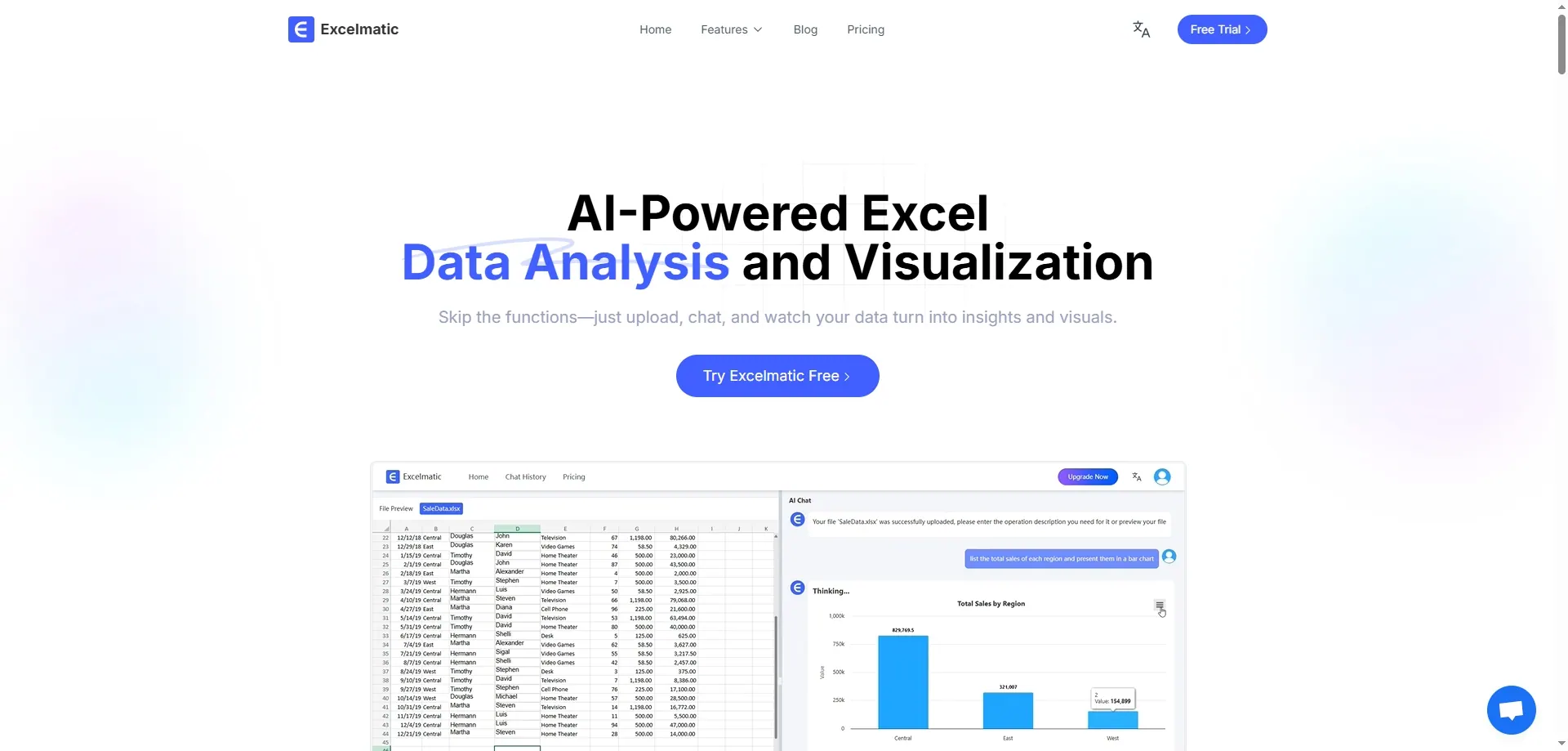
Best for: One-prompt analysis and visual summaries
Free plan: Yes, with daily usage
What we tested: Uploaded this basic Excel file:
| Month | Region | Sales |
|---|---|---|
| Jan | North | 8500 |
| Jan | South | 9400 |
| Feb | North | 7800 |
| Feb | South | 9900 |
| Mar | North | 9100 |
| Mar | South | 10100 |
Prompted:
Summarize total sales by region and show monthly trends.
Results:
- Line graph of monthly totals
- A table comparing the sales situation between two regions.
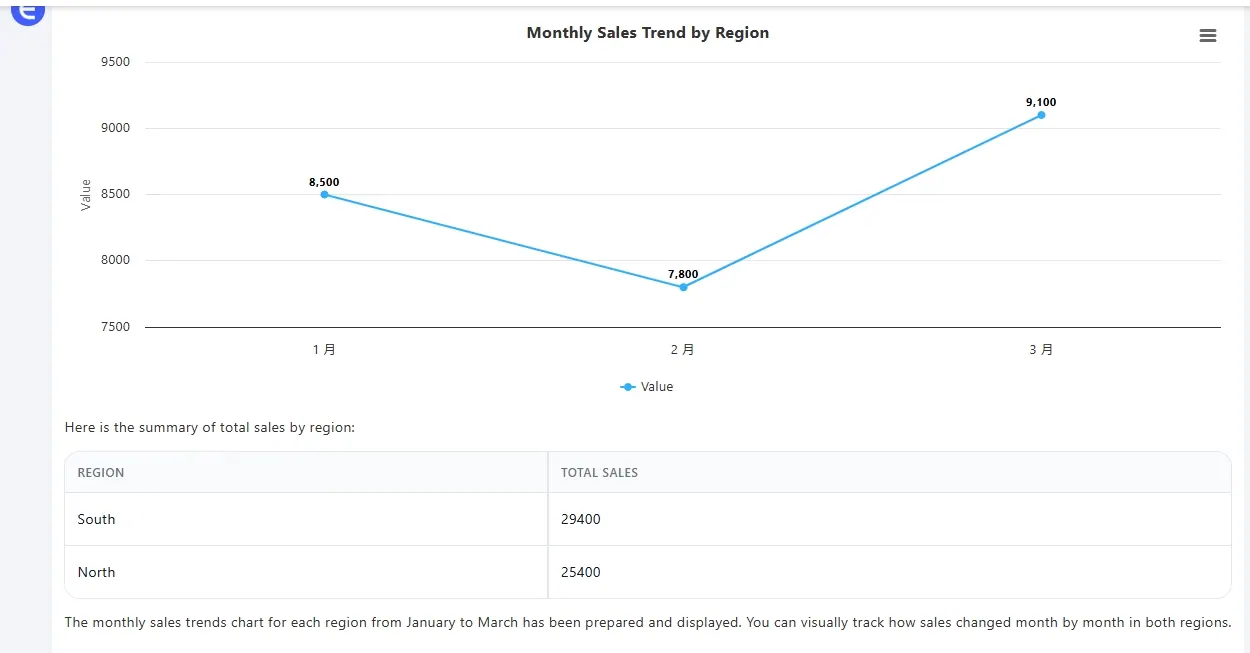
No formulas, no formatting. Took 20 seconds, looked presentation-ready.
ChatGPT – Reliable formula assistant
Best for: Writing and fixing formulas
Free plan: Yes (via ChatGPT 3.5)
What we tested: With this table:
| Product | Revenue | Cost |
|---|---|---|
| A | 12000 | 7500 |
| B | 15000 | 8800 |
| C | 17000 | 9900 |
We asked:
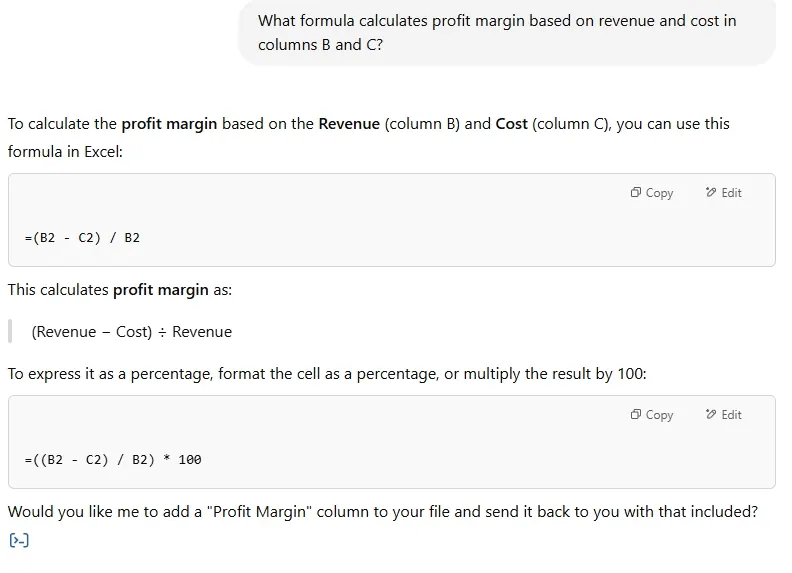
What formula calculates profit margin using columns B and C?
It returned:
=(B2 - C2)/B2
Also helped debug a broken IF statement by identifying missing logic.
Perfect for quick formula support without digging through Google.
Numerous AI – Google Sheets sidebar tool
Best for: Contextual formula help in Google Sheets
Free plan: Trial/limited usage
We couldn’t fully test it due to access restrictions, but this video explains how it works:
From the demo:
- You type instructions like “highlight over-budget rows”
- It suggests formulas in a Sheets sidebar
Good fit if you’re deep into Sheets and don’t want to touch Excel formulas manually.
Formula Bot – English-to-formula tool

Best for: Converting natural language to Excel logic
Free plan: Limited
We tested several prompts but ran into issues — lag, partial responses, or blank outputs.
Instead, here’s a helpful video that shows it in action:
If it works, it’s helpful. But free version seems spotty. Use as a backup, not your main.
Final Thoughts: Excel help without the subscription
If Copilot’s not an option, you still have plenty of tools that get the job done:
- RowSpeak – full charts and summaries from raw data
- ChatGPT – quick formula writing and debugging
- Numerous – contextual in-Sheet help (Sheets only)
- Formula Bot – plain English to Excel syntax (if it responds)
Try RowSpeak Free today! — Upload your file, ask a question, get a report.