Key Takeaways
- Visual Accountability: Transform a static list into a dynamic dashboard that visually prioritizes tasks based on urgency.
- Automated Risk Detection: RowSpeak Template Generation automatically builds the "Overdue" logic, flagging late tasks without manual filtering.
- Operational Clarity: Gain a "Bird's Eye View" of your entire team's workload, ensuring no critical milestone is ignored.
- Instant Deployment: Skip the complex setup and access elite-level frameworks via the Template Library.
The Deadline Dilemma: Why Simple Lists Fail
In the heat of a project, a basic "To-Do" list quickly becomes a graveyard of forgotten tasks. The moment you have more than ten active items, manual tracking becomes an operational risk. You find yourself unhiding columns just to find owner names or struggling to insert rows for new sub-tasks, all while the clock is ticking.
The goal isn't just to "list" tasks—it's to have an Intelligent Early Warning System that tells you what needs your attention before it breaks the project timeline.
Method 1: The Manual "Tracking Trap"
Most project managers start by manually coloring cells to indicate status, which leads to several bottlenecks:
- Formula Fragility: Setting up
IFandDATEDIFformulas to calculate "Days Remaining" is error-prone. One wrong edit to a protected workbook can break the entire alert logic. - Visual Overload: Without clean data analysis and formatting, it’s impossible to distinguish a "Minor Task" from a "Critical Path" delay.
- Manual Updates: Trying to insert multiple columns for new team members often ruins the summary dashboard's alignment.
- Messy Handovers: Trying to clean messy data from a predecessor's tracker takes more time than doing the work itself.
The Result: You become a "spreadsheet secretary" instead of a project leader.
Method 2: The RowSpeak "Command Center" Solution
RowSpeak converts your project parameters into a professional-grade execution tool. By describing your workflow, you build a system that works for you.
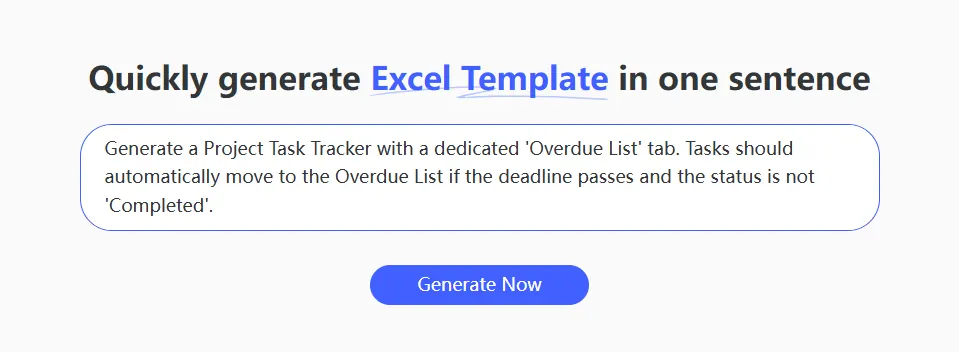
Step 1: Issue a Strategic Command
Don't just ask for a table. Describe the intelligence you need.
The Professional Command:
Generate a Project Task Tracker with a dedicated 'Overdue List' tab. Tasks should automatically move to the Overdue List if the deadline passes and the status is not 'Completed'.
Step 2: AI Logic Generation
RowSpeak builds the structural relationship between your dates and statuses. It handles the statistical forecasting needed to predict if a milestone is at risk based on current progress velocity.
Step 3: Refine and Professionalize
Need to add a specific prefix to Task IDs or reorganize the layout for a stakeholder presentation? Simply tell RowSpeak to adjust the UI. The AI ensures that your dashboard remains visually stunning and ready for the boardroom.
Comparison: Static Trackers vs. AI-Generated Portals
| Feature | Standard Manual Tracker | RowSpeak AI Portal |
|---|---|---|
| Logic Setup | Manual VLOOKUP and IF |
Prompt-based & Validated |
| Alerting | Visual inspection required | Automated neon red flagging |
| Maintenance | High risk of broken links | Self-correcting AI architecture |
| Visual Quality | Basic grids | App-like modern UI |
FAQ: Professionalizing Your Workflow
1. Can I track multiple team members in one view? Yes. You can command RowSpeak to build a VLOOKUP-powered summary sheet that aggregates tasks by owner, giving you a clear view of who is over-capacity.
2. What if I have existing data in a messy file? You can use RowSpeak to clean messy data and merge multiple sheets into your new, clean tracker instantly.
3. Is there a pre-built foundation I can use? If you need to launch in minutes, visit the Template Library. We have thousands of elite-level trackers—from Agile Sprints to Client Deliverable Logs—available for download.
Own Your Deadlines, Don't Let Them Own You
Project success is defined by the quality of your execution. By using AI to generate your tracking infrastructure, you ensure that your focus stays on hitting milestones, not fixing cells. Stop hunting for updates and start commanding your project's success.
🚀 Ready to Master Your Project Timeline?
Join the professionals using AI to eliminate overdue tasks and drive results.
Generate Your Tracker Now