Key takeaways:
- A board report workflow should keep data, charts, commentary, and assumptions synchronized until the report is reviewed.
- Pasting charts into slides solves the visual handoff, but it creates refresh, version, and narrative-drift risk.
- RowSpeak fits when the team needs to turn a real Excel or CSV export into a reviewable management report before deciding whether the workflow belongs in BI.
Every month, someone opens Excel, updates the source data, refreshes a few charts, pastes them into a PowerPoint template, fixes the formatting, checks the numbers again, exports a PDF, and hopes nothing shifted between the spreadsheet and the board deck.
For reports that repeat every week or month, RowSpeak's weekly KPI reporting keeps file cleanup, metric checks, and summaries reusable.
That workflow looks normal because so many teams still run on it. But it is fragile.
A recent r/excel post captured the pain clearly. The user builds a monthly management report for board-level distribution. Their process starts in Excel, moves into PowerPoint, and ends as a PDF. The frustrating part is not building the first chart. It is spending 45 to 60 minutes each month fixing alignment, font sizes, colors, and chart formatting after pasting. Pasting charts as pictures locks the formatting but loses refreshability. Linking charts keeps them refreshable but still creates formatting drift. Power BI is available, but the user says it is worse for this specific board-report use case because the visual customization and document format do not fit the deliverable.
The example comes from a Reddit discussion about cleaning up an Excel-to-PowerPoint monthly reporting workflow.
That is a durable reporting problem. It is not just an Excel problem. It is not just a PowerPoint problem. It is the gap between a spreadsheet that contains the numbers and a management report that leadership can actually review.
The real problem is synchronization
When a report moves manually from Excel to PowerPoint, three things can fall out of sync.
The data can change after the chart was pasted. The chart can look different after it lands in the deck. The written commentary can describe an earlier version of the numbers.
This is why the work feels so tedious. The analyst is not only formatting slides. They are protecting the report from version drift. They are checking whether the chart still matches the source. They are checking whether the PDF still matches the deck. They are checking whether the explanation still matches the latest refresh.
A good monthly reporting workflow should reduce those checks, not add more places to inspect.
Why paste-special and linked charts both disappoint
The usual fixes solve one side of the problem and create another.
Paste as picture is visually stable. It is useful when the report is final and nobody expects the chart to change. But monthly management reports are built on changing data. If a number moves after review, every static chart becomes another object to rebuild and re-check.
Linked charts are more dynamic. They help when the spreadsheet remains the source of truth and the deck can pull updates. But they also create a new maintenance surface. Formatting can shift. Links can break. File paths can change. The report owner still has to check every page before the PDF goes out.
Power BI is often suggested as the grown-up answer. For governed dashboards, recurring data models, scheduled refresh, and role-based access, Power BI can be exactly right. But it is not always the best fit for a board-style management packet where the final artifact needs a specific narrative, layout, and exportable document feel.
The right question is not "Excel or Power BI?"
The right question is "what does this report need to become?"
A better workflow starts with the report, not the slide
For recurring management reporting, the deliverable is not a chart. It is a reviewed business explanation.
That explanation needs a stable reporting period, a small set of KPIs, a few charts that support the story, variance notes that explain what changed, and visible assumptions or data-quality warnings. If those pieces are clear, the output can become a report page, a dashboard view, a PDF, or a deck. If they are not clear, the team is just moving objects between tools.
Start by defining the monthly report structure before touching visuals:
- What is the reporting period?
- Which metrics matter every month?
- Which breakdowns explain movement?
- Which exceptions should be flagged?
- What should the reader know in the first minute?
- Which assumptions need to be visible before the report is shared?
Once those rules are stable, the spreadsheet becomes the input to a reporting workflow instead of the place where every final-format decision has to be rebuilt by hand. For finance teams, this connects directly to a broader management reporting workflow where narrative, evidence, and review matter as much as the chart.
A concrete monthly scenario
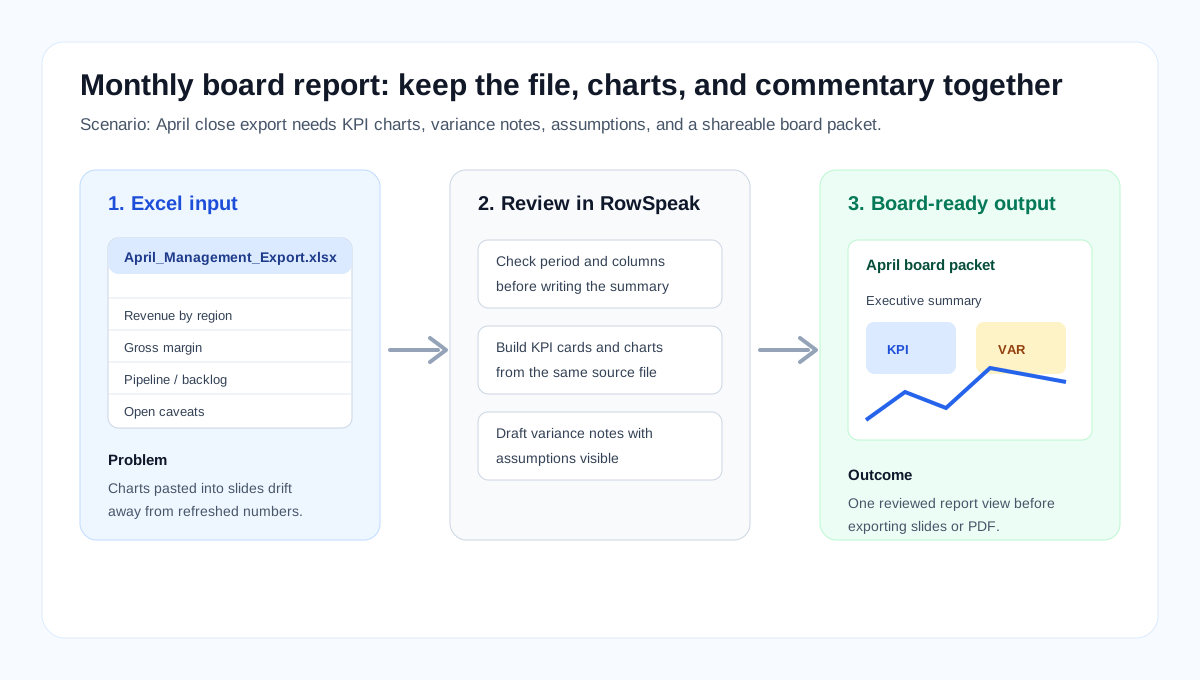
Imagine a finance manager preparing the April board packet. The source file has one tab for revenue by region, one tab for gross margin, one tab for pipeline, and a small notes tab with one-time events. The board does not need all four tabs. It needs a page that answers four questions: did performance improve, what drove the movement, which exceptions matter, and what assumptions should directors know before they discuss the numbers?
The practical handling path is straightforward:
- Upload the April export and name the reporting period.
- Ask RowSpeak to check expected tabs, date coverage, missing values, and duplicated rows before writing a summary.
- Generate only the visuals that support the board question, such as revenue trend, margin by segment, and top variance drivers.
- Ask for a short narrative with evidence: main movement, largest drivers, exceptions, and assumptions.
- Review the caveats, then export or recreate the final board format from one reviewed report view.
That sequence gives the analyst a specific place to review the work. It also prevents the common failure mode where a chart, slide, and written explanation each reflect a different refresh.
What a spreadsheet-to-report workflow should include
A practical workflow has five parts.
First, validate the source file. The report should check the period, expected columns, missing values, duplicate rows, and obvious outliers before it writes a confident summary.
Second, calculate the recurring metrics. These might be revenue, margin, pipeline, orders, churn, support volume, cash movement, budget variance, or operating KPIs. The important point is that the same definitions are used every month.
Third, generate charts that answer the business question. A board report does not need twenty visuals. It needs the few visuals that explain the movement and support the decision.
Fourth, write the narrative after the analysis. The executive summary should name the main result, the biggest drivers, the exceptions, and any caveats. It should not sound like generic AI filler.
Fifth, package the result in a format the reader can review. That might be a shareable report view, a dashboard-style page, or an export. The key is that the data, visuals, and narrative were created from the same reviewed source.

Where RowSpeak fits
RowSpeak is useful for the middle ground between manual Excel reporting and a full BI build.
You can upload an Excel or CSV file, ask for the analysis you need, generate charts, review the explanation, and turn the result into a report-style output. The goal is not to replace every board deck. The goal is to remove the repeated manual work between the spreadsheet and the report.
For example, a monthly management reporting prompt might say:
Use this month-end export to create a management report for April.
Show the top KPIs, compare them with March, explain the largest changes,
flag any missing or unusual records, and create charts that support the summary.
Keep the assumptions visible so I can review them before sharing.
That prompt is not magic. It works because it tells the system what the report is for, what comparison matters, what evidence to show, and what caveats to expose.
A useful AI reporting workflow should make review easier. It should not hide the logic behind a polished paragraph. If the final output needs more visual scanning, the same source file can feed an Excel-to-dashboard workflow after the assumptions and narrative are clear.
The short demo below shows the core interaction pattern: upload a spreadsheet, ask the business question, inspect the answer, and review the generated analysis before sharing it.
Review checks before the report goes out
Before a board or leadership report is shared, run a short review checklist:
- Does the report period match the source file?
- Do the KPI definitions match the prior month?
- Are any records missing, duplicated, excluded, or outside the expected date range?
- Do the charts and written commentary describe the same refreshed numbers?
- Are assumptions, caveats, and open questions visible?
- Can another person trace each major conclusion back to the source file?
These checks matter more than slide polish. A clean deck with stale commentary is worse than a plain report with visible evidence.
When Power BI is still the right answer
None of this means Power BI is wrong.
If the report depends on multiple governed data sources, scheduled refresh, user permissions, a semantic model, and ongoing self-service dashboards, Power BI probably deserves the investment. It is built for that world.
But many monthly reports do not start there. They start with an export, a spreadsheet, a deadline, and a stakeholder who needs a clear answer. In that situation, a spreadsheet-first reporting workflow can be faster to adopt and easier to review.
A good rule is simple. Use BI when the organization needs a governed data product. Use a spreadsheet-to-report workflow when the immediate job is to turn a file into a trusted answer and shareable report. If that spreadsheet-to-report process becomes stable, high-volume, and broadly shared, it may become a good candidate for BI later.
The monthly report should not depend on manual paste work
Pasting Excel charts into PowerPoint is not a failure. It is a sign that the spreadsheet is still close to the business decision.
The problem is that manual paste work does not scale well when the report repeats every month. Every paste creates another chance for stale data, shifted formatting, or mismatched commentary.
A better workflow keeps the source data, charts, and narrative together until the report is reviewed. Then the team can share or export the result with more confidence.
If your monthly report still starts with an Excel file, you do not have to jump straight to a full BI implementation. Start by turning that file into a reviewable report, then decide which parts deserve a permanent dashboard.
Try RowSpeak on your next month-end export: start a spreadsheet report