Key takeaways:
- AI retail operational excellence is not only about forecasting demand or adding chatbots. It is about finding store, inventory, sales, labor, and promotion issues early enough for teams to act.
- Retail teams can start with the files they already use: POS exports, inventory reports, labor schedules, promotion calendars, customer feedback, and weekly Excel workbooks.
- A practical AI workflow should produce reviewable outputs: exception lists, root-cause notes, action owners, weekly reports, and dashboards.
- RowSpeak fits when retail teams need a fast spreadsheet analysis workflow before investing more time in heavy BI models or manual Excel reporting.
AI retail operational excellence means using AI to make retail operations easier to measure, explain, and improve.
That sounds broad, so here is the practical version: a retail team uploads weekly sales, inventory, labor, and promotion files, then uses AI to find the stores, SKUs, categories, or campaigns that need attention. The output is not a vague insight. It is a weekly action plan that a store manager, inventory planner, merchandiser, or operations lead can review and use.
This matters because most retail teams already have the data. The problem is that the data is scattered across POS exports, inventory spreadsheets, staff schedules, ecommerce reports, promotion calendars, and customer feedback files. By the time someone cleans, merges, and summarizes those files in Excel, the meeting is already about status updates rather than decisions.
AI can help, but only if the workflow stays close to the files and decisions that retail teams actually use.
For many retail teams, the most practical starting point is an Excel AI workflow that turns existing spreadsheets and exports into reviewable answers before a heavier BI project is required.
What AI Retail Operational Excellence Means
AI retail operational excellence is the use of AI to improve everyday retail execution across stores, products, inventory, labor, promotions, and customer experience.
It is different from a broad AI transformation project. A transformation project may involve new systems, data platforms, forecasting engines, or agentic workflows. Operational excellence is more immediate. It asks:
- Which stores need attention this week?
- Which products are at risk of stockout?
- Which products are tying up too much cash?
- Which promotion worked, and which only shifted sales from another category?
- Where are labor hours out of line with traffic or sales?
- Which customer complaints point to an operational issue?
The goal is not to automate every decision. The goal is to reduce the time between data export and corrective action.
For many teams, that starts with Excel and CSV files.
Why Retail Operations Break Down in Spreadsheets
Retail operations rarely fail because a team has no metrics. They fail because the metrics are hard to connect.
Sales may be down in one region, but the inventory file shows no obvious shortage. A promotion may lift revenue, but margin falls. A store may hit the weekly target, but only because discounting increased. A product may look slow-moving nationally, while a few stores are actually selling through quickly and need replenishment.
These problems are hard to catch in static spreadsheets because each file answers only part of the question.
| File | What it usually shows | What it does not explain alone |
|---|---|---|
pos_sales_export.csv |
Sales by store, SKU, category, date, and channel | Whether lost sales came from stock, price, traffic, or execution |
inventory_on_hand.xlsx |
Current stock, stock value, days of supply | Whether stock is aligned with current demand |
promotion_calendar.xlsx |
Campaign dates, promoted items, discounts | Whether revenue lift was profitable or incremental |
labor_hours.csv |
Scheduled hours, actual hours, department coverage | Whether staffing matched traffic and sales demand |
customer_feedback.csv |
Ratings, complaints, comments, NPS-style fields | Whether complaints map to product, store, or fulfillment issues |
A useful AI workflow connects these files around retail questions. It does not just summarize each file separately.
The Retail KPIs AI Should Review First
Before asking AI to analyze retail operations, define the metrics that matter. This keeps the output grounded and easier to review.
| Area | Useful KPIs | Operational question |
|---|---|---|
| Store performance | Sales, gross margin, conversion rate, average transaction value | Which stores are underperforming, and why? |
| Inventory | Stockout rate, sell-through rate, days of inventory, aged stock | Where are we losing sales or holding too much stock? |
| Promotion | Promotion lift, margin impact, cannibalization signal, post-promotion drop | Did the campaign create profitable demand? |
| Labor | Labor hours, sales per labor hour, coverage gaps | Are staffing levels aligned with demand? |
| Customer experience | Complaint rate, refund rate, rating trend, recurring issues | Which operational issues are visible to customers? |
These KPIs should not live in isolation. For example, a low-selling store with high stockout rates is different from a low-selling store with enough inventory but declining conversion. The first may need replenishment. The second may need pricing, merchandising, staffing, or store execution review.
This is where AI is useful: it can compare metrics together and explain likely patterns faster than a manual spreadsheet review.
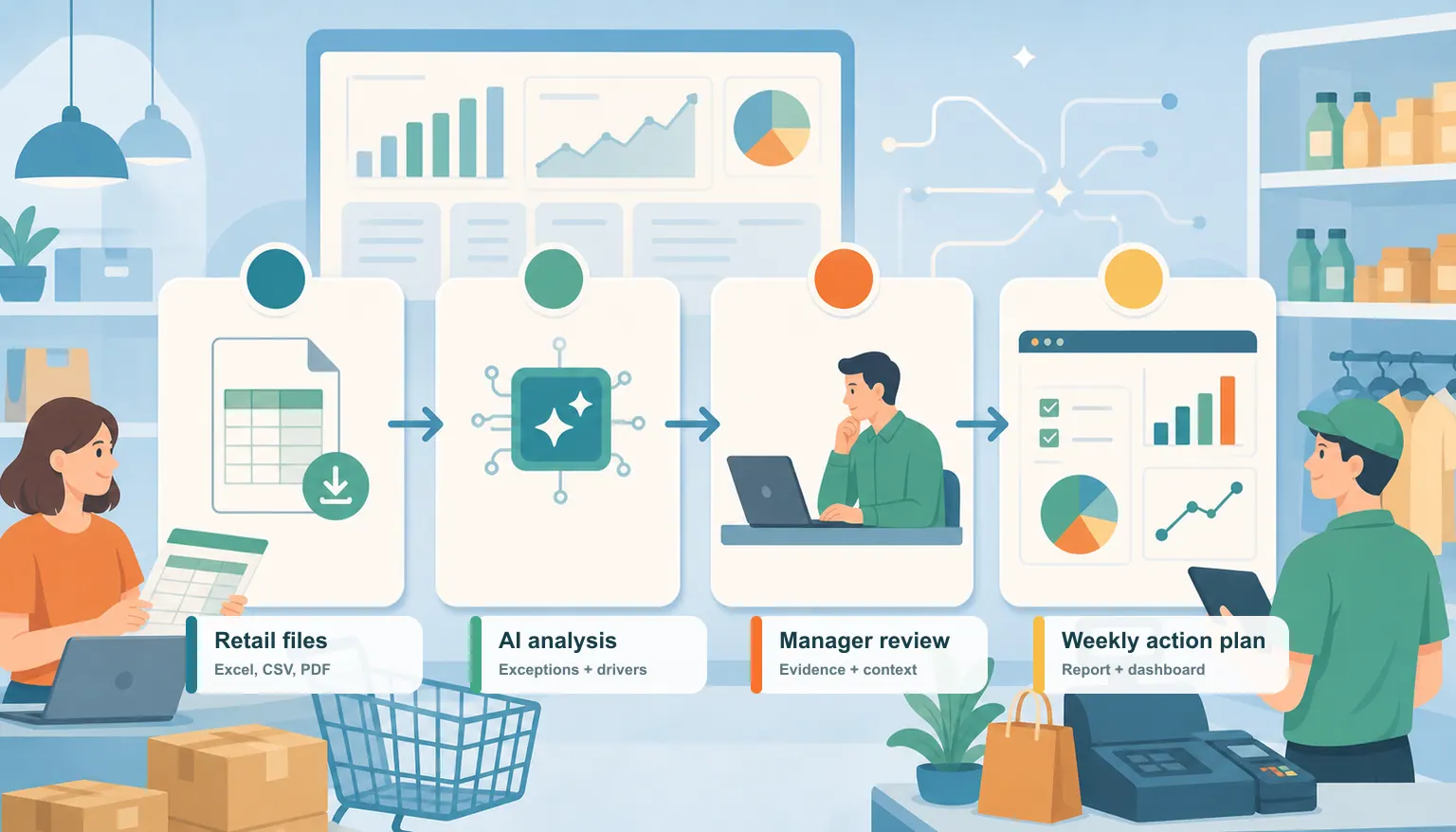
A 6-Step AI Workflow for Retail Operational Excellence
Below is a practical workflow for turning weekly retail exports into a reviewable action plan.
1. Upload the weekly retail files
Start with the files your team already exports:
- POS sales by store, SKU, category, and date
- Inventory on hand by SKU and store
- Stockout or replenishment report
- Labor hours by store and department
- Promotion calendar or campaign report
- Customer feedback, return reasons, or complaint tags
In RowSpeak, these can be Excel or CSV files. If a source comes as a PDF report, screenshot, or image-based table, you can include that too when the data is part of the weekly review.
The important step is to name the files clearly. Use names like weekly_pos_sales.csv, store_inventory.xlsx, and promotion_calendar.xlsx. Clear file names help the AI understand what each file contributes.
2. Ask AI to create a retail operations baseline
Before looking for problems, ask for a baseline summary.
Use a prompt like this:
I uploaded weekly retail sales, inventory, labor, promotion, and customer feedback files. Create a baseline retail operations summary. Show total sales, gross margin, top and bottom stores, top and bottom categories, stockout risks, overstock risks, labor efficiency, and customer complaint themes. Use the file names as evidence when you explain each finding.
This first pass creates shared context. It helps you see whether the AI understands the files, columns, date ranges, and business structure.
If the output uses the wrong date range or confuses store IDs with region IDs, correct that before moving on.
3. Find exceptions that require action
Operational excellence depends on exception management. You do not need AI to describe every metric. You need it to tell you where action is needed.
Use a second prompt:
Find the retail operation exceptions that require action this week. Group them by store, SKU, category, and promotion. For each issue, include the metric, the evidence, the likely cause, the business risk, and the recommended next action.
Ask for a table with these columns:
| Issue | Evidence | Likely cause | Business risk | Recommended action | Owner |
|---|---|---|---|---|---|
| Store A stockout risk for SKU 1942 | 2 days of inventory, 18% sales growth week over week | Demand higher than replenishment plan | Lost sales | Transfer stock from Store C or update reorder quantity | Inventory planner |
| Store B weak promotion lift | 4% sales lift, 12% margin drop | Discount did not increase units enough | Margin erosion | Review price and display execution | Merchandising |
| Store C labor mismatch | Traffic up 16%, labor hours flat | Understaffed peak period | Lower conversion and wait times | Add weekend coverage | Store ops |
This is the point where the article's keyword becomes real. AI retail operational excellence is not a dashboard full of numbers. It is a repeatable process for moving from numbers to decisions.
4. Ask for root-cause comparisons
When AI flags an exception, do not accept the first explanation as final. Ask it to compare possible causes.
For example:
For each underperforming store, compare inventory availability, promotion activity, labor coverage, product mix, and customer feedback. Do not give a single cause unless the evidence supports it. Show which explanation is strongest and which still needs manager review.
This prompt keeps the output more honest. A sales decline may have multiple causes, and some causes may not be visible in the uploaded files. Good operational analysis should separate evidence from assumption.
5. Turn findings into a weekly report
Once the analysis is reviewed, turn it into an AI reporting workflow that managers can share.
Ask for a report structure like this:
- Executive summary
- Store performance exceptions
- Inventory risks
- Promotion and margin review
- Labor and coverage issues
- Customer feedback themes
- Recommended actions for this week
- Follow-up questions for store managers
The report should be short enough for a weekly meeting. It should also be specific enough that each action has an owner.
6. Convert the recurring review into a dashboard
After the workflow works once, turn the recurring metrics into an Excel-to-dashboard workflow.
A retail operations dashboard should show:
- Store exceptions by region
- Stockout and overstock risk
- Promotion lift and margin impact
- Sales per labor hour
- Customer complaint themes
- This week's recommended actions
The dashboard should not replace the written report. The dashboard helps teams monitor the same signals each week. The report explains what changed and what to do next.
Where RowSpeak Fits in This Workflow
RowSpeak is useful when your retail data already exists in business files and your team needs answers, reports, and dashboards without rebuilding a BI model for every new question.
Instead of manually cleaning Excel files, writing formulas, copying charts, and drafting summaries, you can upload the files and ask RowSpeak to analyze the retail operation directly.
This fits especially well when:
- You receive weekly Excel or CSV exports from POS, ERP, ecommerce, or inventory systems.
- You need to combine multiple files before the real analysis begins.
- Your team needs written explanations, not only charts.
- Managers ask follow-up questions after seeing the first result.
- BI is useful for standard views, but too slow for ad hoc operational questions.
For inventory-heavy teams, RowSpeak can support an inventory AI workflow that reviews stockouts, overstock, sell-through, aging inventory, and replenishment priorities. For broader operations reviews, it can connect sales, labor, promotions, and customer feedback into one working analysis.
This does not mean AI should approve every retail action automatically. Retail teams still need business judgment. RowSpeak helps shorten the path from raw files to reviewable decisions.
Review Checks Before You Trust the AI Output
Retail data can be messy, and AI output is only useful when the inputs are clear. Before sharing the result, review these checks:
- Date range: Confirm that all files cover the same week, month, or promotion period.
- Store mapping: Check that store IDs, region names, and channel names match across files.
- SKU mapping: Make sure product IDs, variants, and bundles are not being mixed incorrectly.
- Returns and refunds: Confirm whether sales are gross, net, or adjusted for returns.
- Inventory timing: Check when inventory was captured. A morning snapshot and end-of-day sales file can create false stockout signals.
- Promotion periods: Confirm campaign start and end dates before judging lift.
- Labor data: Check whether hours are scheduled hours, actual hours, or paid hours.
- Missing data: Ask AI to list missing columns, blank values, and unmatched records.
If the files include customer-level data, employee-level data, or sensitive sales details, anonymize unnecessary fields before analysis. For teams that need stricter data boundaries, evaluate private deployment rather than using public uploads for sensitive workflows.
Common Mistakes in AI Retail Operations Projects
The biggest mistake is starting with a tool instead of a decision.
If the question is vague, the output will be vague. "Analyze our retail operations" is too broad. "Find stores with declining sales, high stockout risk, weak promotion lift, and labor mismatch this week" is much better.
Another mistake is asking AI for insight without asking for evidence. Every important finding should include the file, metric, comparison period, and business reason. If the AI cannot show evidence, treat the output as a question for review, not a final answer.
A third mistake is stopping at charts. Charts are useful, but retail teams need actions. A good AI retail operational excellence workflow should end with decisions such as transfer stock, check display execution, revise reorder quantity, change staffing, investigate margin drop, or ask a store manager to verify an issue.
Example Prompt for RowSpeak
Use this prompt as a starting point:
I uploaded weekly retail files for sales, inventory, labor, promotions, and customer feedback. Analyze them as a retail operational excellence review. Find store, SKU, category, promotion, and staffing issues that require action this week. For each issue, show the evidence, likely cause, business risk, recommended action, and owner. Then create a short management report and suggest the best dashboard views to monitor these issues next week.
If you have fewer files, adjust the prompt. For example, if you only have sales and inventory data, focus on stockouts, overstock, sell-through, category performance, and store-level exceptions.
From Retail Files to Better Weekly Decisions
AI retail operational excellence becomes valuable when it stays close to the work.
For retail teams, that work often starts in spreadsheets: sales exports, stock reports, promotion calendars, labor schedules, and feedback files. AI should help connect those files, explain what changed, and create outputs that managers can review.
RowSpeak is built for this kind of file-based business workflow. You can upload the retail files your team already uses, ask practical operational questions, refine the output, and turn the result into a report or dashboard.
If your team is still spending hours each week preparing retail operations reports, start with one workflow: upload this week's exports, ask RowSpeak to find the exceptions, review the evidence, and turn the findings into a weekly action plan.
Let Rows Speak.
Frequently Asked Questions
What is AI retail operational excellence?
AI retail operational excellence means using AI to improve everyday retail execution across stores, inventory, labor, promotions, and customer experience. The goal is to turn retail data into faster, more consistent action.
What files do I need to start?
Start with weekly sales, inventory, promotion, and store performance files. If available, add labor hours, customer feedback, returns, or ecommerce data. Excel and CSV exports are usually enough for the first workflow.
Can AI replace a retail BI dashboard?
Not always. BI is useful for standardized recurring metrics. AI is useful when teams need to analyze messy files, ask follow-up questions, generate written explanations, or prepare action-oriented reports from changing exports.
What should a retail AI report include?
A useful retail AI report should include exceptions, evidence, likely causes, business risks, recommended actions, owners, and review notes. It should help managers decide what to do next, not only show what happened.
Try RowSpeak on Your Next Retail Export
Start with one weekly POS, inventory, labor, or promotion export. Upload the file, ask RowSpeak to find the operational exceptions, review the evidence, and turn the result into a short action plan your team can discuss.
Try RowSpeak with a real retail spreadsheet and see how quickly your weekly exports can become a report, dashboard, or decision checklist.