Every payout matches your bank statement. Then you notice a September order refunded in October, a currency conversion that is $10 short of its book value, and $120 in processing fees sitting in Miscellaneous expense. Which items need a correction, and which simply need an explanation?
This guide helps ecommerce bookkeepers and finance teams turn those questions into an exception queue: a short list of items to review, with source records and a next action for each. You will check cash, the month-end balance, and fee classification separately.
Start with the practice workbook, or download the complete practice pack with CSVs, failure tests, and separate reference answers. All records are synthetic.
Key takeaways:
- Explain a legitimate $800 month-end balance without forcing the clearing account to zero.
- Find a $120 fee classification problem even when all $8,700 of payouts match the bank.
- Keep cross-period refunds and unexplained currency differences visible until the relevant policy or evidence resolves them.
- Use the files and copyable prompts to request a queue in RowSpeak, then check the answer against independent calculations and a missing-$30-refund test.
What a useful payout exception queue looks like
A payout is money your payment processor sends to your bank. A clearing account is the temporary bookkeeping account used to track funds passing through that processor. The general ledger, or GL, records the accounting entries.
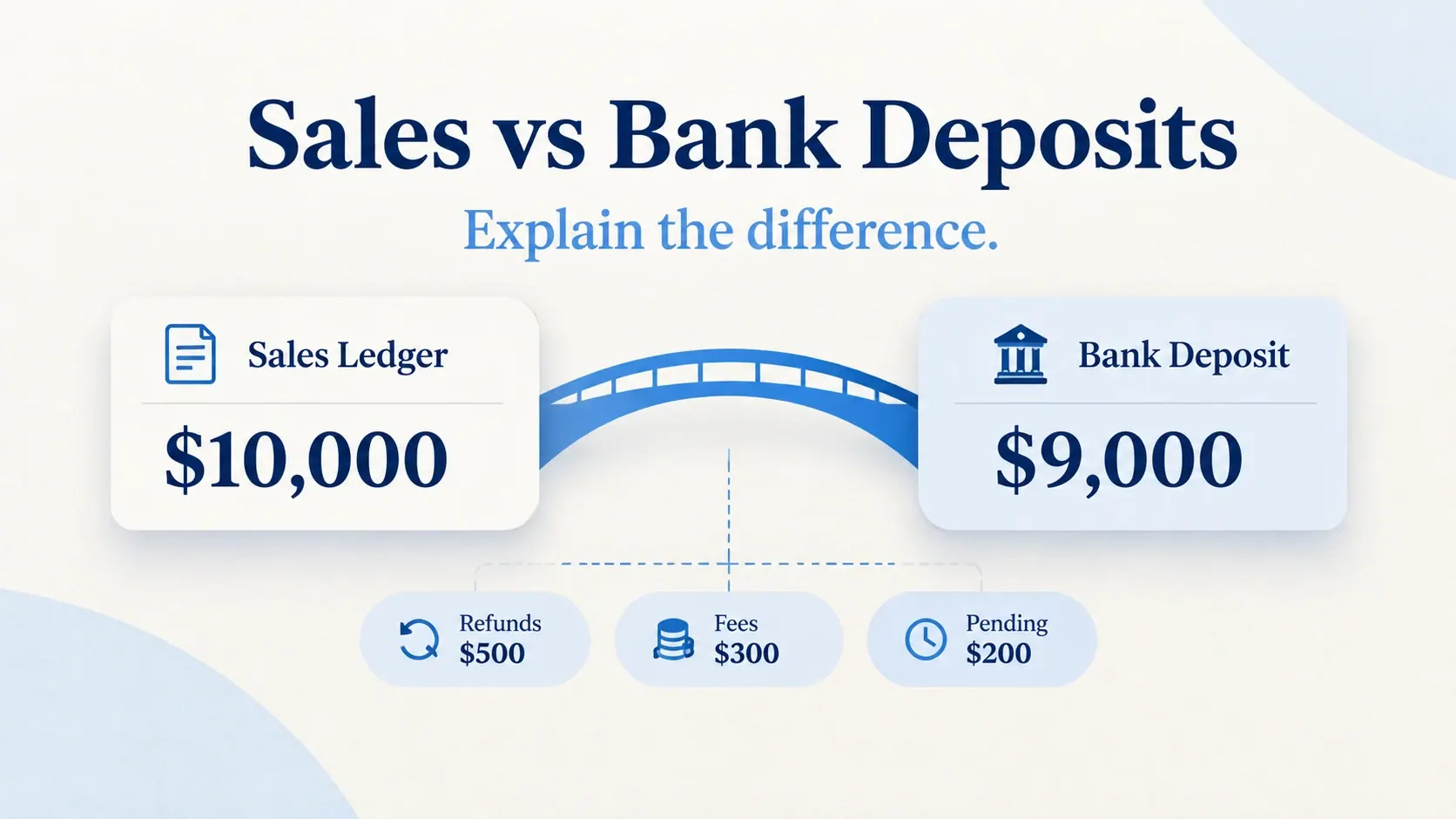
Matching a payout to the bank answers one question: did that transfer arrive? It does not establish whether every refund was recorded, the remaining balance is supported, or processing fees went to the right expense account.
For this exercise, the useful outcome is four review items:
| Item | Amount and meaning | Status | What to do next |
|---|---|---|---|
| R-01: September order refunded in October | $300 refund activity | Cutoff review | Check refund and GL dates against the supplied period policy. |
| M-01: Fee account differs from approved mapping | $120 of affected fees; cash difference $0 | Classification review | Review the account and obtain configuration history. |
| X-01: Separate EUR settlement differs from book value | $10 unexplained USD difference | Evidence missing | Obtain historical rates, dates, and conversion fees. |
| B-01: Funds still on the processor | $800 supported closing balance | Explained-open | Trace the later payout and bank receipt. |
An exception is an item needing attention, not automatically an error or a loss. These amounts describe different things. Adding them into a single “loss total” would mislead the reviewer.
Step 1: Prepare the exports and fix the month-end scope
The workbook contains a fictional, complete October 2026 for DemoStore. All main-case amounts are USD, dates use UTC, and opening balances are zero. The EUR supplement belongs to a separate account and stays outside the main USD totals.
| Worksheet | What it supplies |
|---|---|
Read_me |
Account scope, dates, signs, tolerance, and exercise policy |
Processor |
One charge, refund, or fee event per row, with event and payout IDs |
Payouts and Bank |
Transfers sent, bank references, and actual posting dates |
GL |
One paired journal per row: a debit account, credit account, and positive amount |
Mapping and Config_snapshot |
Approved fee account with effective dates, plus the current configuration snapshot |
Balances |
Opening and closing processor and GL balances |
FX_supplement |
A separate settlement with intentionally missing currency-conversion evidence |
Real GL exports often use one row per account line. Confirm your format before calculating debits minus credits; do not count both sides as expenses. This exercise's receipts and refunds control accounts do not determine recognized revenue or tax treatment.
Keep original exports unchanged. Write down the account, currency, timezone, start and end dates, and whether the clearing account includes transfers in transit or reserves. Obtain period-boundary balances and relevant earlier orders. Filtering every file to October order dates would exclude the September order behind this month's refund.
For the basic difference between sales, processor activity, and bank deposits, use our sales-to-bank reconciliation guide.
Step 2: Match payouts, then explain the closing balance
First, group processor events by payout_id. Match each transfer to a bank credit using the bank reference, then check its amount and dates. Matching equal amounts alone can connect the wrong transactions.
| Payout | Processor events | Net activity | Transfer sent | Bank record and credit |
|---|---|---|---|---|
| P01 | E01, E03, E04, E05 | $4,620 | $4,620 | B01 / PAY-P01: $4,620 |
| P02 | E02, E06 | $4,080 | $4,080 | B02 / PAY-P02: $4,080 |
| Total | $8,700 | $8,700 | $8,700 |
Stripe's payout reconciliation documentation describes itemized payout activity and unsettled ending balances. It also distinguishes estimated arrival dates from actual bank posting dates. Its automatic-payout report has a defined scope; manual or instant payouts need the appropriate alternative reconciliation approach.
Now calculate the processor balance independently:
Opening processor balance              $0
October charges                   $10,000
Refunds                             -$300
Processing fees                     -$200
Payouts sent                      -$8,700
Supported closing balance            $800

Same-scope GL clearing balance       $800
Unexplained balance difference         $0
Fees and refunds are already negative in Processor.signed_USD; sum those signed values once. Subtracting a negative fee again would overstate the balance.
The $800 belongs to E07, charged October 31 and available after month-end. There are no reserves or transfers in transit in this fixture. In real files, identify those separately and avoid counting funds twice across accounts.
The self-check is the unexplained difference, not a forced zero account balance. A fully settled batch should have no unexplained residual. A month-end account can legitimately hold money that has not settled.
Step 3: Review refunds, currency differences, and fee accounts separately
Cross-period refunds: preserve all relevant dates
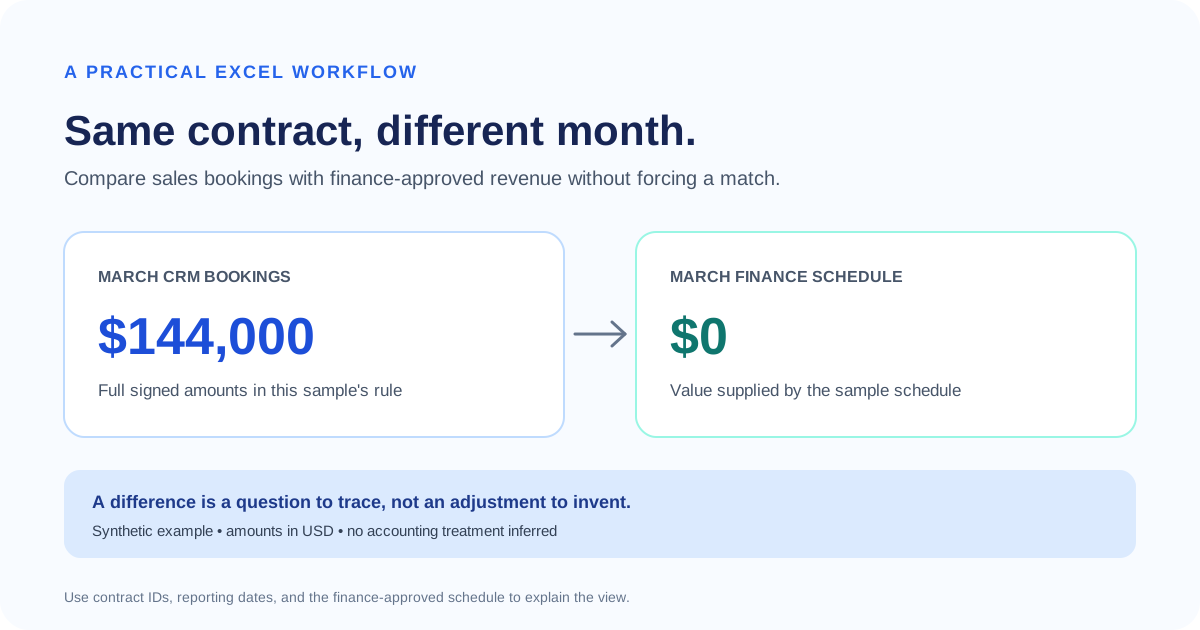
Order S090 is dated September 25. Refund events E03 and E04 occurred on October 3 and 4, totaling $300. Both were included in October payout P01; their GL journals J03 and J04 were also posted in October.
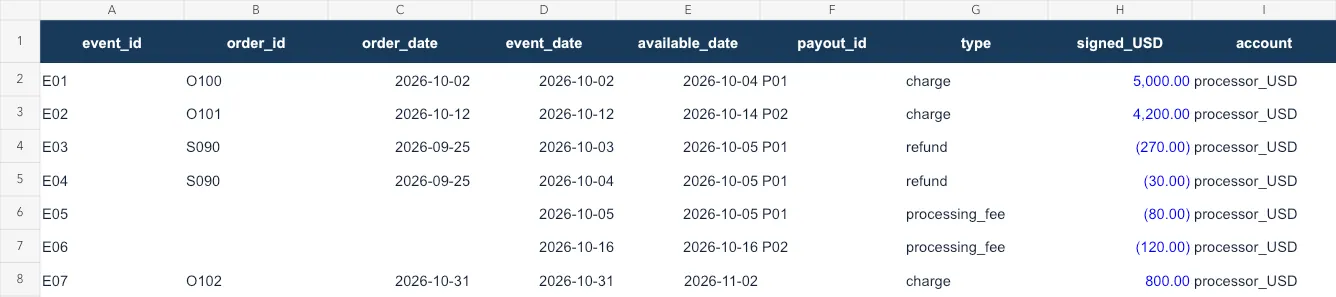
Workbook preview from the downloadable synthetic inputs. E03/E04 retain the original order date; E07 has no payout assigned.
The exercise policy records refunds on the refund event date. Under that supplied rule, these dates agree. Retain the review trail and record the reviewer's decision; do not move refunds into September merely to match the order month. Your business's accounting policy determines the treatment.
FX differences: request evidence before naming the cause
Foreign exchange, or FX, means converting between currencies. In the separate supplement, EUR 1,000 has a historical USD carrying amount of $1,080, while the bank receives $1,070. Carrying amount means the value already recorded in the books.
The arithmetic difference is $10. The files do not establish how much relates to exchange rates, conversion fees, or another adjustment. Keep it unresolved and request the historical rate dates, rate direction, source, fee breakdown, and applicable measurement policy. A current market rate cannot explain a past settlement by itself.
Fee mapping: compare the approved account with the actual posting
A fee mapping is the rule connecting a processor event type to a bookkeeping account. Rule M01 says October processing fees belong in Processing fees. Journal J06 instead debits Miscellaneous expense for E06's $120 fee.
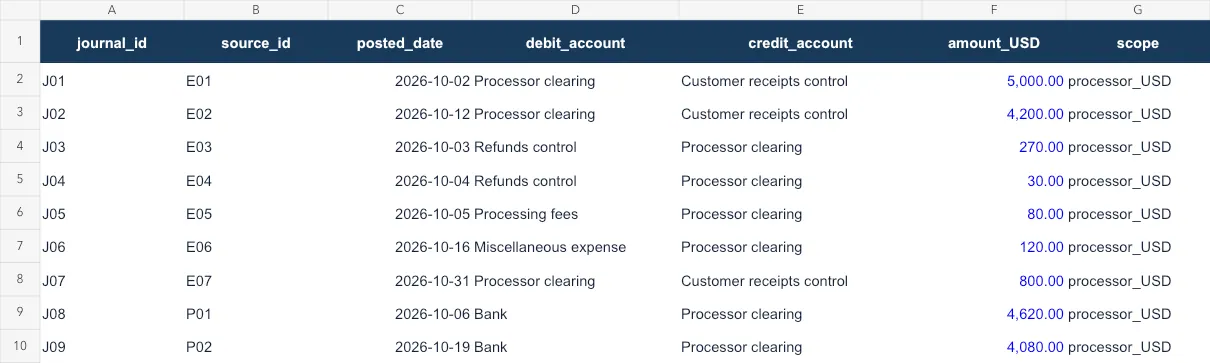
Workbook preview from the synthetic inputs. Compare J06 with rule M01, effective October 1–31. This classification difference leaves the clearing credit unchanged.
Check the approved rule effective on the fee's event date, the actual journal account, and the configuration history. A current snapshot alone cannot tell you when or why a rule changed.
In this fixture, snapshot C01 also points processing fees to Miscellaneous expense. That supports a configuration review. It does not prove a silent reset: the change log is absent. If reclassification is appropriate, the accounting owner approves it; the reconciliation request should not silently change the books.
Step 4: Upload the files to RowSpeak and confirm coverage
Once you know the checks you need, RowSpeak's file-based data analysis gives you a place to bring the exports together, ask for comparisons, and refine the explanation in plain language.
Open RowSpeak, sign in, and select Chat With Excel. Click the upload area to choose payout-month-end-inputs.xlsx from your computer. Start a conversation with my file opens the library of previously uploaded files. Wait for file processing before asking for the reconciliation. Upload the workbook or the nine base CSVs, so the same records are not counted twice. Keep the separate answer key out of the analysis.
Existing RowSpeak upload screenshot illustrating the entry point; interface wording may change. This image is not a payout-analysis result.
Begin with a coverage check:
Inspect this synthetic practice workbook before calculating.
List its worksheets, what each row means, unique IDs, date ranges,
accounts, currencies, amount signs, and missing evidence.
Use Read_me for scope and policy. Check duplicate IDs and missing links.
Confirm that GL rows are paired debit/credit journals.
Keep FX_supplement separate from processor_USD. Do not fill missing
rates, owners, follow-up dates, or configuration history with guesses.
Review before continuing: the response should recognize nine worksheets, two payouts, seven processor events, and nine paired GL journals. FX evidence and configuration history should remain missing. If a worksheet is not read, attach its CSV and explicitly identify it as a replacement source.
In our October 21 product run, RowSpeak identified those counts, the $800 supported balance, and J06's $120 classification difference. One sentence in the first response incorrectly said E05/E06 had no payout, although the same response correctly calculated their payout groups. That is why you should review individual source claims as well as totals.
Step 5: Ask for the exception queue and inspect its evidence
“Give me an exception queue” names the desired outcome. The next prompt supplies the rules that make the output reviewable:
Prepare the October 2026 month-end payout reconciliation using the
attached sources and Read_me policy. Use a USD 0.01 tolerance.

1. Match signed Processor activity to Payouts by payout_id, then to
Bank by bank_reference/reference. Check IDs, coverage, dates and
amounts. Keep duplicates and ambiguous matches unresolved.
2. Explain opening balance + activity - payouts = closing balance.
Compare the GL clearing balance with independently supported closing
items in the same account scope. Do not force zero or invent entries.
3. Keep original order, refund event, availability, payout sent,
bank posted and GL dates distinct. Apply the supplied refund policy.
4. Compare each fee's GL debit account with Mapping effective on its
event date. A snapshot is not proof of when or why a rule changed.
5. Keep the EUR supplement separate. Show carrying versus bank USD
amounts; leave the cause unresolved without historical rates and fees.

Return payout matching, a closing-balance explanation, a fee-account
comparison, and an exception queue. Include source worksheet/file,
row ID, event/payout IDs, relevant dates, amount, currency, amount basis,
rule/evidence, status and next action. Leave unknown owners and due
dates blank. Separate unexplained cash differences from classification
amounts. Include explained-open items needing later settlement evidence.
Do not mark an item approved or resolved without supporting evidence.
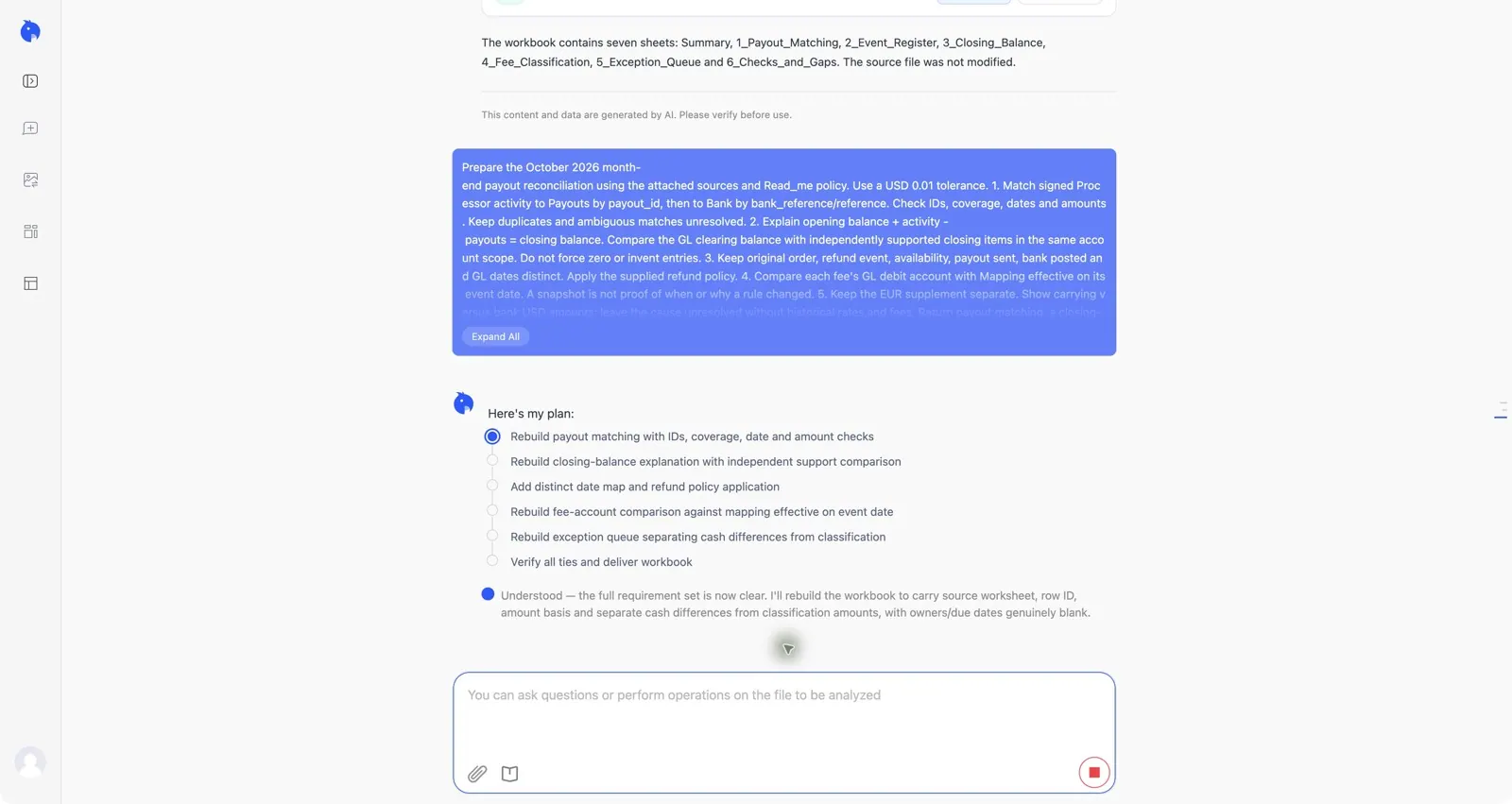
Actual product capture from the synthetic workbook run on October 21, 2026. The screenshot shows the submitted request and analysis plan, not an approved close. Browser chrome and account history are excluded.
Trace at least one line in every output back to the original file. For M-01, that means Processor E06 → GL J06 → Mapping M01, with C01 as additional context. A confident explanation without those records is insufficient.
In the completed run with the full prompt, the visible response matched both payouts to $8,700 of bank credits, explained the $800 closing balance with no unexplained difference, and identified the $120 fee classification item. It kept X01's $10 difference unresolved and E07's $800 balance open for later settlement evidence. Its payout table correctly linked E05 to P01 and E06 to P02.
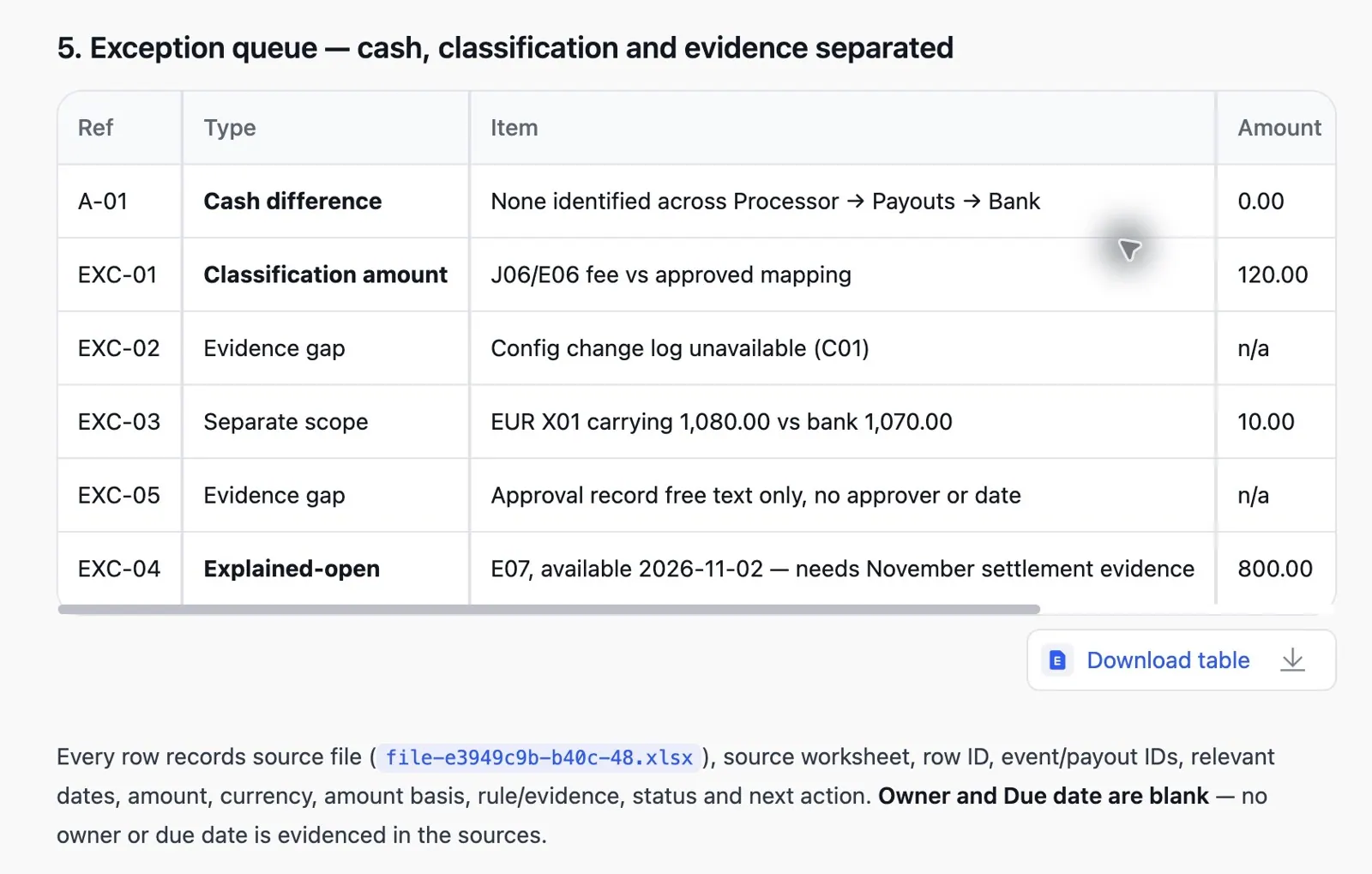
Cropped actual RowSpeak response from the same synthetic run. Queue IDs differ from our reference IDs; compare source records and meaning. We checked the visible response against the inputs, not every cell or formula in the generated download. This is one illustrative run, not an accuracy benchmark.
If a source claim is wrong or an unsupported threshold appears, request a correction before using the result:
Recheck every event-to-payout link against Processor.payout_id.
Cite the affected row IDs and correct conflicting statements.
Use only the supplied USD 0.01 matching tolerance. Do not invent an
accounting materiality threshold or dismiss items without our policy.
Save the response before opening the independent answer key. The reference below shows what the supplied records support; it is not a captured RowSpeak answer.
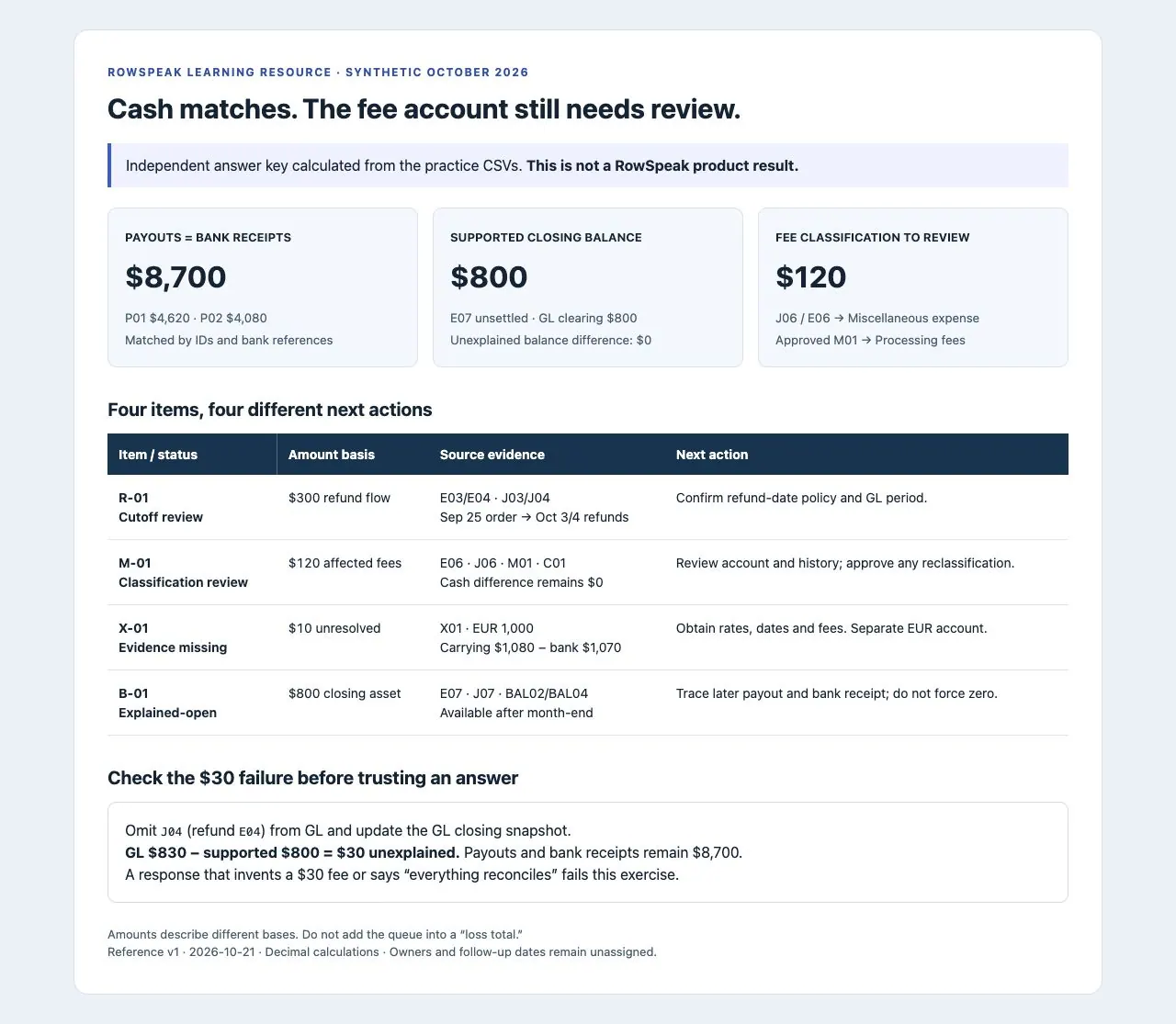
Screenshot of the practice answer key, calculated separately from the CSVs. Use it to evaluate your output; it is not product performance evidence.
Step 6: Run a failure test before using the result for close
An analysis should respond correctly when a source record changes. The practice pack includes two controlled variants:
| Test | Exactly what to replace in a fresh CSV analysis | Independently calculated result |
|---|---|---|
| Missing refund journal | Replace GL.csv with failure-tests/GL-omit-J04.csv, and Balances.csv with failure-tests/Balances-omit-J04.csv. Keep the other seven sources. |
GL clearing $830; supported closing $800; unexplained difference $30. E04 lacks J04. Payout/bank checks still match. |
| Wrong fee account only | Replace GL.csv with failure-tests/GL-change-J05-account.csv. Keep the other eight sources. |
Cash and clearing results unchanged; affected fee classification increases from $120 to $200 because J05 now also differs. |
Use either variant instead of its baseline source, and state the replacement in your request. Do not upload the baseline workbook alongside the variant CSVs. These are reference tests, not a claim that a live RowSpeak run passed them.
Rerun the same checks on this variant. Identify which source changed,
which control results changed, and which stayed the same. Show the
source IDs behind any new difference. Never add a balancing fee.
Reject an answer that explains away the missing $30, changes the cash total after an account-only edit, labels the unsupported $10 as a proven FX loss, or removes the $800 just to reach zero. For a broader review process, follow our guide to auditing AI-generated Excel reports.
Carry open items into next month
Keep the input versions, approved mapping, saved prompts, source IDs, reviewer decisions, and evidence together. Assign an owner and follow-up date to each open item. B-01 can be marked resolved after the later payout and bank receipt are traced; M-01 needs a documented posting decision; X-01 needs the missing conversion evidence.
After checking the output, ask for a short close note:
Draft a month-end review note using only the checked results. Separate
matched payouts, supported open balances, classification items, and
unresolved differences. Cite source IDs and list decisions awaiting the
accounting owner's approval. Do not state that the books are approved.
Before your next close, try the sample reconciliation in RowSpeak. Check whether your output preserves the legitimate $800 balance, identifies the $120 classification item, and finds the missing $30 in the failure variant. Start while there is still time to obtain missing exports and configuration records.
If your real finance files require deployment inside your organization's environment, review RowSpeak's on-premise deployment option before choosing the production workflow.
Method, sources, and limits
Prepared by the RowSpeak Team · October 21, 2026. We created the fictional source records, checked the controls separately using decimal arithmetic, and supplied the reference answers and deliberate failure variants. AI assisted with drafting and preparation. The workbook previews show the inputs; the answer-page screenshot shows the independent reference calculation. The upload image illustrates an existing entry point. The two live product captures show our submitted prompt and the resulting queue. We reviewed the baseline run's visible response; the failure variants were checked independently and were not run in RowSpeak.
The upload-and-conversation path follows RowSpeak's getting-started documentation. Report scope and payout terminology are supported by Stripe's payout reconciliation documentation; our fixture is a simplified, platform-neutral exercise, not a Stripe export template.
The prompts request analysis of uploaded files. They do not establish a live bank integration, automatic journal posting, persistent monitoring, or accounting approval. Adapt cutoff, currency measurement, and account treatment to your organization's policy and have the responsible accountant approve the close.
Start with the synthetic workbook in RowSpeak before your next close. Use the independent answers to check the output, then choose a production workflow that meets your finance team's data and review requirements.