A sales funnel analysis measures how potential customers move through the steps toward a purchase. It counts how many reach each stage, calculates the percentage that advance, and checks how long progress takes. Sales teams use it to find where prospects stop progressing and decide what to investigate or improve.
If you copy a sales-system export into Excel every week but still cannot explain why more leads have not produced more sales, this guide gives you a starting point. Follow a 1,000-lead example from CSV to a checked funnel report. Start with the RowSpeak walkthrough and downloadable workbook below, then use the manual Excel method if you want to build the calculations yourself. Download the practice CSV to follow along before your next sales meeting.
Key takeaways:
- Turn the sample CSV into a funnel chart and reviewable workbook with RowSpeak; watch the recording and compare your output with the downloadable result.
- Calculate conversion between stages and for the whole funnel, using the same group of prospects.
- Separate prospects who have not advanced yet from deals confirmed as lost.
- Use stage-entry dates to measure progress; today's stage counts cannot reconstruct historical conversion.
- Compare the same amount of follow-up time for each group before calling one month better than another.
- Finish with one evidence-based investigation, an owner, and a review date. The manual Excel method explains how to reproduce the stage counts and conversion rates.
Which sales funnel stages should you measure?
You may see the broad stages awareness, interest, desire, and action, often called AIDA. These help describe a buying journey, but an analysis needs events you can actually record. Amplitude's sales funnel guide illustrates how those events differ across ecommerce, subscription products, and other businesses.
For a business that sells through conversations and proposals, start with a sequence like this:
| Stage | A clear entry rule |
|---|---|
| Lead created | A new sales inquiry is recorded |
| Qualified | The inquiry meets your written fit and buying-need criteria |
| Demo completed | The prospect attends a demonstration or discovery meeting |
| Proposal sent | Your team sends a priced proposal |
| Closed won | The customer accepts the agreement under your sales reporting rules |
In an online store, you might track product viewed → added to cart → checkout started → purchase. For a subscription, you might track signup → first useful action → paid subscription.
Keep the counting unit consistent. This example counts one sales journey: one inquiry followed through a single potential sale. A person may create several inquiries, and an account may have several deals. Choose your unit and keep an identifier that follows it across stages.
Sales funnel analysis vs. sales pipeline analysis
A pipeline view usually shows active deals, their current stages, values, and next actions. Funnel analysis shows how a group progresses between stages over time. Monday.com's guide explains this distinction between individual deal tracking and aggregate conversion patterns.
Use a pipeline view to ask, “Which proposal needs follow-up today?” Use funnel analysis to ask, “What share of proposals become customers within 90 days?” Both views help, but they answer different questions.
A sales funnel analysis example: 1,000 leads to 25 wins
For inquiries created in January, count the stages each reached within 90 days of its creation date.
The practice file contains invented records for this example. These are synthetic teaching records, not customer results or industry benchmarks. The RowSpeak recording and workbook below use this same file; the key totals have been checked against independently calculated reference answers.
Conversion and non-advancement below refer to the previous stage, within each journey's 90-day window.
| Stage | Journeys | Stage conversion | Not advanced |
|---|---|---|---|
| Lead created | 1,000 | — | — |
| Qualified | 400 | 40% | 600 |
| Demo completed | 200 | 50% | 200 |
| Proposal sent | 100 | 50% | 100 |
| Closed won | 25 | 25% | 75 |
Overall lead-to-customer conversion is 25 ÷ 1,000 × 100 = 2.5%. For this sequential example, multiplying the stage rates gives the same answer: 40% × 50% × 50% × 25% = 2.5%.
Two findings deserve attention:
- The largest number not advancing is at qualification: 600 inquiries have not qualified within the observation window. Investigate fit, response coverage, and qualification rules.
- The lowest stage conversion is proposal to won: 25 of 100 proposals have become wins. Review the remaining proposals before assuming price is the problem.
Those 75 proposals without a win include 50 confirmed losses and 25 open deals. Calling all 75 “lost” would misrepresent the data. Open deals may convert later.
Method 1: Analyze your sales funnel with RowSpeak
If your weekly report starts with an exported spreadsheet, use RowSpeak's sales analysis workflow to turn that file into stage counts, a chart, and a report you can review. You need a consistent journey ID, stage-entry dates, and a clear follow-up window before either AI or manual calculations can give you a useful answer.
Watch the recorded walkthrough: this 2-minute, 14-second screen recording shows the sample CSV and prompt, RowSpeak's analysis, and the generated Excel workbook preview. The recording shows one run, including intermediate work; check the final result before using it in a meeting.
Step 1: Upload the practice CSV
Open RowSpeak, sign in, and upload journeys.csv. It has one row per sales journey, with dates for lead creation, qualification, demo, proposal, and win, plus the outcome and observation end date.
For your own file, check that those dates describe stage entry. An order export or today's deal-status list alone cannot show which journeys advanced between stages.
Step 2: Give RowSpeak the counting rules
Copy the prompt below. It specifies who to include, how long to follow each journey, which rates to calculate, and how to distinguish open proposals from confirmed losses.
Analyze this synthetic sales funnel CSV for a sales manager.
One row is one journey; journey_id must be unique.
Include leads created January 1–31, 2026. Use each row's observation_end:
90 elapsed days after lead_created_at. Count each journey once per stage.
Check missing IDs, duplicate IDs, date order, and events beyond observation_end.
Show counts for lead created, qualified, demo completed, proposal sent, and won.
Calculate stage conversion, non-progression within the window,
and overall lead-to-won conversion. Show numerators and denominators.
For journeys that reached proposal, separate won, lost, and open outcomes.
Calculate closed-deal win rate for that proposal subset, excluding open deals.
Show a stage-count chart and a short summary. Separate facts from hypotheses.
List data limitations and one investigation to take to the next meeting.
If a field is missing or a denominator is zero, mark the metric unavailable.
Step 3: Review the funnel chart and denominators
The chart supplied from this run shows 1,000 leads → 400 qualified → 200 demos → 100 proposals → 25 wins. The stage rates are 40%, 50%, 50%, and 25%; overall conversion is 2.5%.
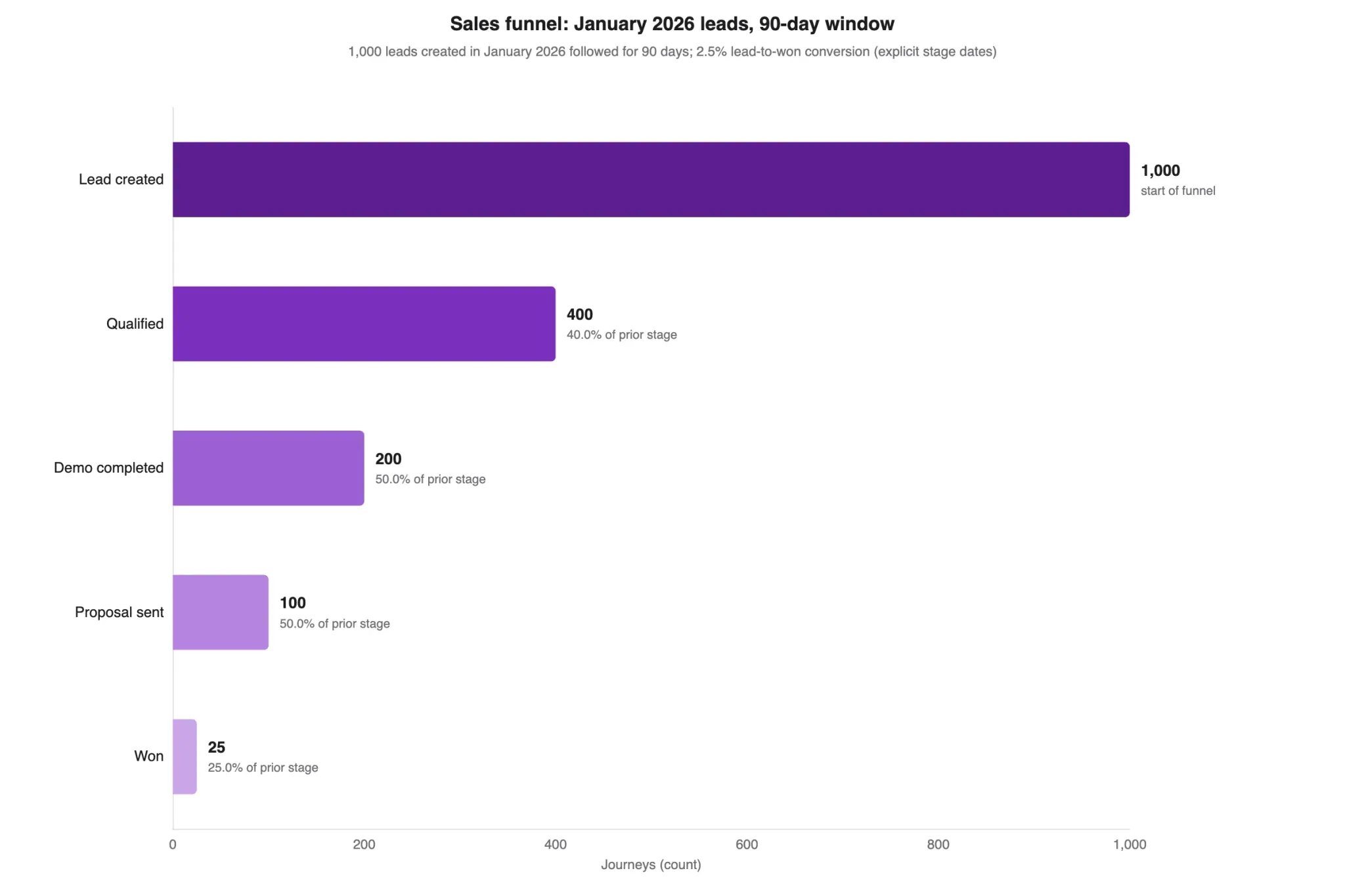
Before accepting an explanation, check the underlying counts. The 75 proposals without a win include 50 confirmed losses and 25 still-open deals. That produces 25% proposal-to-won conversion and 33.3% closed-deal win rate for the proposal subset. The two rates answer different questions.
Step 4: Preview, download, and check the workbook
In the recorded run, RowSpeak provides a Funnel Analysis Workbook.xlsx file with Preview and Download controls. Open the preview to inspect the Summary and supporting sheets, then download the workbook for your sales review.
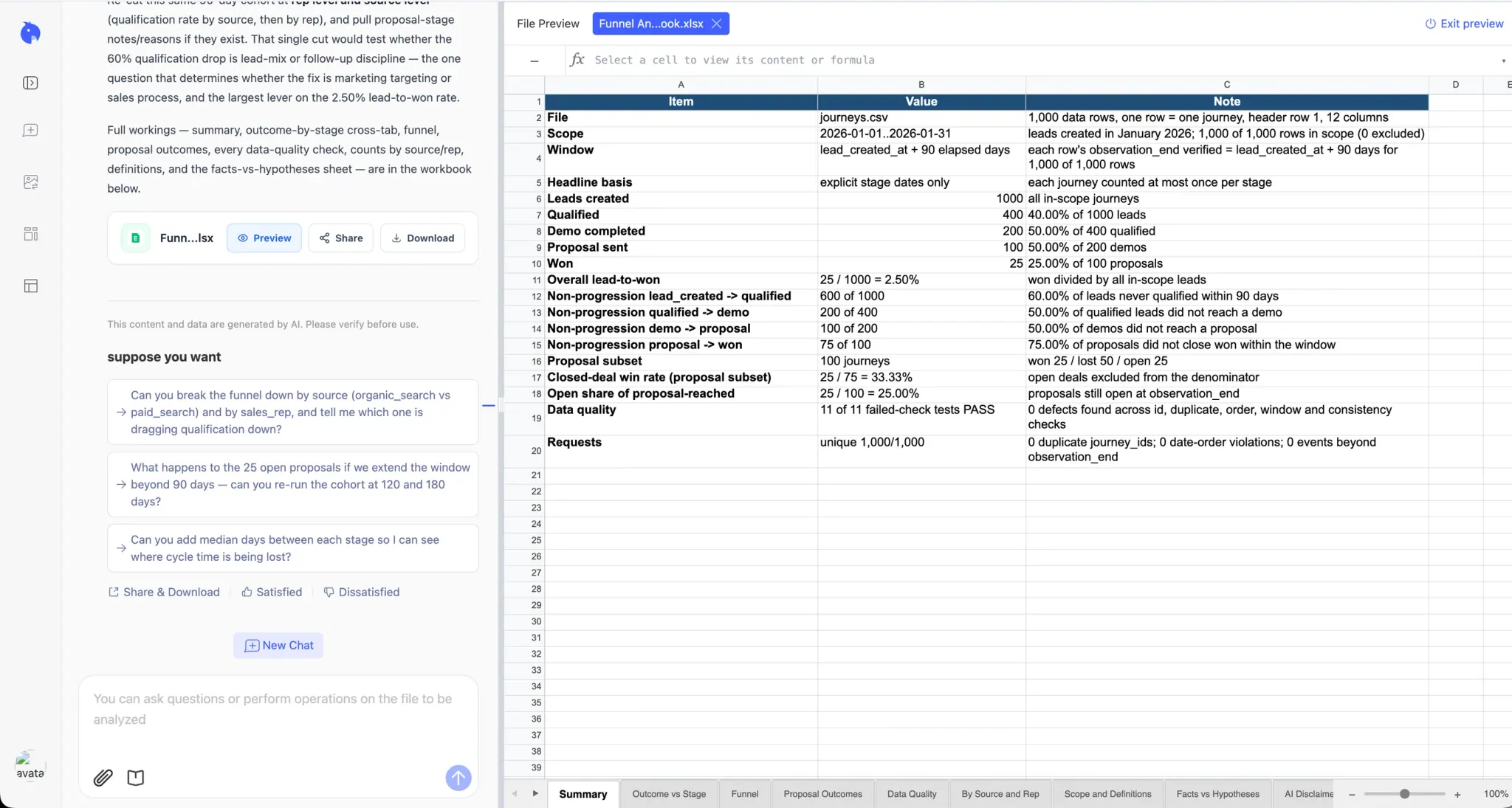
Download the workbook generated in this demonstration and compare it with the CSV. Its nine sheets include Summary, Funnel, Proposal Outcomes, Data Quality, Scope and Definitions, and Facts vs Hypotheses. They make the counting rules and possible explanations available for review alongside the headline numbers.
Use these checks before sharing:
- Scope: 1,000 January journeys, each followed for 90 elapsed days.
- Counts: 1,000 / 400 / 200 / 100 / 25, with each journey counted once per stage.
- Proposal outcomes: 25 won, 50 lost, and 25 open; open deals stay out of the closed-deal win-rate denominator.
- Quality and limits: the workbook reports 11 passed checks. Its source/representative sheet contains volume counts; it does not yet establish which source or representative has a lower qualification rate.
- Interpretation: treat pricing, lead quality, and follow-up explanations as hypotheses until you inspect supporting records.
Output layouts can vary between runs. If the chart, summary, and workbook disagree, ask RowSpeak to reconcile the counts before using them. The AI report review checklist provides further checks.
This demonstration starts from an uploaded file. For your next reporting period, upload the new export and confirm its coverage. A live CRM connection, automatic stage-history retrieval, and scheduled refresh are not demonstrated here.
Method 2: Do a sales funnel analysis manually in Excel
Use this method when you want to build and inspect the calculations yourself. Work from the same CSV so you can compare your numbers with the RowSpeak example.
Step 1: Choose one question and one starting group
Ask, “Which transition needs investigation before our next sales review?” Then define a cohort: a group with a shared starting event. For the sample:
Include inquiries created January 1–31, 2026. Count stages reached within 90 elapsed days of each inquiry's creation. Count each journey once per stage.
Give comparison groups equal follow-up time. Comparing January inquiries after 90 days with February inquiries after 30 days can make February look worse simply because its deals have had less time to close. Choose a window appropriate to your buying process; 90 days is an example, not a standard.
Step 2: Export identifiers and stage history
Export Excel or CSV files from your customer relationship management system, commonly called a CRM. Look for:
| Field | Why you need it |
|---|---|
| Journey, lead, or opportunity ID | Follow the same unit and avoid double-counting |
| Created date | Select the starting group |
| Entry date for each stage | Confirm progression and calculate elapsed days |
| Won/lost dates and outcome | Separate completed decisions from open deals |
| Source, representative, or segment | Compare like-for-like groups |
| Export or data-through date | State how much follow-up is available |
A current-stage-only export is insufficient for historical conversion. If it shows 100 proposals today and 25 wins this month, dividing 25 by 100 mixes different groups. Obtain stage history or label the view as current pipeline inventory.
The practice CSV has one row per journey and date columns for stages. Your export may have one row per activity or stage change. Check duplicates, stage names, missing dates, and event order. Define rules for skipped, repeated, or reopened stages; do not invent missing transitions.
Step 3: Count stages and check the formulas
In Excel, convert the practice CSV to a table named Journeys. Its dates are formatted as YYYY-MM-DD; import them as dates if your Excel settings treat them as text.
For this checked fixture, every populated stage date falls within its row's observation window, so these counts are sufficient:
=COUNTA(Journeys[journey_id])
=COUNT(Journeys[qualified_at])
=COUNT(Journeys[demo_at])
=COUNT(Journeys[proposal_at])
=COUNT(Journeys[won_at])
The expected results are 1,000, 400, 200, 100, and 25. For real files, filter to your cohort and observation window before counting, and count unique IDs if the export has multiple rows per journey.
Put these five counts in cells B2:B6, in stage order. In C3, enter the formula below, format it as a percentage, and fill down through C6:
=IF(B2=0,"N/A",B3/B2)
Overall conversion is =IF(B2=0,"N/A",B6/B2). A zero denominator means the rate is unavailable; it is not evidence of a 0% conversion rate.
Step 4: Compare groups and investigate the gap
Split the results by lead source, representative, product, or deal size when those fields are available. Keep stage definitions and follow-up windows consistent, and show the counts beside percentages. A 50% rate from two leads is weaker evidence than the same rate from 200.
Use the numbers to choose an investigation:
| Finding | What to check next |
|---|---|
| Many leads, few qualified inquiries | Source quality, duplicate inquiries, response coverage, qualification criteria |
| Qualified prospects rarely attend demos | Booking delays, reminders, meeting relevance |
| Demos rarely produce proposals | Fit, buying authority, requirements, agreed next steps |
| Proposals rarely become wins | Recorded loss reasons, pricing objections, approval delays, still-open deal age |
These are possible explanations to check. A conversion table alone cannot establish why a prospect stopped progressing.
Step 5: Choose one change and measure the next group
Rank opportunities by likely benefit, effort, and evidence. The lowest percentage does not automatically identify the best investment.
For example, moving proposal-to-won conversion from 25% to 35% would produce 10 additional wins from 100 proposals, if proposal volume and other conditions stayed the same. That is a 10 percentage-point increase, or a 40% relative increase. It is a scenario, not a forecast or proof that a particular change will work.
Finish with a small action record:
Finding: 25 proposals remain open after 90 days. Next action: review their recorded next steps and approval status. Owner: sales manager. Review: next weekly meeting. Success check: compare proposal-to-won conversion for the next cohort at the same age.
The sales funnel metrics you need first
Stage conversion rate
Stage conversion rate = journeys that reached the next stage ÷ journeys that reached the previous stage × 100.
For demo to proposal, the calculation is 100 ÷ 200 × 100 = 50%. Both counts must come from the same starting group and observation rule.
Drop-off rate
Drop-off rate = 100% − stage conversion rate.
For proposal to won, that is 75% within 90 days. Here, “drop-off” means no observed next-stage event during the window. Split that group into confirmed losses and still-open deals before choosing an action.
Overall conversion rate
Overall conversion rate = journeys reaching the final stage ÷ journeys entering the first stage × 100.
Name the starting and finishing events: lead-to-customer and trial-to-paid conversion measure different things.
Closed-deal win rate
Closed-deal win rate = won deals ÷ (won deals + lost deals) × 100, within a defined group of opportunities.
Among this example's 100 proposal-stage deals, 25 won and 50 lost, so closed-deal win rate is 33.3%. The 25 open deals are excluded. That differs from the 25% proposal-to-won conversion, which includes all 100 proposals in its denominator. Label both the group and the denominator in your report.
Time in stage and open-deal age
For a completed transition, subtract the stage-entry date from the next-stage date. For an open deal, subtract the current-stage entry date from the report's data-through date.
Report these separately. Otherwise, an average based only on deals that advanced can hide the deals still waiting. Also define whether a duration ends at advancement, loss, or either event. A general “last updated” field may record an edited note and cannot reliably replace a stage-entry date.
Frequently asked questions
What is a good sales funnel conversion rate?
It depends on the starting and final events, audience, buying process, and follow-up period. Compare equivalent cohorts first. Use external benchmarks only when their definitions match yours. This example's 2.5% is teaching data.
How often should you analyze your sales funnel?
Review open-deal follow-up as often as your team needs it, often weekly. Review conversion trends when prospects have had enough time to progress; a long buying cycle needs longer observation windows.
Can you do sales funnel analysis without a CRM?
Yes. Use a spreadsheet with consistent identifiers and stage-entry dates. If you have only today's status, start recording stage changes now; that snapshot cannot reliably reconstruct past conversions.
Does funnel analysis tell you why customers leave?
It shows where progress stops and which groups differ. To understand why, add evidence such as recorded loss reasons, customer feedback, sales notes, or a controlled test. Keep an untested explanation labeled as a hypothesis.
Build a funnel report before your next sales review
Start with the practice CSV and copy the prompt into RowSpeak. Compare the result with the demonstrated workbook, then check whether your own export contains the history needed to repeat the analysis. Bring one finding, its supporting records, and an assigned next action to the meeting.
When you are ready, use RowSpeak's sales analysis workflow to request the same review from your next export. Once the funnel numbers are checked, the weekly sales dashboard guide can help you add a broader sales-performance view for the meeting.