Your marketing report looks ready for the meeting. Then someone asks why the return on ad spend differs from the spreadsheet. You ask the AI to fix it, and the layout changes while the calculation stays unclear.
A useful AI dashboard prompt describes both the view you want and the rules behind its numbers. Below, you can copy a brief, check it against six rows of sample data, and write a correction request that names the exact mistake. Start with one metric you need for your next reporting meeting.
Key takeaways:
- Define what one row means, which dates to include, and how each number is calculated before asking for charts.
- Use the sample below to check $400 spend, $1,000 attributed revenue, and 2.50× ROAS. Keep a missing-spend row separate; do not silently turn it into zero.
- Correct one rule at a time, then check the totals and charts together. A more detailed prompt still needs human review.
- Use RowSpeak to turn a file and a clear request into a dashboard you can review. Label the source period; an interactive filter does not make an uploaded file live.
Step 1: Write the calculation rules before the layout
“Create a marketing dashboard” leaves too many decisions open. Does revenue mean all sales or revenue attributed to ads? Does a blank spend cell mean no spend, or missing information?
Fill in these six parts in everyday language:
| Part of the brief | What to write |
|---|---|
| Reader and decision | Marketing manager deciding which platform needs investigation |
| File and row meaning | One row is one platform on one day; all money is USD |
| Reporting period | 12–14 October 2026, including both dates |
| Calculation rules | Total ROAS = total attributed revenue divided by total spend |
| Missing information | Hold rows with missing spend for review; do not guess |
| View and checks | Summary cards, platform comparison, dates in order, and a table of totals |
ROAS means return on ad spend: revenue attributed to advertising divided by advertising spend. It is not profit. It does not subtract product costs, refunds, fees, or overhead. Agree on what your revenue column represents before using ROAS to change a budget.
Step 2: Try a complete input → prompt → expected-result example
This is a synthetic teaching dataset, not a customer result or a recorded RowSpeak test. The expected figures below are calculated from the displayed rows so you have a reference independent of an AI answer.
Copy this into a CSV file named ad_daily_sample.csv. The empty spend field in the final row is intentional.
Date,Platform,Spend_USD,Attributed_Revenue_USD,Conversions
2026-10-12,Search,100,300,3
2026-10-12,Social,50,100,2
2026-10-13,Search,0,200,1
2026-10-13,Social,150,300,3
2026-10-14,Search,100,100,1
2026-10-14,Social,,60,1
Each row contains daily totals, not an individual order. The file contains one currency and no overlapping platform/date rows. Your real export may need those checks first.
Copy this dashboard prompt
Use ad_daily_sample.csv to prepare a marketing review dashboard.
The reader needs to decide which platform to investigate, not make
an automatic budget change. Each row is one platform on one day.
All amounts are USD. Include 12–14 October 2026, inclusive.

First show a calculation table before creating charts:
- Treat blank spend as missing, not zero. Hold that whole row out
  of all summary metrics and list it in a separate review table.
- Keep rows where spend is explicitly zero. Include their revenue
  and conversions in the totals. Show row-level ROAS as N/A when
  spend is zero; do not divide by zero.
- Total ROAS = sum of eligible attributed revenue / sum of eligible
  spend. Use this same rule for each platform. Do not average ratios.
- Show the included and held row counts, spend, revenue, conversions,
  and ROAS. If total spend is zero, show ROAS as N/A.

Then create summary cards and a platform comparison. Add a daily
revenue/spend chart with dates sorted oldest to newest. Use separate
labels for spend and attributed revenue. Show the date range and
filename. State that one row is held out, so results are provisional.
Do not invent earlier-period comparisons or claim revenue is profit.
If a requested view cannot be produced, explain what is missing.
This is a request specification, not a guarantee that every tool will follow every rule. Check the calculation table first. If it is wrong, stop there and correct it before spending time on colors.
Check these expected numbers
| Included data | Spend | Attributed revenue | Conversions | ROAS |
|---|---|---|---|---|
| Search: 3 rows | $200 | $600 | 5 | 3.00× |
| Social: 2 rows | $200 | $400 | 5 | 2.00× |
| Total: 5 rows | $400 | $1,000 | 10 | 2.50× |
The held Social row has $60 attributed revenue, one conversion, and unknown spend. Those values remain visible in the review table but are outside the summary. Recover the missing spend before making a platform-level budget decision.
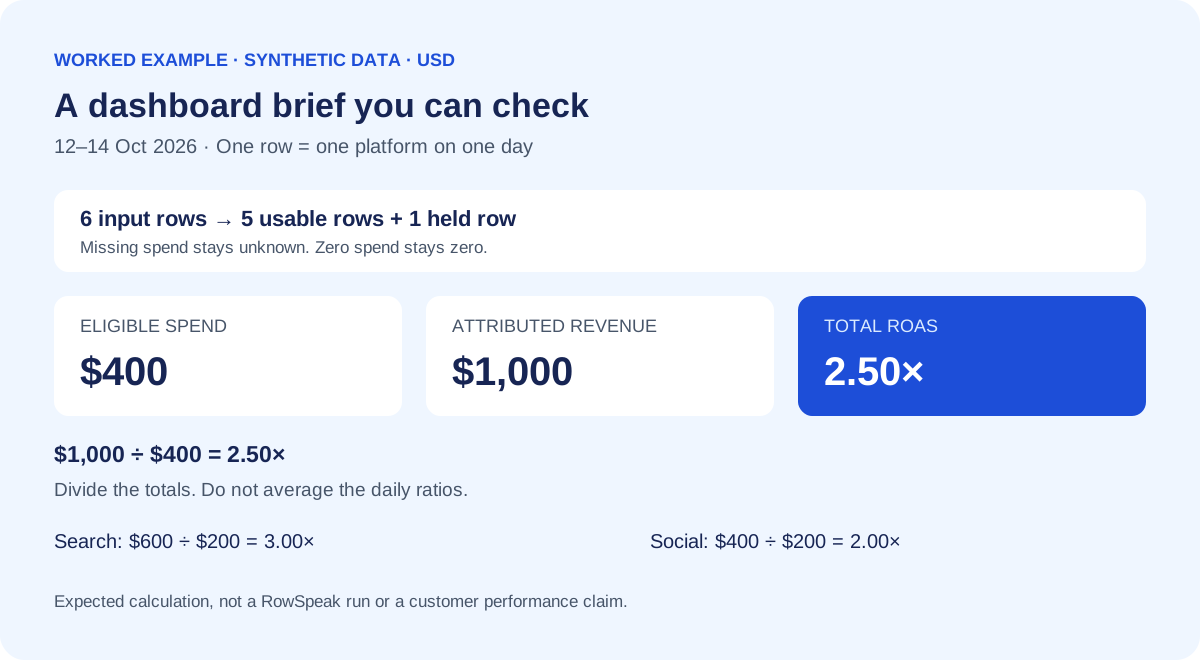
Calculation illustration for the sample above; this is not a product screenshot.
Check the arithmetic yourself: eligible revenue is 300 + 100 + 200 + 300 + 100 = 1,000; spend is 100 + 50 + 0 + 150 + 100 = 400. Dividing gives 2.50. Averaging only the defined daily ratios gives (3 + 2 + 2 + 1) / 4 = 2.00, which answers a different question.
The zero-spend row contributes $200 revenue to the total. Whether that attribution is appropriate for your real business is a separate question to resolve with the person who owns the export.
Step 3: Correct one assumption without rewriting the whole brief
“Make it more accurate” does not identify the error. Name the value that failed, the rule that should replace it, and what must stay the same.
The overall ROAS shows 2.00, but the eligible rows total $1,000 revenue
and $400 spend. Recalculate it as 1,000 / 400 = 2.50.
Keep the date range, missing-spend exclusion, and existing layout.
Show the calculation table again. Apply the corrected rule to both
platform totals and the overall card, and list anything you changed.
Do not alter the source values to make them match the expected total.
This is a hypothetical correction, not an observed model failure. After any correction, check both platform totals and the overall card. A corrected headline with an unchanged chart still leaves the report inconsistent. For a broader review process, use the AI-generated Excel report audit checklist.
Check chart order as well as totals
The existing marketing example below illustrates why review includes presentation. Its visible date labels move from January 3 to January 11 and then January 6. That sequence needs checking before a reader interprets the line as a chronological trend.
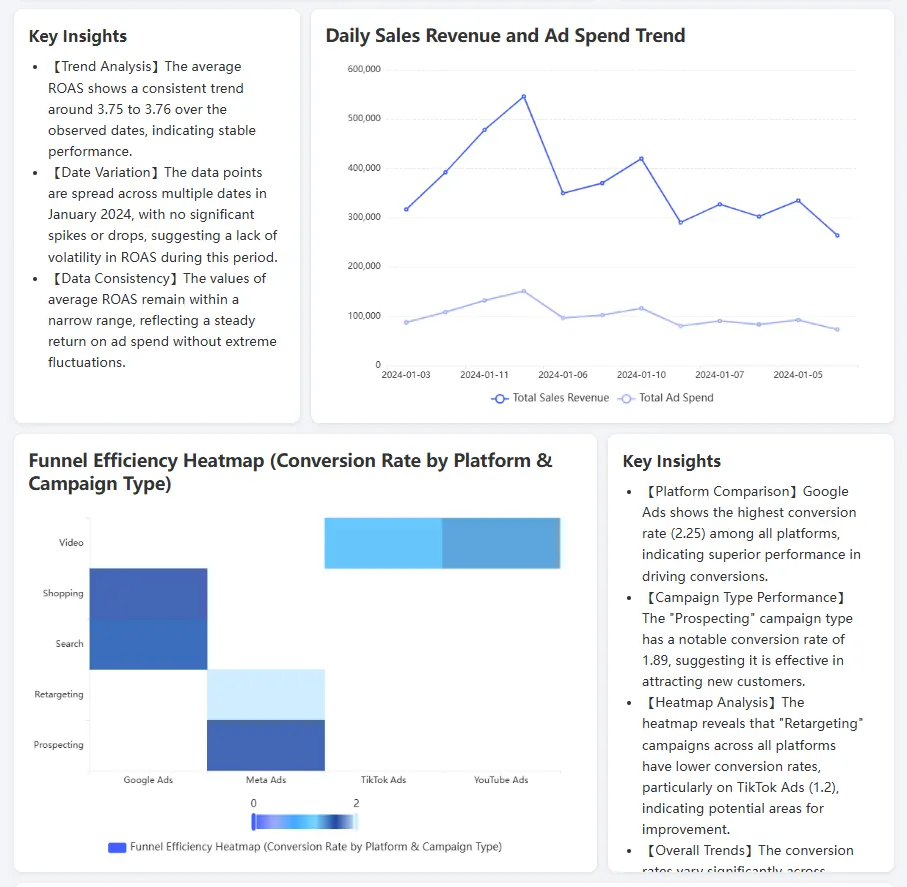
Existing illustrative dashboard from this article's media library. Its source file and numerical claims are not validated here. It is separate from the six-row example above.
A specific follow-up would be: “Parse Date as a calendar date, sort ascending, and preserve the revenue/spend pairing for each date.” Check that points still match their source rows after sorting. A persuasive written insight beside a chart is not evidence that its numbers are right.
Step 4: Adapt the brief to your own report
Replace the sample's field names and rules with ones you can confirm in your file. Do not request a comparison if the comparison data is absent.
Sales: distinguish order lines from orders
Each row is an order line, so Order_ID can repeat across products.
For completed orders in the selected date range, sum Line_Net_USD
and count distinct Order_ID values. Average order value = that sum
/ that distinct order count. If the count is zero, show N/A.
Show revenue by region and a table of included order IDs.
Do not treat two different product lines as duplicate orders.
Ask for clarification if the same order has conflicting statuses.
An order count based on rows will overcount orders with multiple products. For the full upload-to-review process, follow the sales dashboard workflow; this page focuses on writing and correcting the request.
Marketing: define the comparison before asking for a winner
Compare platform ROAS using revenue divided by spend for each platform.
Use the same reporting dates and attribution definition throughout.
List platforms with missing spend separately. State that ROAS excludes
product costs. Suggest questions to investigate; do not recommend
moving budget solely from this small sample.
A platform with the highest ratio may have very little spend or an incomplete reporting period. Show its spend and included dates beside the ratio so the reader can judge that context.
Recurring reports: distinguish the data date from the creation date
Show source filename, selected reporting period, and latest included
transaction date. Label the dashboard as an uploaded-file snapshot.
If a generation timestamp is available, label it separately.
Do not describe the data as current merely because the dashboard
was generated today. Do not invent a refresh schedule.
A file exported today can still contain last week's transactions. A dropdown filters the available rows; it does not fetch new ones. For a file-based workflow, provide the next export and repeat the checks. See the monthly CSV reporting workflow for keeping inputs and reporting rules organized.
Step 5: Use the brief in RowSpeak, then review before sharing
RowSpeak's Excel-to-dashboard workflow is a practical fit when you have an Excel or CSV export and need a visual report without building a full BI setup.
Start with the synthetic sample or an anonymized export. Provide the file and your brief, inspect the calculated answer, then request the dashboard and any corrections. Treat requested exception tables, date labels, and calculations as acceptance checks: confirm they appear correctly rather than assuming they are automatic features.
Before sharing, check:
- Scope: correct file, dates, currency, and meaning of each row.
- Numbers: one total checked outside the AI, plus the components that add up to it.
- Missing values: held rows are visible and their effect is explained.
- Charts: dates run in order, labels name the right units, and filters agree with cards.
- Claims: revenue is not called profit; a snapshot is not called a live feed.
A clear prompt reduces ambiguity. It does not establish perfect accuracy, an independent verification service, a live data connector, or a production monitoring system. Keep consequential decisions with the person responsible for the report, and use only files approved for the tool you choose.
Prepare before the next review
Turn one clear brief into a dashboard you can check.
Try the six-row sample first. Confirm the $400 spend and 2.50× ROAS, then adapt the brief to an approved export. Save your calculation rules before the next reporting deadline so you can reuse them when the new file arrives.
Explore RowSpeak dashboards →